Teams Intro
What is Microsoft Teams?
- Microsoft Teams is a collboration platform. It is designed to facilitate communication and collaboration among individuals and teams within an organization. users work from office or remotely can collaborate with each other.
- code
Key features of Teams
- Chat: It allows users to have one-to-one or group chat conversations. These conversations can include text messages, emojis, GIFs and file attachments.
- Video conferencing: It allows users to hold virtual meetings with colleagues and clients. It supports audio and video calls, screen sharing, and ability to schedule and record meetings.
- Channels: Teams can be organized in different channels which as as dedicated space for specific projects, or departments. Channels helps users to keep the conversations and files organzied.
- File Sharing and Collaboration: Users can upload, share, and collaborate on documents and files directly within teams. Teams integrates with Microsoft 365 apps like word, excel, powerpoint for real-time co-authoring.
- Integration: It integrate with a wide range of third-party applications and services.
- Security & complaince: It includes security and compliance feature to help organizations to protect the data.
- Mobile Apps: Available as a mobile application for iOS and Android devices. Users can install Microsoft Teams applications on their mobile devices.
Default Group
- After creating a tenant a default group is created.
- Teams is also created with that default group name along with a channel called General.
- Code
- code
code
- code
- code
- code
code
- code
- code
- code
code
- code
- code
- code
code
- code
- code
- code
Desktop Version
- Download: To download search in google teams for windows desktop. Click download teams for desktop and select Teams for work or school and download and install it.
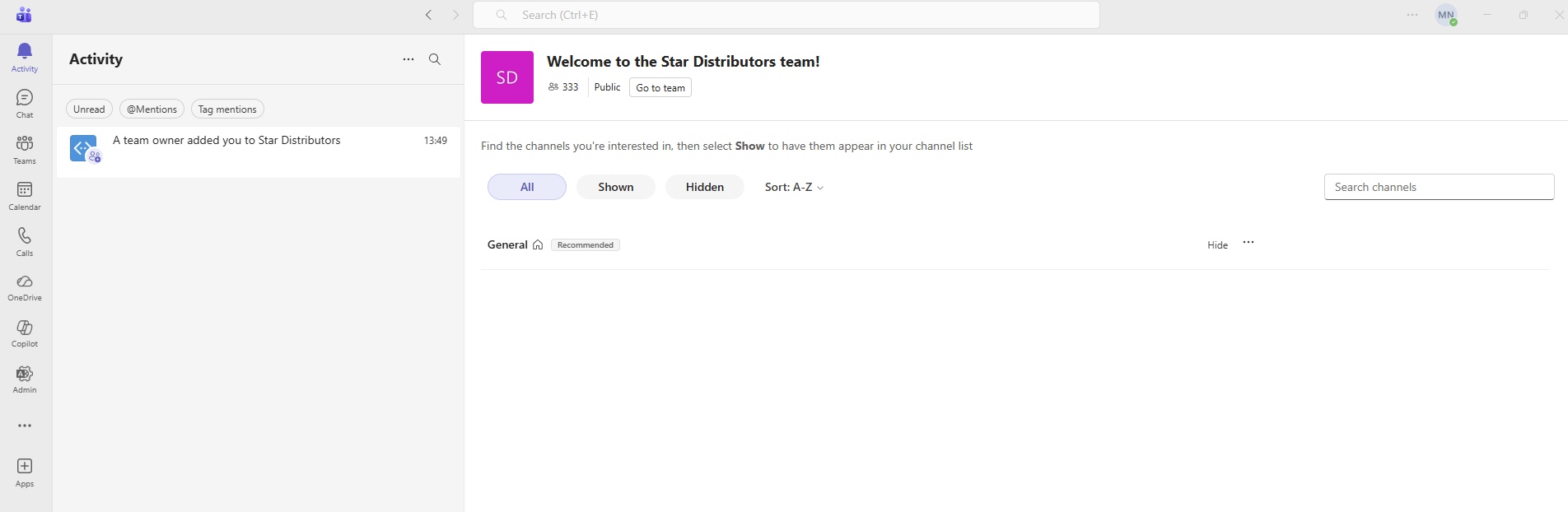
- Login: Open teams and enter credentials.
- Multiple account login:
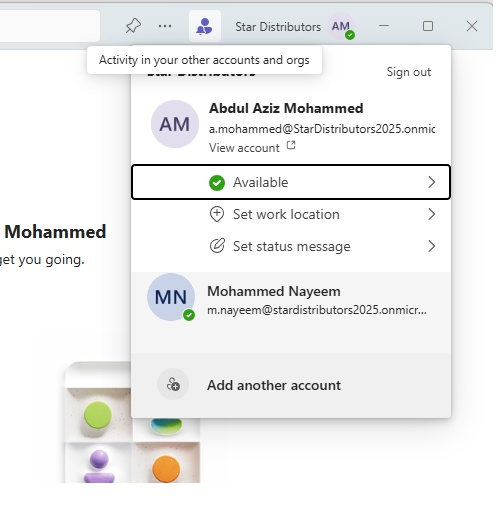
- You can enter multiple accounts and switch to other account.
- When you are in one account, it shows any activity in other accounts.
- Status:
- Click on your name on top right corner and set your status.
- Set work location: Office or Remote
- Set status message: Type @ to mention someone in your status, select check box Show when people message me.
- Clear status message after: Never, Today, 1 hour, 4 hour.
- Schedule out of office: it will redirect to --> click three dots-->settings-->General-->Out of Office-->schedule.
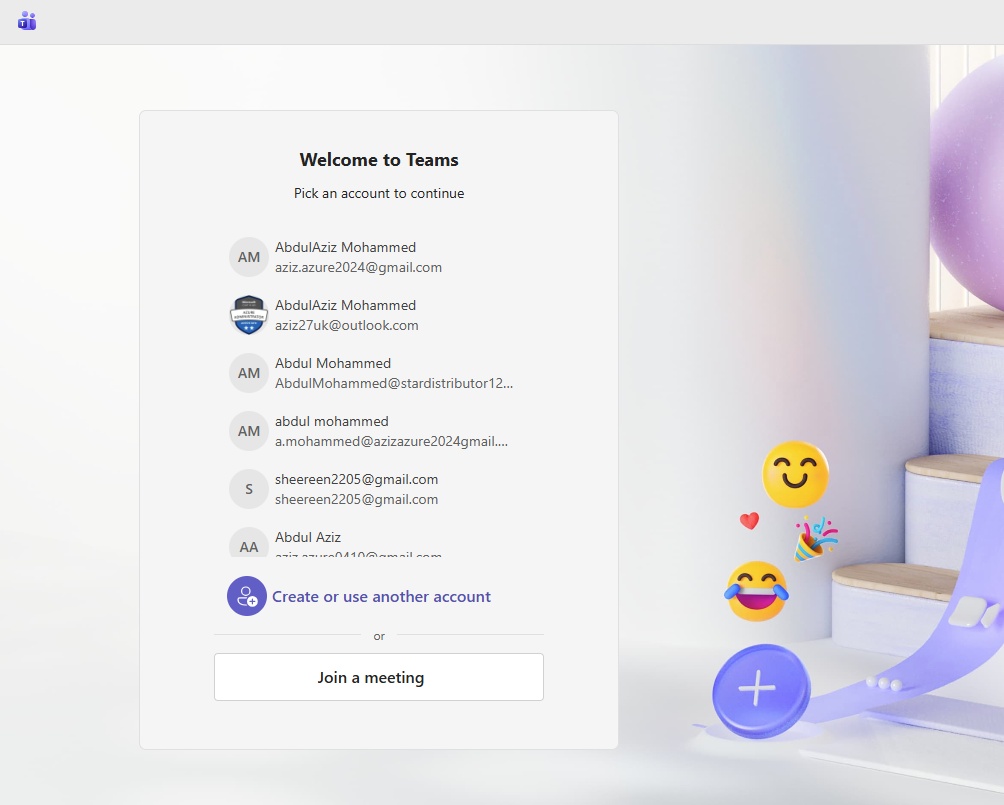
- previously logged in accounts are displayed, Remove accounts from list:
-
In the new Teams, previously logged in accounts are displayed for selection after you log out.
To remove the users from the new Microsoft Teams, you can do the following.
- Click on the Windows button > Run
- Run one by one path from this list and delete everything in the folder:
%LocalAppData%\Packages\MSTeams_8wekyb3d8bbwe
%LocalAppData%\Packages\Microsoft.AAD.BrokerPlugin_cw5n1h2txyewy
%LocalAppData%\Microsoft\OneAuth
%LocalAppData%\Microsoft\TokenBroker
%LocalAppData%\Microsoft\IdentityCacheThis will remove all the signed-in users (including the user you want to remove).
- Go to control panel-->Credential Manager-->Widows Credentials-->Remove accounts related with teams.
- Go to settings-->Accounts-->Your accounts-->Remove account.
Settings and more (...)
- Pin window on top (Ctrl+Shift+T)
- ... (three dots)
- Settings:
General:
- System:
- Auto-Start Teams: Check box:
- Open application in background: check box
- On close, keep the applicaiton running: check box
- Register the new Teams as the chat app for Microsoft 365 (requires restarting Microsoft 365 applications)
- Opening content in Teams windows:
- Main window:
- New window:
- Starting chats
- Main Window
- New Window
- Meeting
- Ask me to confirm when I leave a meeting.
- Language and regional formats
- Follow IS settings : On/Off
- Time zone: You can adjust the time zone from your OS settings.
- Translation:
- Translate messages into this language: select
- How to handle messages in other languages: Ask me before translating or Auto-translate all messages or Never Translate.
- Never translate messages in these languages: select
- Editor spellcheck: Customise Editor to check for spelling and grammar improvements in up to three languages. If you'd like to include a different language or remove an old one, select Manage spellcheck languages.
- Out of office:
- Schedule out of office and set automatic replies, Schedule
- Keyboard shortcuts: Use Teams shortcuts, or combine them with those of other apps: Teams only, Teams + Slack, Teams + Zoom
- Use Enter or Spacebar to show content: Press Enter or Spacebar to open an item in a list (like @mentions, chats, or channels) and view its content. On/Off
Appearance:
- Theme: Follow OS system them, Light, Dark, Classic, High Contrast.
- Alwas use dark theme for calls and meetings : check box
- Skin tone preference: Reactions and emoji will appear with this skin tone. select color
Chats and channels:
- Viewing chats,teams, and channels: See all conversations in a combined view, or keep chats separate from teams and channels. select Combined or Separate.
- Chats and channels list:
- Show message previews for chats and team names for channels: on/off
- Show time stamps: on/off
- Filters: On/Off
- Copilit On/off
- Automatically follow threads in channels: To choose how you get notified
- Thread started from my messages or posts
- Threads I reply to
- Threads where I'm @mentioned
- Chat: Message density: choose Comfy, Compact,
- When I open a chat, take to: Last read message, Newest message.
- Read Receipts: Let people know when you’ve seen their messages and know when they’ve seen yours. Close and reopen any chat windows for the setting to take effect in those chats.: on/off
- In post channels, show recent activity:
- At the top
- At the bottom.
- Suggested replies: Show suggested replies in chat: On/Off
Notifications and activity:
- Mute all notifications (except for calls and meetings): On/Off.
- Sound:
- Play sounds with notifications: Default, Vibe, Nudge, Tap, Flick, Pluck, summon.
- Play sounds with urgent and priority contact notifications: Dfault, Priorities, Escalate, alarm.
- Play sounds with incoming calls, requests to join, and meeting start notification: check box
- Play sounds when I'm busy or in a meeting: check box.
- Display:
- Show message and content previews in notifications:
- Show notifications during calls and meetings.
- Flash taskbar when notifications are received. This setting will only take effect if the taskbar flashing setting in your Windows OS settings is turned on.
- Dismiss notificaions after this amount of time: set time
- Position on the screen: Bottom right, top right, bottom left, top left
- Size: Comfy, Compact
- Missed activity emails: asap, every 10 mi, every hour, 8 hours, Daily, Off
- Chats and channels
- Chat message notifications: show in banner, Off
- @Mentions: On/Off
- Channel and team @mentions: Show in activity and banner, show in activity , off
- Tag @mentions:Show in activity and banner, show in activity , off
- Everyone in chat @mentions:Show in activity and banner, show in activity , off
- Personal @mentions:Show in activity and banner, show in activity , off
- Replies to followd threads and posts: Show in activity and banner, show in activity , off
- Likes and reactions: Show in activity and banner, show in activity , off
- Posts in all shown channels: Show in activity and banner, show in activity , off
- Meetings:
- Meetings:
- Meeting start notifications: On/Off
- Show meeting join bar : On/Off
- Meeting chat notifications for meetings I've accepted: Unmute, Mute,
- Meeting chat notifications for meetings marked as tentative or no response: Mute unti I join or send a message, Mute, Unmute
- Meet now start notifications: Of/Off
- Presence: Keep track of someone's status and get notified when they appear available or offline.
- Calendar:
- New invites, updates and cancellations sent to me: Show in activity and banner, show in activity , off
- When people forward meetings I’ve organised: Show in activity and banner, show in activity , off
Accounts and orgs:
- Organization name:
- User who manage:
- Privacy:
Accessibility:
- Hearing:
- Sign language mode: Enable features that provide an enhanced experience for sign language users. On/Off
- Teletypewriter(TTY) mode: Use the TTY mode to communicate using text over the phone. For this to work, you’ll need to connect a TTY device. On/Off
- Captions and transcripts:
- Automatically identify me in live captions and live transcripts: Of/Off
- Captions:
- Always show captions in y calls and meetings: Of/Off
- Filter out profane words in live captions: On/Off
- Single pointer controls: Turn on single pointer controls, Available: Start reordering, an alternate to drag and drop in the chats and channels list. On/Off.
Devices:
- Audio settings:
- Noise suppression:
- Spatial audio:
- Video settings:
- Devices:
Calls:
- Call handling and forwarding: Forward all cals to voiemail: on/off
- When you can't answer a call: Redirect to voicemail, Do not redirect calls.
- Ring for this many seconds before redirecting: 20sec, choose time
- Choose a ringtone: choose from list
- Manage voicemail:
- Record a customesed greeeting: Record a greeting.
- Choose a language for your default greeting: choose language.
- Choose what happens when the call is redirected to voiemail: choose
- Setup text-to-speech customised greeting option: Your customised greeting.
- Manage out-of-office voicemail: All time, When outlook automatic replies are on. your customsed greeting.
Files and links:
- Downloads Locations: C:\Users\username\Downloads
- Always ask where to save downloaded file: On/Off
- Alwasy open word, excel, powerpoint files in: Teams or browser
- Links open preference: Always open web links in : Default browser, Edge
App Permissions:
- Control what your apps can access when using Teams. Some apps have permissions enabled by default for your convenience.
Recognitions:
- Voice: Your voice profile is used to suppress background noises in Teams meetings through voice isolation. When using an intelligent speaker, your voice profile is used to identify you in meeting transcripts. Manage and delete your profile anytime from this device. Takes about 30 seconds.
- Face: Your face profile is used to automatically recognise, display your name during meetings, add your name to participant list as you walk into a Microsoft Teams Rooms with supported equipment. Manage or delete your face profile anytime from settings. It takes about 30 seconds.
About Teams:
- Version:
- Legal information:
- Privacy and cookies:
- Third party notice;
- Cast
- Zoom : Zoom the screen
- Help: Get help with Microsoft.
- Feedback: Report a problem,
- Keyboard shortcuts:
- Get the Mobile App: Get teams mobile app, Scan the code below with your mobile camera or with a QR reader app.
Activity
- Unread:
- @Mentions:
- Tag mentions:
Chat
- code
- code
- code
Teams
- code
- code
- code
Calendar
- code
- code
- code
Calls
- code
- code
- code
Onedrive
- code
- code
- code
Copilot
- code
- code
- code
Admin
- code
- code
- code
Apps
- code
- code
- code
Web Version
Login
- Go to portal.office.com and enter credentials. click teams and you can access web version of teams.
- Once a user assigned a license, user can access teams.
- code
code
- code
- code
- code
code
- code
- code
- code
code
- code
- code
- code
code
- code
- code
- code
code
- code
- code
- code
code
- code
- code
- code
Schedule, Join a meeting
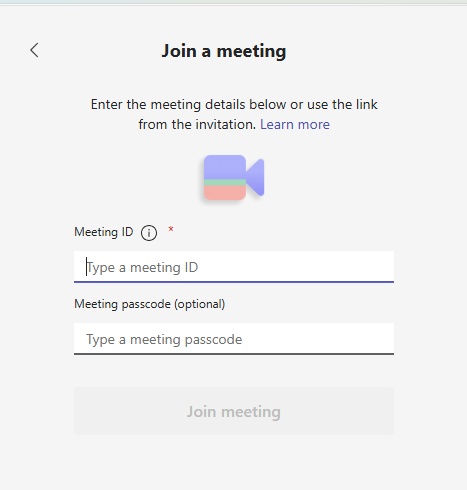
Without O365 License
- Open Teams and click join a meeting.
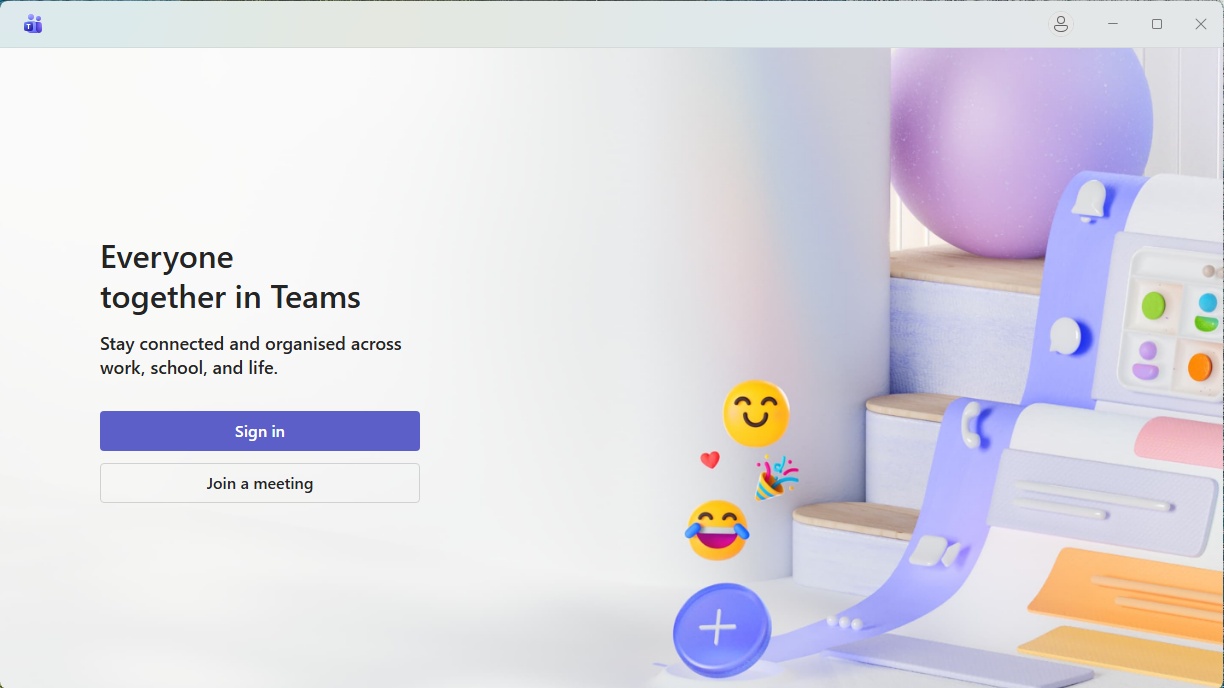
- Click on join a meeting.
- Enter Meeting ID and password.
With O365 License
- You will receive an email of meeting scheduled.
- You accept the invitation.
- Click on Calendar in outlook or in Teams and join the meeting on scheduled time.
- code
- code
Schedule a meeting.
- code
- code
- code
code
- code
- code
- code
code
- code
- code
- code
code
- code
- code
- code
code
- code
- code
- code
5
code
- code
- code
- code
code
- code
- code
- code
code
- code
- code
- code
code
- code
- code
- code
code
- code
- code
- code
code
- code
- code
- code
code
- code
- code
- code
6
code
- code
- code
- code
code
- code
- code
- code
code
- code
- code
- code
code
- code
- code
- code
code
- code
- code
- code
code
- code
- code
- code
code
- code
- code
- code
7
code
- code
- code
- code
code
- code
- code
- code
code
- code
- code
- code
code
- code
- code
- code
code
- code
- code
- code
code
- code
- code
- code
code
- code
- code
- code
8
code
- code
- code
- code
code
- code
- code
- code
code
- code
- code
- code
code
- code
- code
- code
code
- code
- code
- code
code
- code
- code
- code
code
- code
- code
- code
9
code
- code
- code
- code
code
- code
- code
- code
code
- code
- code
- code
code
- code
- code
- code
code
- code
- code
- code
code
- code
- code
- code
code
- code
- code
- code