365 Outlook Web
code
- code
- code
- code
code
- code
- code
- code
code
- code
- code
- code
code
- code
- code
- code
code
- code
- code
- code
code
- code
- code
- code
code
- code
- code
- code
365 Outlook Desktop
- Code
File
Info
- account_info1.jpg
Account information
- Choose the account if multiple is configured.
Add Account
- add a new account to Outlook:
Account Settings
- Account Settings:
- Account Name and Sync Settings:
- Delegate Access:
- Download Address Book:
- Manage Mobile Notification:
- Change Profile:
- Manage Profiles:
Automatic Replies (Out of Office)
- User Automatic replies to notify others that you are out of office, on vacation, or not available to respond to email messages.
- Code
Tools
- Mailbox Cleanup:
- Empty Deleted items folder:
- Clean up old items:
Manage Rules & Alerts
- Email Rules:
- Manage Alerts:
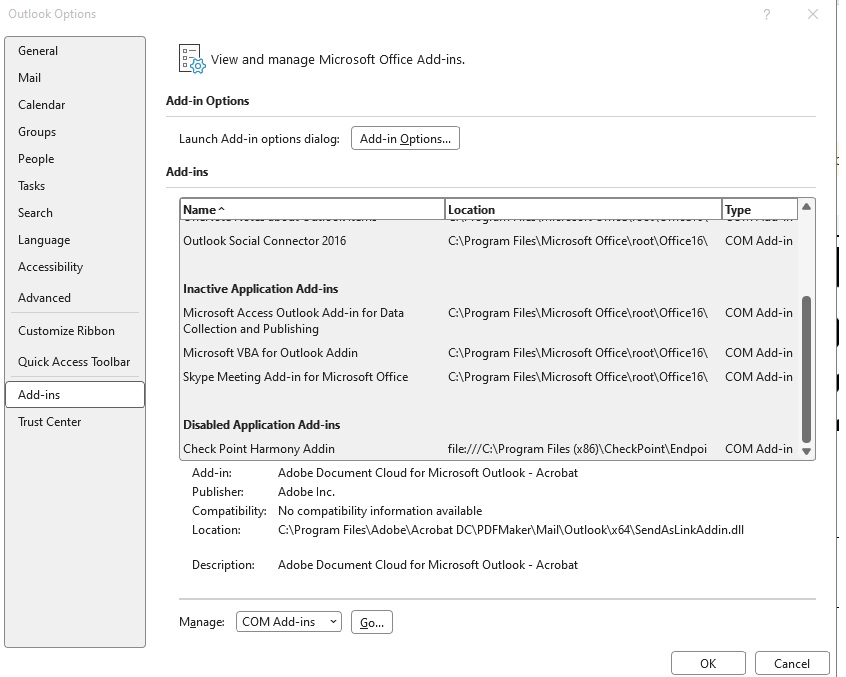
Manage COM Add-ins
- Slow and Disabled Add-ins
Manage Add-ins: It will open outlook web
Open and Export
Open Calendar:
- Open a calendar file in outlook (.ics, .vcs).
- Code
Open Outlook Data File
- Open an Outlook data file (.pst).
- Code
Import/Export
- Import or export files and settings.
- Code
Other User's Folder
- Open a folder shared by another user.
- Code
Print:
- Any email need to print can print from here. Select the email in inbox and go to file and print. or From Inbox type CTRL + P
- Table Style
- Memo Style: It will print whicher email in the inbox was selected.
Office Account
User information
- Account Privacy:
- Office Background:
- Office Theme:
- Connected Services:
- Add a service
Product Information
- Manage Account
- Switch License
- Update License
- Update Options:
- About Outlook
- What's New:
Options
General
- Cloud storage options: Check box: Store my Outlook in the cloud (Requires restarting outlook):
- User Interface options
- When using multiple displays: Optimize for best appearance, Optimize for compatability (application restart required)
- Show Mini Toolbar on selection: Check box
- Enable Live Preview: Check box
- Screen Tip Style: Show feature descriptions in screen tips, Dont show feature description in screen tips, Dont show screen tips.
- Personalize your copy of Microsoft Office
- User name: Enter name (Abdul Mohammed)
- Initials: AM
- Always use these values regardless of sign in to office: Check box
- Office Background: Choose background from list: Circuit
- Office Theme: Choose from list
- Never change the message background color: check box
- Privacy settings: Office privacy settings give you control your experience and data. Your privacy settings generally apply to all devices where you sign in to office with the same account.
- Starup options
- When Outlook opens: Ask me if I want to reopen previous items, Never reopen previous items, always reopen previous iems.
- For files I choose from OneDrive or SharePoint: Ask e how I want to attach them every time, always share them as links, Always attach them as copies.
- LinkedIn Features:
- Use Linkedin features in Office to stay connected with you professional network and keep up to date in your inudstry: check box: Enable LinkedIn features in my office application.
- Abdout LinkedIn features, Manage LinkedIn account associations.
Mail:
- Compose messges
- Change the editing settings for messages: Editor options
- Proofing: Specify how Outlook corrects and formats the contents of your emails.
- AutoCorrect options: Various options available.
- When correcting spelling in Microsoft Office Program
- Ignore works in UPPERCASE: check box
- Ignore words that contain numbers: check box
- Ignore Internet and file addresses: check box
- Flat repeated words: check box
- Enforce accepted uppercase in French: check box
- Suggest from main dictionary only: Custom Dictionary
- French modes:
- Spanish modes:
- When correcting spelling in outlook
- Check spelling as you type:
- Mark grammar errors as you type:
- Frequently confused words:
- Choose the checks Editor will perform for Grammar and Refinements
- Writing style: Grammar & Refinements, Grammar
- Click settings to choose various options.
- Acessibility:
- Make your document accessible to others: Accessibility Assistant helps you find and fix content in your document that may make it harder for people with disabilities to consume your content. Turn on the following settings to keep Accessibility Assistant running even when the pane isn't open.
- Show accessibility status for the Accessibility Assistant in the Status Bar: Check box
- Show accessibility status inline with the document: check box
- Feedback options
- Provide feedback with sound: check box, select sound scheme
- provide feedback with animation: check box
- Application display options
- Screen Tip style: Show feature descriptions in Screen Tips, Dont show feature descriptions in Screen Tips, Dont show Screen Tips.
- Show shortcut keys in Screen Tips: Check box
- Show the Start screen when this application starts: check box
- Automatic Alt Text: Automatic alt text generates descriptions of images to make them accessible to people who use screen readers. Turn on automatic alt text by selecting the checkbox. You can also generate alt text by selecting "Generate alt text for me" in the Alt Text pane.
- Automatically generate alt text for me: check box
- Document display option
- Expand all headings when opening a document: check box
- Keyboard navigation options
- Use reading order for arrow key navigation: check box
- Advanced:
- Editing options
- Various options
- Cut, copy and paste
- Various options
- File open preference
- Various options
- Pen
- Various options
- Image size and Quality
- Various options
- Display
- Various options
- Advanced typography
- Various options
- Editing options
- Proofing: Specify how Outlook corrects and formats the contents of your emails.
Calendar:
- Change the settings for calendars, meetings, and time zones.
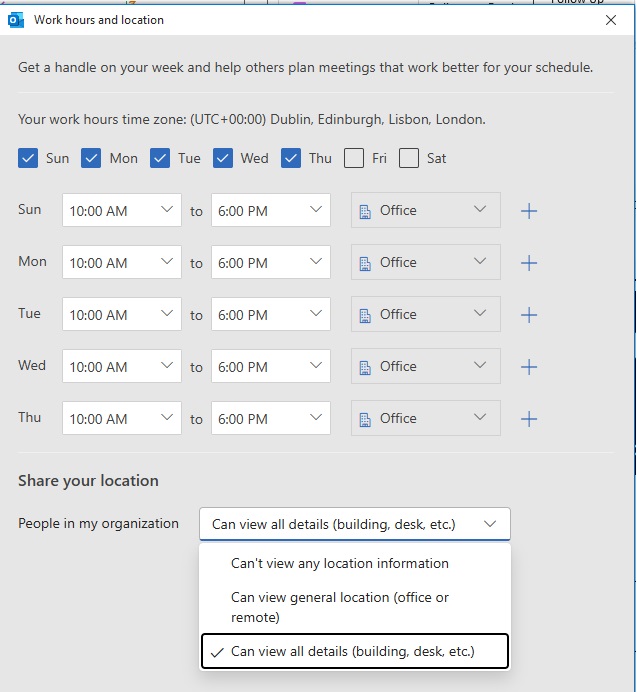
Work hours and location
- Setup your weekly schedule to let colleagues know when you're available and in the office. click work hours and location
- first day of week: choose
- First week of year: choose
Calendar options
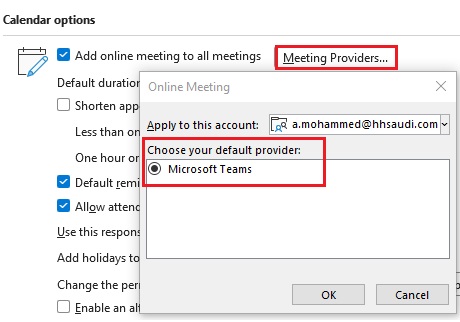
- Add online meeting to all meetings: click Meeting Providers.
- Default duration for new appointments and meetings: choose time, 30 min, 1hr, 1.5 hr, 2 hrs.
- Shorten appointments and meetingsL check box, choose less than one hour, One hour or longer.
- Default reminders: choose time, various
- Allow attndees to propose new times for meetings: check box
- Use this response when proposing a new meeting time: Tentative, Accept, Decline
- Add holidays to the Calendar: Add holidays
- Change the permissions for viewing Free/Busy information: various options to choose: Free/Busy Options, Other Free/Busy
- Enable an alternate calender: check box
- When sending meeting requests outside of your organization, use the iCalendar format: check box
- Show bell icon on the calendar for appointments and meetings with reminders: check box
Display options
- Default calendar color: choose color
- Use this color on all calendar: check box
- Show week numbers in the month view and in the Date Navigator: check box
- When in Schedule View, show free appointments: check box
- Automatically switch from vertical layout to schedule view when the number of displayed calendars is greater than or equal to : choose number
- Automatically switch from schedule view to vertical layout when the number of displayed calendar is fever than or equal to : choose number
Time zones
- Time zone: choose
- Show a second time zone: check box
- Show a third time zone: check box
Scheduling assistant
- Show calendar details in Screen Tip: Check box
- Show calendar details in the scheduling grid: Check box
Automatic accept or decline
- Automatically accept or decline meeting requirements: click and choose
Meeting insights
- Show meeting insights: check box.
Groups:
- Options for working with groups.
- User Interface options
- Show the group header in the group space: check box
- Show the grou header in the Inbox: check box
- Notifications
- Show alert when, Someone like my messages: check box
- Attachment options
- For files I choose from my computer: choose from below
- Ask me how I want to attach them every time
- Always upload to the group's files in Sharepoint
- Always attach them as copies.
People:
- Change how you work with your contacts.
- Names and filing
- Default "Full Name" order: choose
- Default "File As" order: choose
- Check for duplicates when saving new contacts: check box
- Contacts index
- Show an additional index: check box
- additional contact index: choose
- Online status and photographs
- Display online status next to name: check box
- Show user photographs when available (requires restarting outlook): check box
- Show only names in the People peek (required restarting outlook): check box
Tasks:
- Change the settings that track your taks and to-do items.
- Task options
- open tasks in the To Do app: check box
- Set reminders on tasks with due dates: check box
- Default reminder time: select time
- Keep my task list updated with copies of tasks I assign to other people: check box
- Send status report when I complete an assigned task: check box
- Overdue task color: choose color
- Completed task color: choose
- Set Quick Click Flag: choose
- Work hours
- Task working hours per day: choose
- Task working hours per week: choose
Search:
- Change how items are searched with instance search.
- Change the outlook stores indexed by windows search: click indexing options
- Results
- Include results only from:
- Current folder
- Current folder. Current mailbox when searching from the inbox
- Current mailbox
- All mailboxes
- Include messages from the Deleted items folder in each data file when searching in All itms: check box
- Highlight search terms in the results: check box
- Highlight color: choose
- Notify me when results might be limited because search indexing is not complete: check box
- Show most relevant search results on top: check box
Language:
- Set the office Language preferences
- Office Display Language
- Match Microsoft Windows, English US, English UK or add a language.
- Office authoring languages and proofing
- Manaage languages used for creating and editing documents, including proofing tools such as spelling and grammar check.
Accessibility:
- Accessibility checker option
- The accessibility checker helps you find and fix content in your message that may mame it harder for people with disabilities to consume your content.
- Show me accessibility warnings while I work:
- Show me accessibility warnings when:
- At least one recipient prefers accessible content
- Using a dark background to compose a message
- Composing a message to a lage audience
- At least one recipient is outside my organization
- Composing a message with high importance
- Show me accessibility warnings only when I open the accessibility cheer.
- Feedback options
- Provide feedback with sound: sound scheme: select
- Application display option
- Screen Tip style: choose
- Dont automatically expand conversations when using the keyboard to change messages: check box
- Show Read Aloud: check box
- Suggest names to mention when i use the @ symbol in a message (requires restarting outlook): check box
- Document display option
- Use stationery to change default fonts and styles, colors, and backgrounds. click Stationery and Fonts.
- Automatic Alt Text:Automatic alt text generates descriptions of images to make them accessible to people who use screen readers. Turn on automatic alt text y selecting the checkbox. You can also generate alt text by selecting "Generate alt text for me" in the Alt Text pane.
- Automatically generate alt text for me: check box
Advanced:
- Outlook Panes
- Customize Outlook pane: click Reading pane and select options.
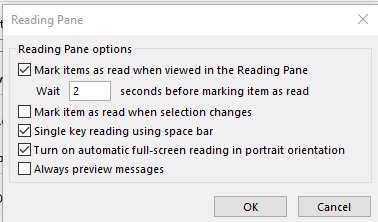
- Show apps in Outlook: check box
- Outlook Start and Exit
- Start Outlook in this folder: Inbox (click browse and choose like Inbox or any other folder).
- Empty Deleted items folders when exiting Outlook: check box
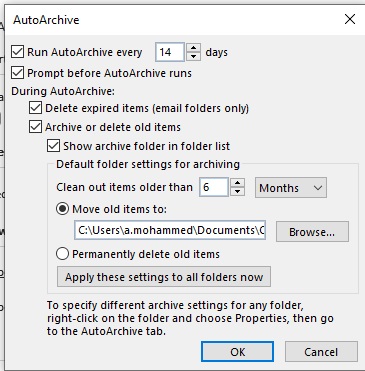
- AutoArchive
- Reduce mailbox size by deleting or moving old items to an archive data file. Click AutoArchive Settings:
- File and browser preferences
- Open Word, Excel, and PowerPoint files using: Broswer / Desktop (online or desktop)
- Open hyperlinks from outlook in : Microsoft Edge / Default Browser.
- Reminders
- Show reminders: Check box
- Play reminders sound: browse and choose
- Show reminders on top of other windows: check box
- Automatically dismiss reminders for past calendar events: check box
- Export
- Export Outlook information to a file for use in other program: click export
- RSS feeds
- Any RSS Feed item that is updated appears as new: check box
- Synchronize RSS Feeds to the Common Feed list (CFL) in Windows: Check box
- Send and receive
- Set send and receive settings for incoming and outgoing items: click Send/Receive
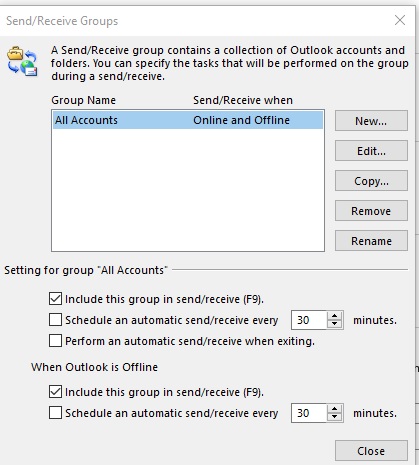
- Send immediately when connected: check box
- Developers
- Configure advanced custom forms options: click Custom Forms
- Show add-in user interface errors: check box
- International options
- Use English for message flag labels: Check box
- Use English for message headers on replies and forwards and for forward notifications: check box
- Automatically select encoding for outgoing messages: check box
- Preferred encoding for outgoing messages: select
- Automatically select encoding for outgoing vCards: check box
- Preferred encoding for outgoing vCards: choose
- Allow international domain names in email address: check box
- Allow UTF-8 support for the mailbox protocol: check box
- Right to Left
- Arrange panes left to right for right to left languages: check box
- Define the direction of your views:
- Left to Right
- Context
- Right to Left
- Define the global text direction of srings and edit controls. Select context to layout the text based on the first strong left to right or right to left character detected:
- Left to Right
- Context
- Right to Left
- Other
- Set Quick Click Category: click Quick Click
- Prompt for confirmaiton before permanently deleting items: check box
- Allow analysis of send emails to identify people you commonly email and subjects you commonly discuss, and upload this infomation the the default Sharepoint server: check box
- Enable troubleshooting logging (requires restarting outlook): check box
- Migrate group schedules from a previous version of Microsoft Outlook: select folder
- Use animations when expanding conversations and groups: check box
- Disable incident notifications intended for administrators: check box
- Outlook Panes
Customize Ribbon
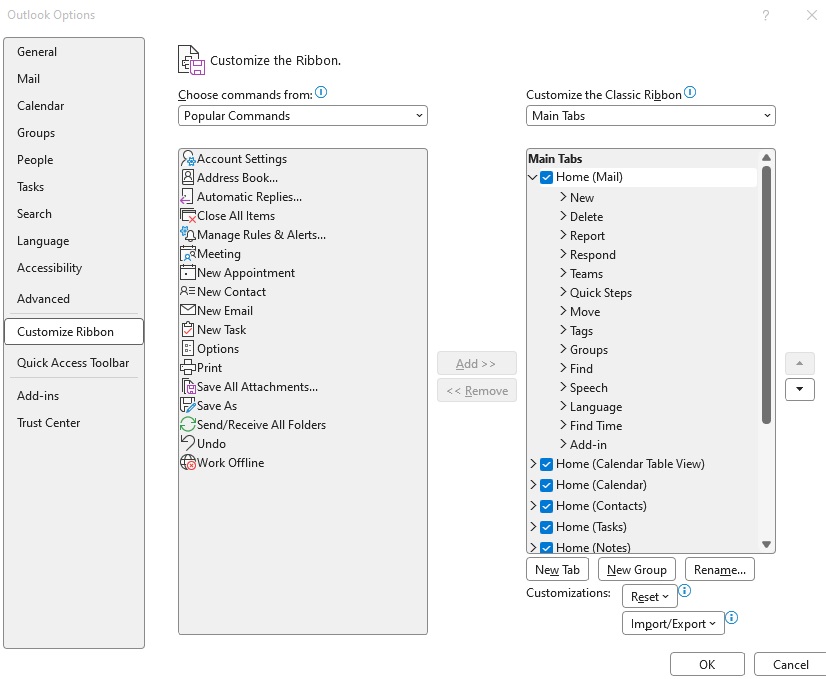
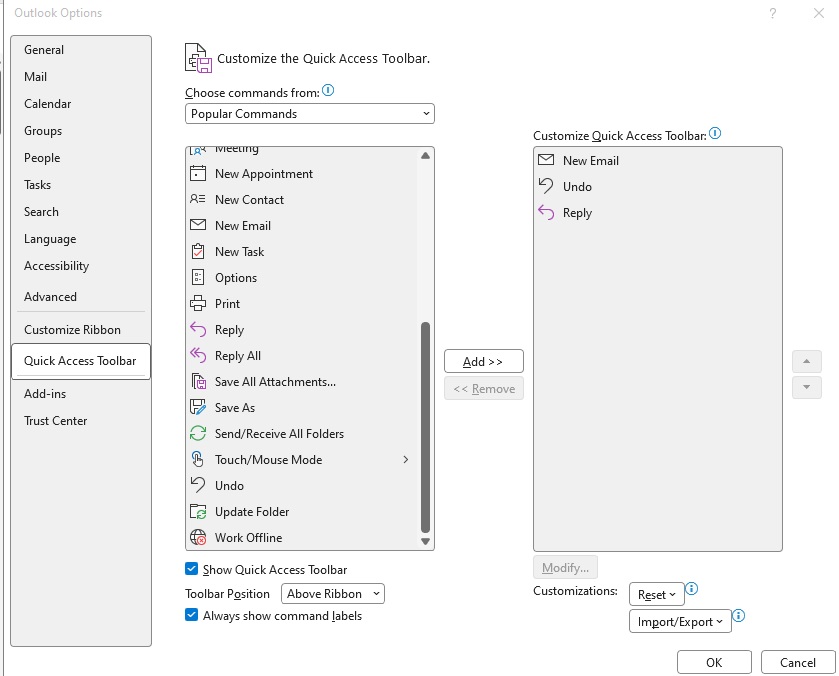
- Add/remove buttons
Quick Access Toolbar
Add-ins
Trust Center
- Help keep your documents safe and your computer secure and healthy.
- click Trust Center Settings.
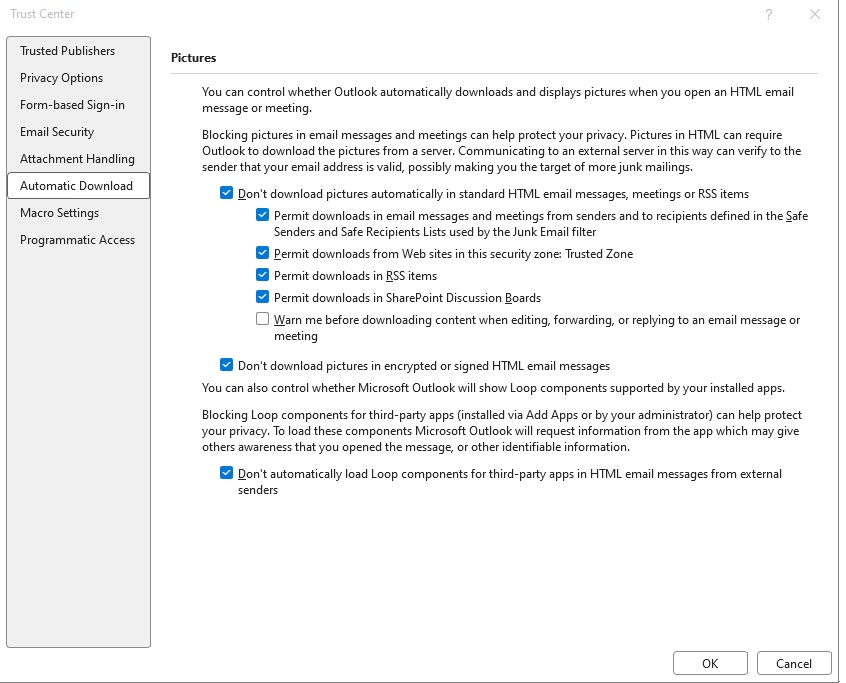
Mail
Home
- code
- code
- code
Send/Receive
- code
- code
- code
Folder
- code
- code
- code
View
- code
- code
- code
Help
- code
- code
- code
Account/Try the new outlook/Copilot
- code
- code
- code
Code
code
- code
- code
- code
code
- code
- code
- code
code
- code
- code
- code
code
- code
- code
- code
code
- code
- code
- code
code
- code
- code
- code
code
- code
- code
- code
5
code
- code
- code
- code
code
- code
- code
- code
code
- code
- code
- code
code
- code
- code
- code
code
- code
- code
- code
code
- code
- code
- code
code
- code
- code
- code
6
code
- code
- code
- code
code
- code
- code
- code
code
- code
- code
- code
code
- code
- code
- code
code
- code
- code
- code
code
- code
- code
- code
code
- code
- code
- code
7
code
- code
- code
- code
code
- code
- code
- code
code
- code
- code
- code
code
- code
- code
- code
code
- code
- code
- code
code
- code
- code
- code
code
- code
- code
- code
8
code
- code
- code
- code
code
- code
- code
- code
code
- code
- code
- code
code
- code
- code
- code
code
- code
- code
- code
code
- code
- code
- code
code
- code
- code
- code
9
code
- code
- code
- code
code
- code
- code
- code
code
- code
- code
- code
code
- code
- code
- code
code
- code
- code
- code
code
- code
- code
- code
code
- code
- code
- code
Calendar
code
- code
- code
- code
code
- code
- code
- code
code
- code
- code
- code
code
- code
- code
- code
code
- code
- code
- code
code
- code
- code
- code
code
- code
- code
- code
Copilot
code
- code
- code
- code
code
- code
- code
- code
code
- code
- code
- code
code
- code
- code
- code
code
- code
- code
- code
code
- code
- code
- code
code
- code
- code
- code
People
code
- code
- code
- code
code
- code
- code
- code
code
- code
- code
- code
code
- code
- code
- code
code
- code
- code
- code
code
- code
- code
- code
code
- code
- code
- code
Org Explorer
code
- code
- code
- code
code
- code
- code
- code
code
- code
- code
- code
code
- code
- code
- code
code
- code
- code
- code
code
- code
- code
- code
code
- code
- code
- code
Tasks
code
- code
- code
- code
code
- code
- code
- code
code
- code
- code
- code
code
- code
- code
- code
code
- code
- code
- code
code
- code
- code
- code
code
- code
- code
- code
More Apps
code
- code
- code
- code
code
- code
- code
- code
code
- code
- code
- code
code
- code
- code
- code
code
- code
- code
- code
code
- code
- code
- code
code
- code
- code
- code
To Do
code
- code
- code
- code
code
- code
- code
- code
code
- code
- code
- code
code
- code
- code
- code
code
- code
- code
- code
code
- code
- code
- code
code
- code
- code
- code
Other Task and Troubleshooting
Email Forwarding, Email recall,
-
All Email forwarding in O365:
Go to Microsoft 365 Admin Center (admin.cloud.microsoft.com)
Go to Users-->Active Users-->select user to whom all emails should be forwarded.
Go to Mail -->Email forwarding --> select Manage email forwarding-->enter the email address to which emails forwarded.
select check box : Forward all emails sent to this mailbox (The mailbox owner will be able to view and change these forwarding settings.)
select check box: Keep a copy of forwarded email in this mailbox.
Save changes.> Access User Settings: Go to the Microsoft 365 admin center and select Users > Active users.
> Select User: Click on the display name of the user whose email you want to forward.
> Manage Forwarding: In the user properties pane, click the Mail tab and select Manage email forwarding.
> Configure Options:
> Toggle Forward all emails sent to this mailbox to On.
> Enter the forwarding address in the Forwarding email address box.
> Check Keep a copy of forwarded email in this mailbox if you want to retain a copy.
Save: Click Save changes. - Email Recall:
- Email sent to aziz27uk@yahoo.co.uk from a.mohammed@hhsaudi.com which needs to recall before user access it.
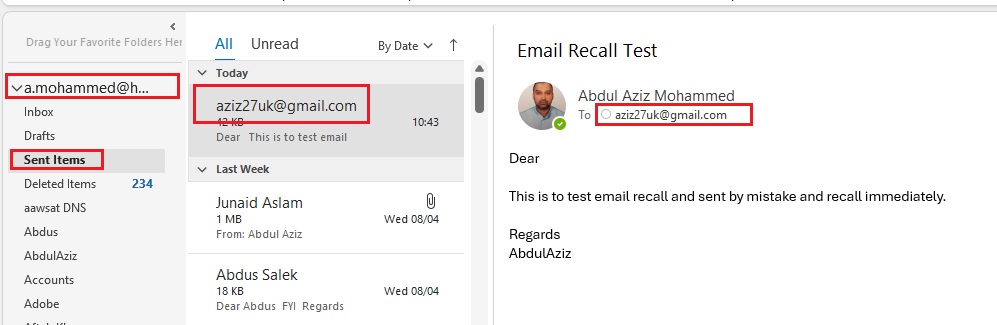
- Go to sent folder and double click the sent email, Click File/Info/Resend or Recall and click Recall This Message. If Recall or resend is not visible from file is because you click the File from main outlook menu, double click the send email and go to file.
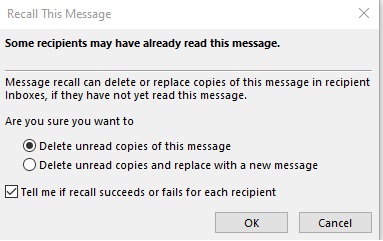
- Choose Delete unread copies of this message or Delete unread copies and replace with a new message. (user who is not read the message will be deleted)
- Select check box : Tell me if recall succeeds or fails for each recipient: It means if user has already seen the message than you will not be notified or else you will receive the message.
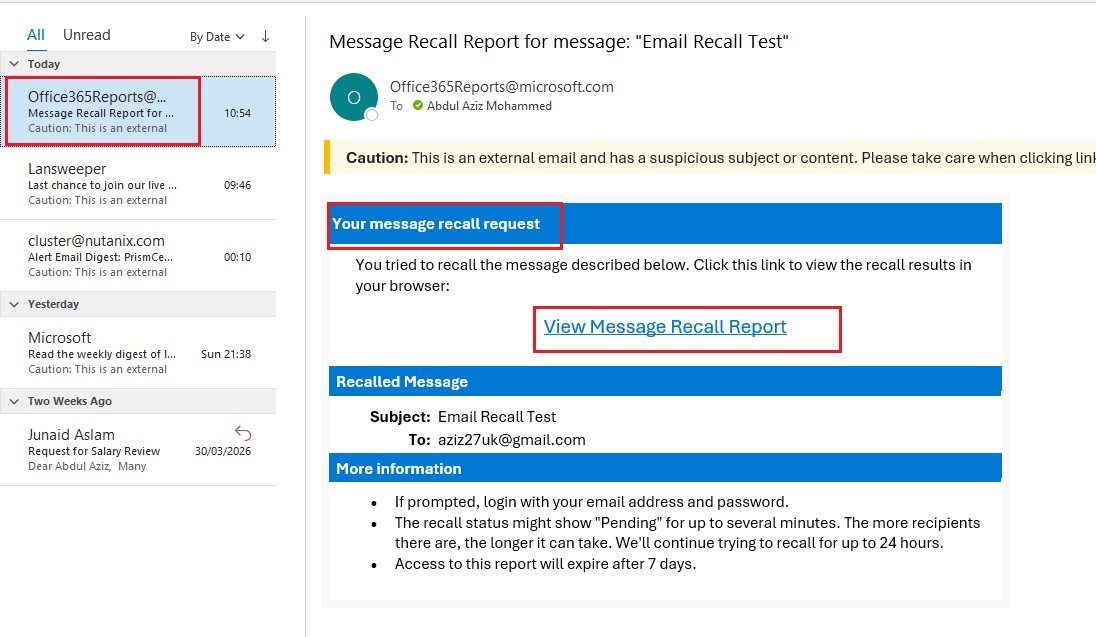
- Enter credentials if needed.
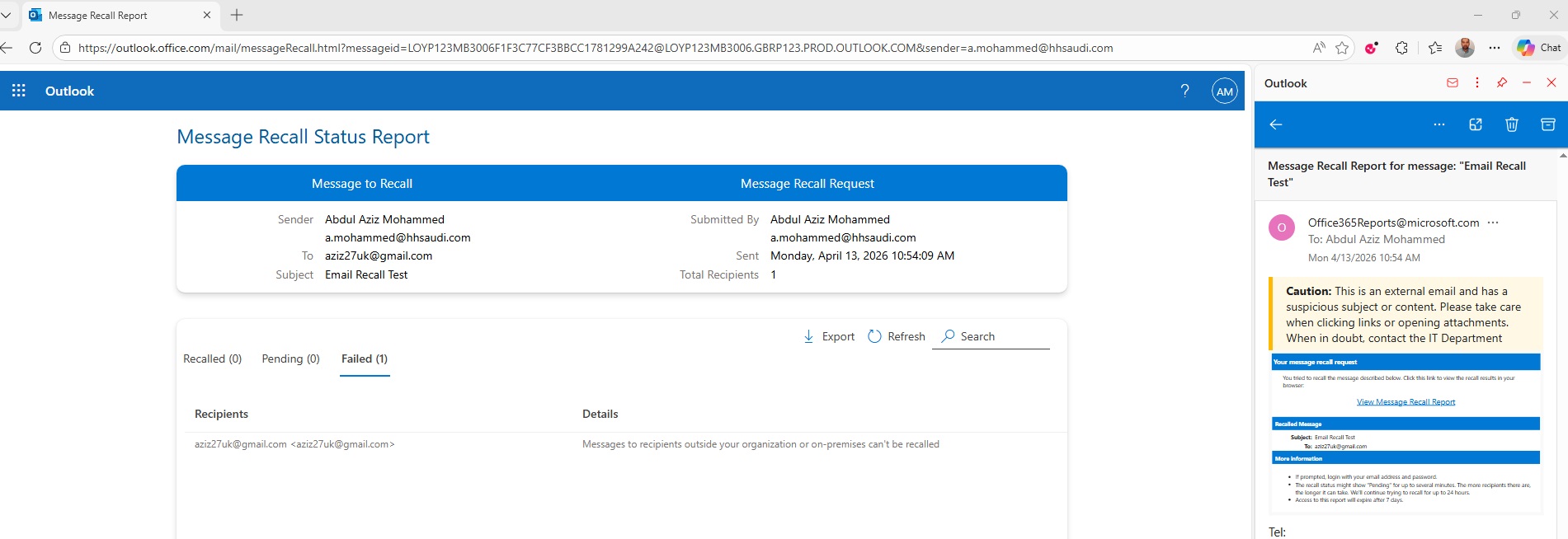
- Message recall was failed because Message to recipients outside your organization.
- code
-
Move emails to a folder,
- Outlook rule that moves specific emails to a folder:
- Method1: Right-click an email from the sender, select Rules > Create Rule. Choose criteria (such as "From: enter email address [Sent: your email address]") and the target folder under "Folder name," then click OK.
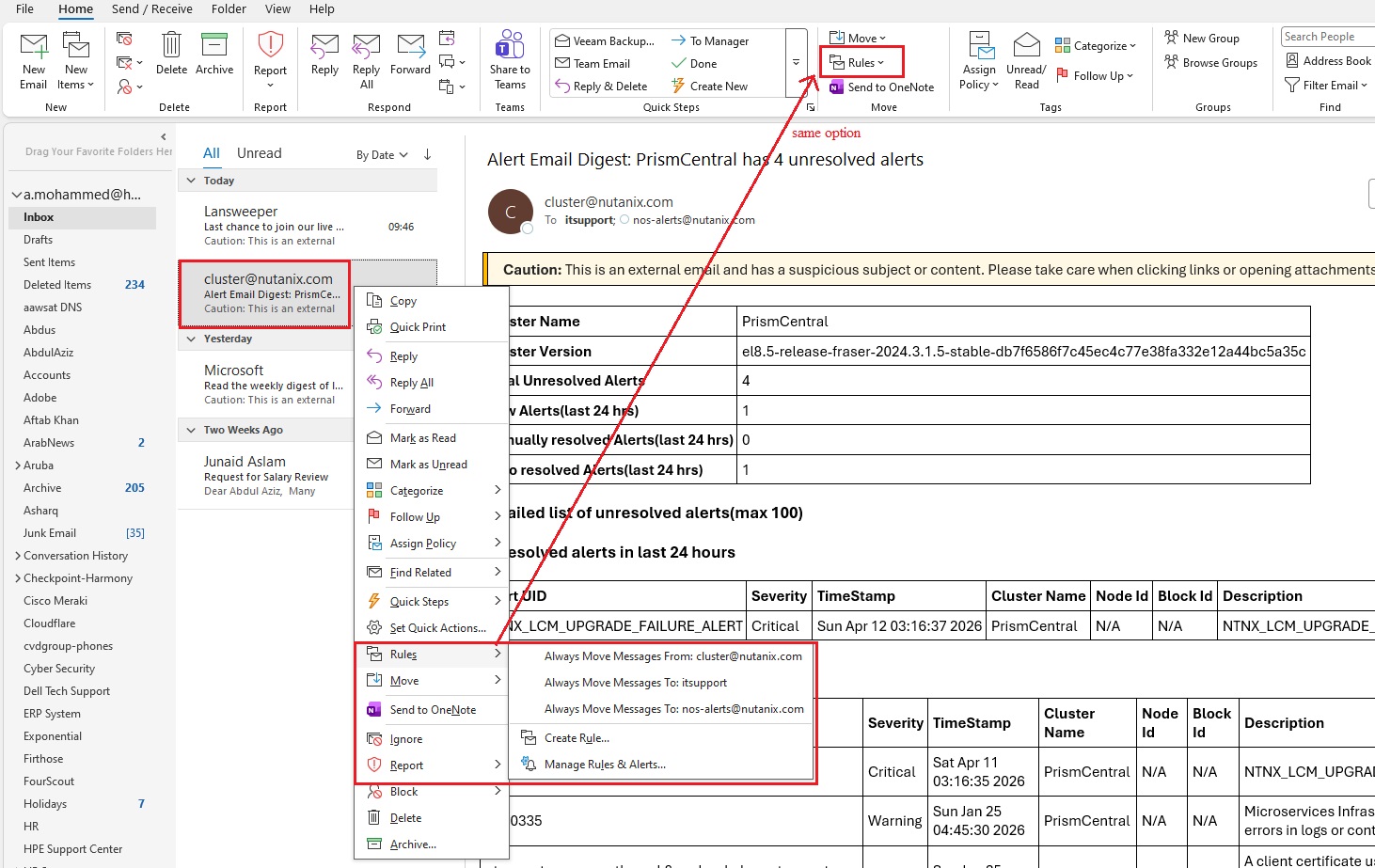
- Method 2: Select the received email, click on Rules on top menu bar and click create Rule, Select check box From xyx@abc.com , subject keep blank, select check box sent to : youremail and Select check box Move the item to Folder and select folder.
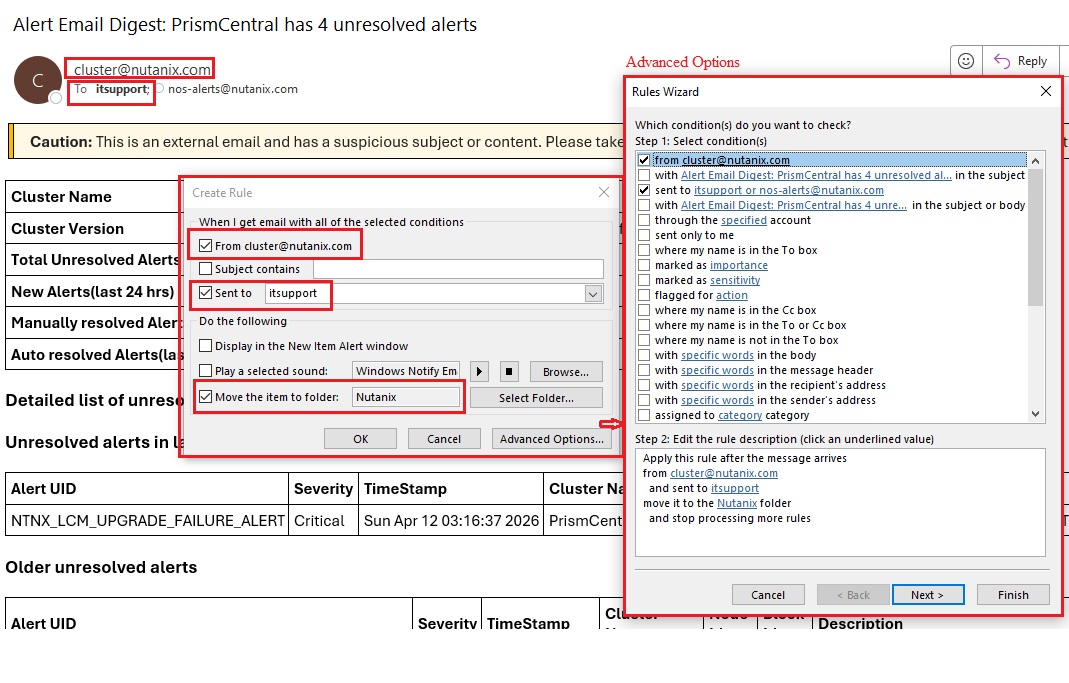
- code
- code
- Outlook rule that moves specific emails to a folder:
code
- code
- code
- code
code
- code
- code
- code
code
- code
- code
- code
code
- code
- code
- code
code
- code
- code
- code