Intro
code
- code
- code
- code
code
- code
- code
- code
code
- code
- code
- code
code
- code
- code
- code
code
- code
- code
- code
code
- code
- code
- code
code
- code
- code
- code
Portal
Acces portal/Login
- Go to admin.cloud.microsoft
- Enter credentials.
Home
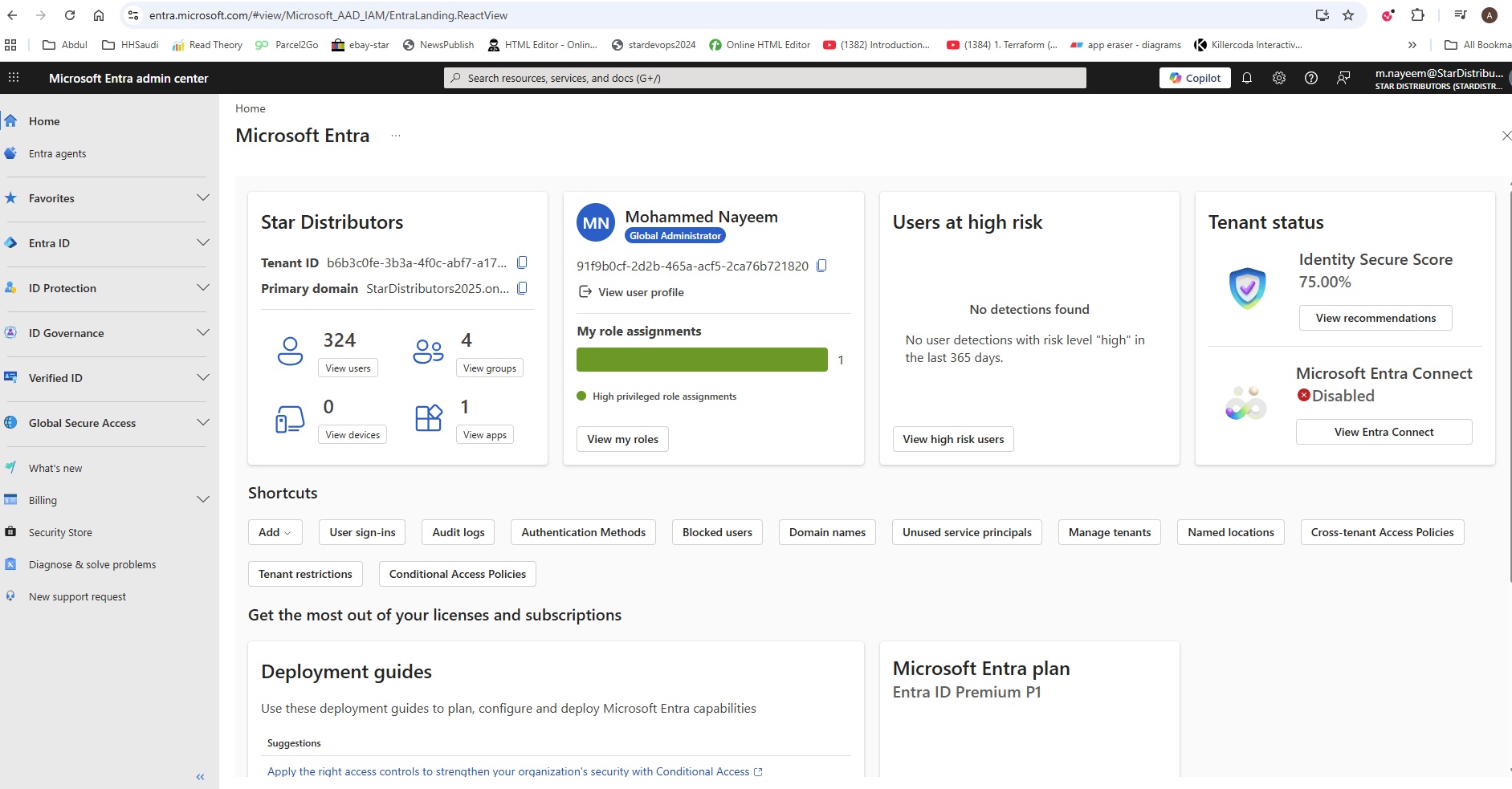
- code
- code
Entra agents
- Security Copilot agents
- code
Favourites
- code
code
- code
- code
- code
code
- code
- code
- code
code
- code
- code
- code
Entra ID
Overview
- code
- code
- code
Users
- code
- code
- code
Groups
- code
- code
- code
Devices
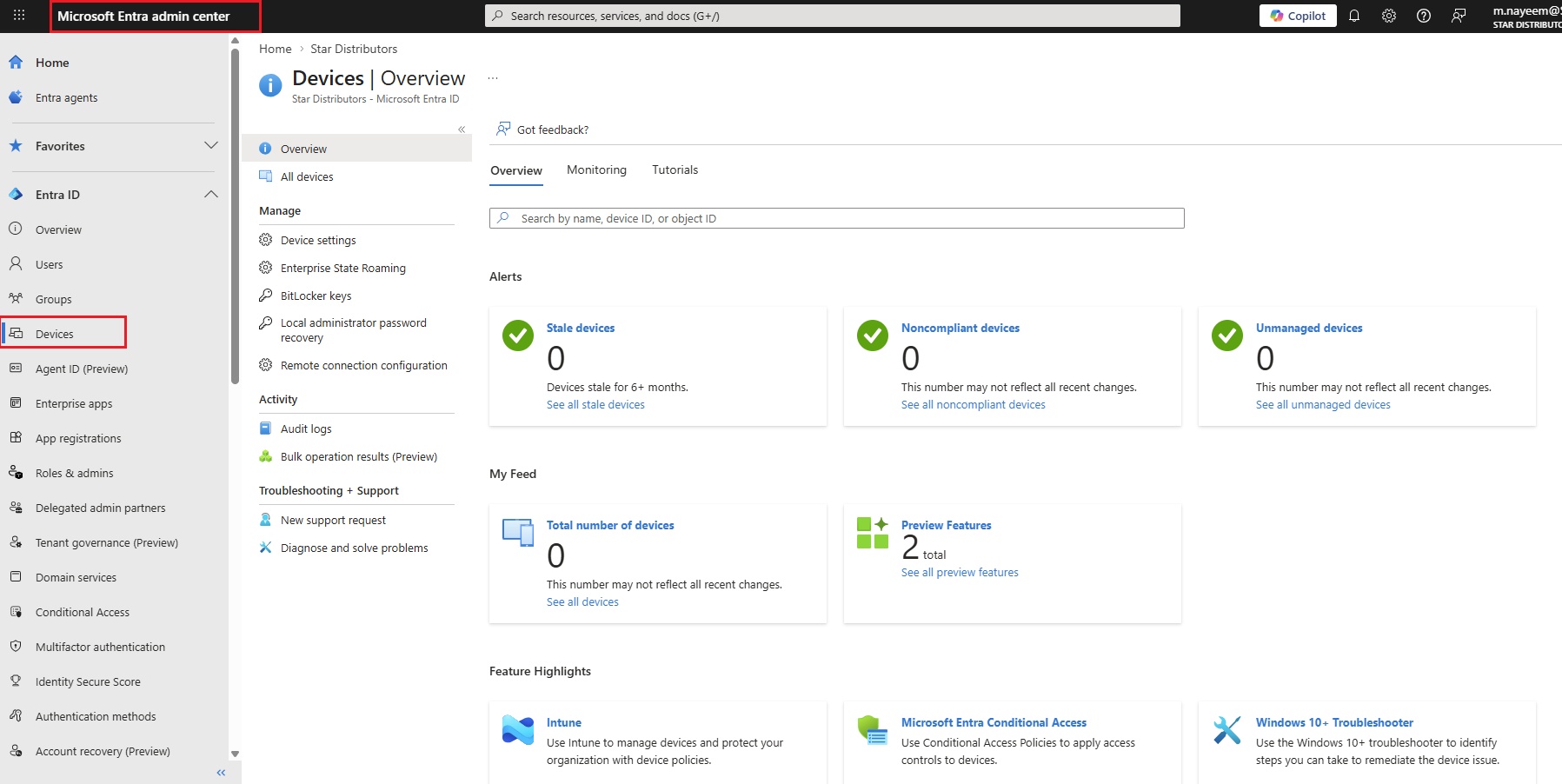
- Devices enrollment are two types:
- Device Join: Company owned devices will join the AAD and has fully control to manage end devices.
- Device Register: Customer own devices can be register with less control to manage.
- Overview
- Overview: It shows the list of all stale devices, noncompliant devices,unmanaged devices. Total number of devices etc..
- Monitoring: Audit log events with various options, Devices by OS type, Devices by join type.
- Tutorials:
- All devices
- Download devices: bulk operation
- Manage
- Device settings:
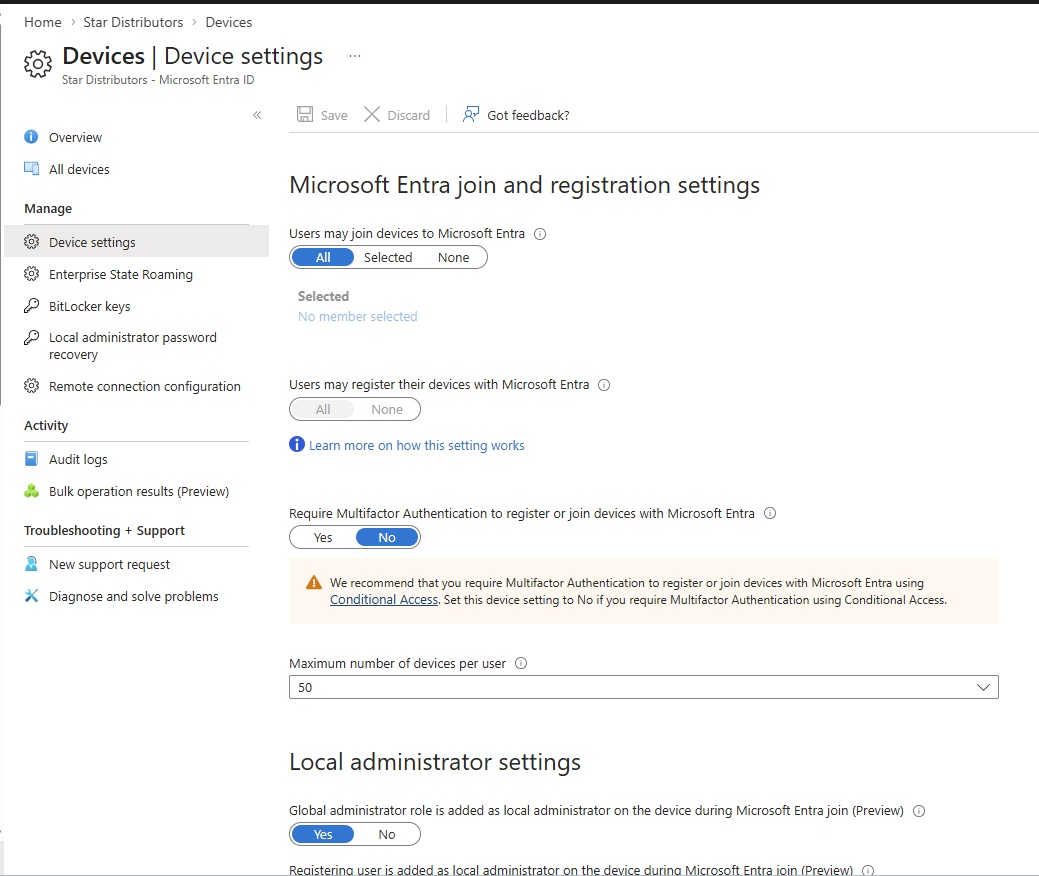
- Microsoft Entra join registration settings: Select the users and groups that are allowed to join devices to Microsoft Entra. This setting is applicable to Microsoft Entra join on Windows and MacOS devices. This setting does not apply to Microsoft Entra hybrid joined devices, Microsoft Entra joined VMs in Azure and Microsoft Entra joined devices using Windows Autopilot self-deployment mode as these methods work in a userless context.
- All, Selected, None
- Users may register their devices with microsoft entra: All None (All grayed out)
- Require Multifactor Authentication to register or join devices with Microsoft Entra: Yes/No
- Maximum number of devices per user: choose number
- Local administrator settings
- Global administrator role is added as local administrator on the device during Microsoft Entra join: Yes/No
- Registering user is added as local administrator on the device during Microsoft Entra Join: All, Selected, none
- Manage additional local administrators on all microsoft entra joined devices
- Enable Microsoft Entra local administrator pasword solutions (LAPS): Yes/No
- other settings
- Restrict users from recovering the Bitlocker key(s) for their owned devices: Yes/No
- Enterprise State Roaming:
- Bitlocker keys:
- Local administrator password recovery:
- Remote connection configuration:
- Activity
- Audit logs:
- Bulk operation results
- Troubleshooting + Support
- New support request:
- Diagnose and solve problems:
Agent ID
- code
- code
- code
Enerprise apps
- code
- code
- code
App registrations
- code
- code
- code
Roles & admins
- code
- code
- code
Delegated admin partners
- code
- code
- code
Tenant governance
- code
- code
- code
Domain services
- code
- code
- code
Conditional access
- code
- code
- code
Multifactor Authentication
- code
- code
- code
Identity secure score
- code
- code
- code
Authentication methods
- code
- code
- code
Account recovery
- code
- code
- code
Password reset
- code
- code
- code
Custom security attributes
- code
- code
- code
Certificate authorities
- code
- code
- code
External identities
- code
- code
- code
Cross-tenant synchronization
- code
- code
- code
Entra connect
- code
- code
- code
Backup and recovery
- code
- code
- code
Domain names
- code
- code
- code
custom branding
- code
- code
- code
Mobility
- code
- code
- code
Monitoring & Health
- Sign-in-logs
- Audit logs
- Provisioning logs
- Health
- Log Analytics
- Diagnostic settings
- Workbooks
- usage & insights
- Bulk operations
ID Protection
Dashboard
- code
- code
- code
Risk-based Conditional Access
- code
- code
- code
Risky users
- code
- code
- code
Risky workload identities
- code
- code
- code
code
- code
- code
- code
code
- code
- code
- code
code
- code
- code
- code
ID Governance
Dashboard
- code
- code
- code
Entitlement management
- code
- code
- code
Access reviews
- code
- code
- code
Privileged identity management
- code
- code
- code
lifecycle workflows
- code
- code
- code
code
- code
- code
- code
code
- code
- code
- code
Verified ID
Overview
- code
- code
- code
Credentials
- code
- code
- code
Organization settings
- code
- code
- code
code
- code
- code
- code
code
- code
- code
- code
code
- code
- code
- code
code
- code
- code
- code
Global Secure Access
Dashboard
- code
- code
- code
Applications
- code
- code
- code
Connect
- code
- code
- code
Secure
- code
- code
- code
Monitor
- code
- code
- code
Settings
- code
- code
- code
Third party security solutions
- code
- code
- code
Billing
Licenses
- code
- code
- code
Trials
- code
- code
- code
code
- code
- code
- code
code
- code
- code
- code
code
- code
- code
- code
code
- code
- code
- code
code
- code
- code
- code
Diagnose & solve problems
code
- code
- code
- code
code
- code
- code
- code
code
- code
- code
- code
code
- code
- code
- code
code
- code
- code
- code
code
- code
- code
- code
code
- code
- code
- code