Intune Intro
What is Intune
- Microsoft Intune is a cloud-based endpoint management service that helps organizations manage and secure devices and applications.
- Intune is Saas (software as a service), Microsoft manage all its infrastructure.
- On-prem we used SCCM to manage devices but in cloud we manage with Intune.
- MD-102 - Endpoint Administrator Associate Certification
- It manage and protect Apps, Identities and Devices.
What is MDM, MAM, What Intune does?
-
1. Mobile Device Management (MDM): Intune lets IT teams manage:
Windows PCs
macOS computers
iPhones and iPads
Android devicesThey can:
Enforce password policies
Require encryption
Push Wi-Fi/VPN settings
Remotely lock or wipe devices -
2. Mobile Application Management (MAM):
Deploy apps to devices
Restrict copy/paste between work and personal apps
Protect company data inside apps (even on personal devices)
This is useful for BYOD (Bring Your Own Device) environments. -
3. Security & Compliance
Intune works with:
Microsoft Entra ID (formerly Azure AD)
Microsoft Defender for EndpointIt can:
Block non-compliant devices from accessing company resources
Enforce security baselines
Monitor device health - Code
-
Intune Use case
- If a company gives employees laptops:
Intune automatically sets security policies
Installs required apps (like Outlook and Teams)
Ensures the device is encrypted
Allows IT to wipe it if it’s lost - code
- If a company gives employees laptops:
Licenses
- https://m365maps.com/
- Microsoft E3 License: Microsoft 365 E3
- Microsoft 365 E3 is an enterprise-grade subscription that bundles desktop productivity apps, Windows Enterprise rights, and core security and device management tools
- Core Apps: Word, Excel, PowerPoint, and Outlook (desktop, web, and mobile versions).
- Microsoft 365 E3 License Includs:
- Office produsts (Word, Excel, PowerPoint, and Outlook (desktop, web, and mobile versions)).
- Endpoint management: Intune Plan 1.
- Identity management: Microsoft Entra ID P1.
- O365 is integrated with Entra ID and Entra ID is integrated with Intune.
- You can purchase individual license for entra id, intune etc or if you have E3 or E5 License which comes with Entra ID and Intune license.
- When setting up a tenant for Microsoft 365 E3 /E5 for enterprise, you must use or create a business identity. The initial tenant creation provides a domain ending in onmicrosoft.com (e.g., yourcompany.onmicrosoft.com), which forms your organizational sign-in.
- Custom Domains: You can map your company's custom DNS domain (e.g., name@yourcompany.com) to the tenant so user email addresses and login IDs use the corporate domain.
- Personal Accounts: Personal Microsoft accounts (like @outlook.com, @hotmail.com, or @gmail.com) cannot be used to host or provision an Enterprise E3 tenant. A Microsoft Enterprise E3 license requires a company or organizational email address/domain (a work or school account managed via Microsoft Entra ID), rather than a standard personal email account.
- https://learn.microsoft.com/en-us/intune/intune-service/fundamentals/licenses
- Office 365 E3 License:
- Contains office products.
- Word, Excel, PowerPoint, and Outlook (desktop, web, and mobile versions).
- Enterprise Mobility + Security E3 License: Microsoft Entra ID P1 or P2
- Contains only identity, device, and data protection tools like Microsoft Entra ID P1 (formerly Azure AD), Microsoft Intune, and Azure Information Protection. It does not include Office desktop applications or Windows OS licenses.
- Microsoft Intune License: Intune Plan 1 or Intune Plan 2
- Difference between O365 E3 license vs Microsoft enterprise E3 license:
- The primary difference is that Microsoft 365 E3 is an all-inclusive bundle containing Office 365 E3, Windows Enterprise, and Enterprise Mobility + Security (EMS), whereas Office 365 E3 provides only the core productivity apps and cloud services without advanced device management or security add-ons.
- To confirm your Microsoft Intune license or trial, use the following steps:
- Sign in to Microsoft Intune admin center.
- Select Tenant administration > Tenant status.
- Under the Tenant details tab, you will see the MDM authority, the Total licenses users, and the Total Intune licenses.
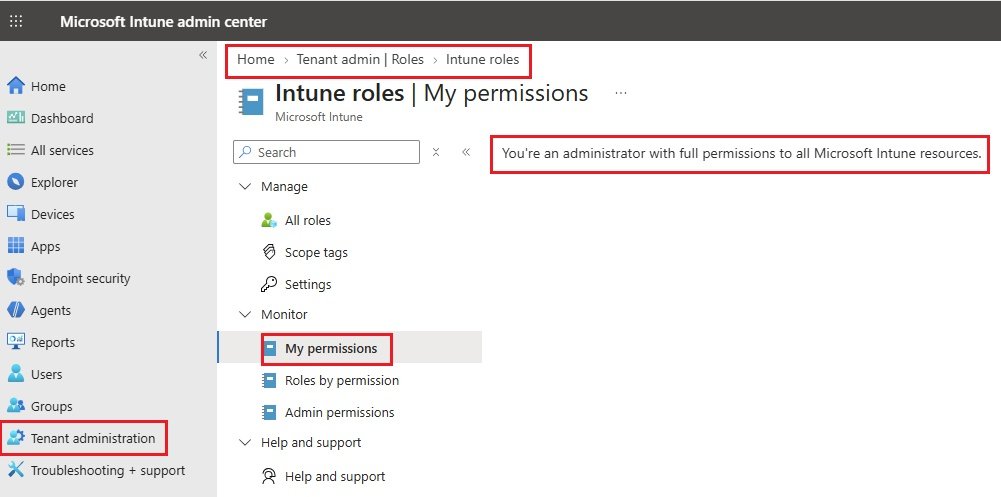
- Select Tenant administration > Roles > My permissions.
- Confirm you are an administrator with full permissions to all Intune resources.
code
- code
- code
- code
My Permissions
- Sign in to Microsoft Intune admin center.
- Select Tenant administration > Roles\ Monitor\ My Permissions
- code
- code
code
- code
- code
- code
Intune Portal
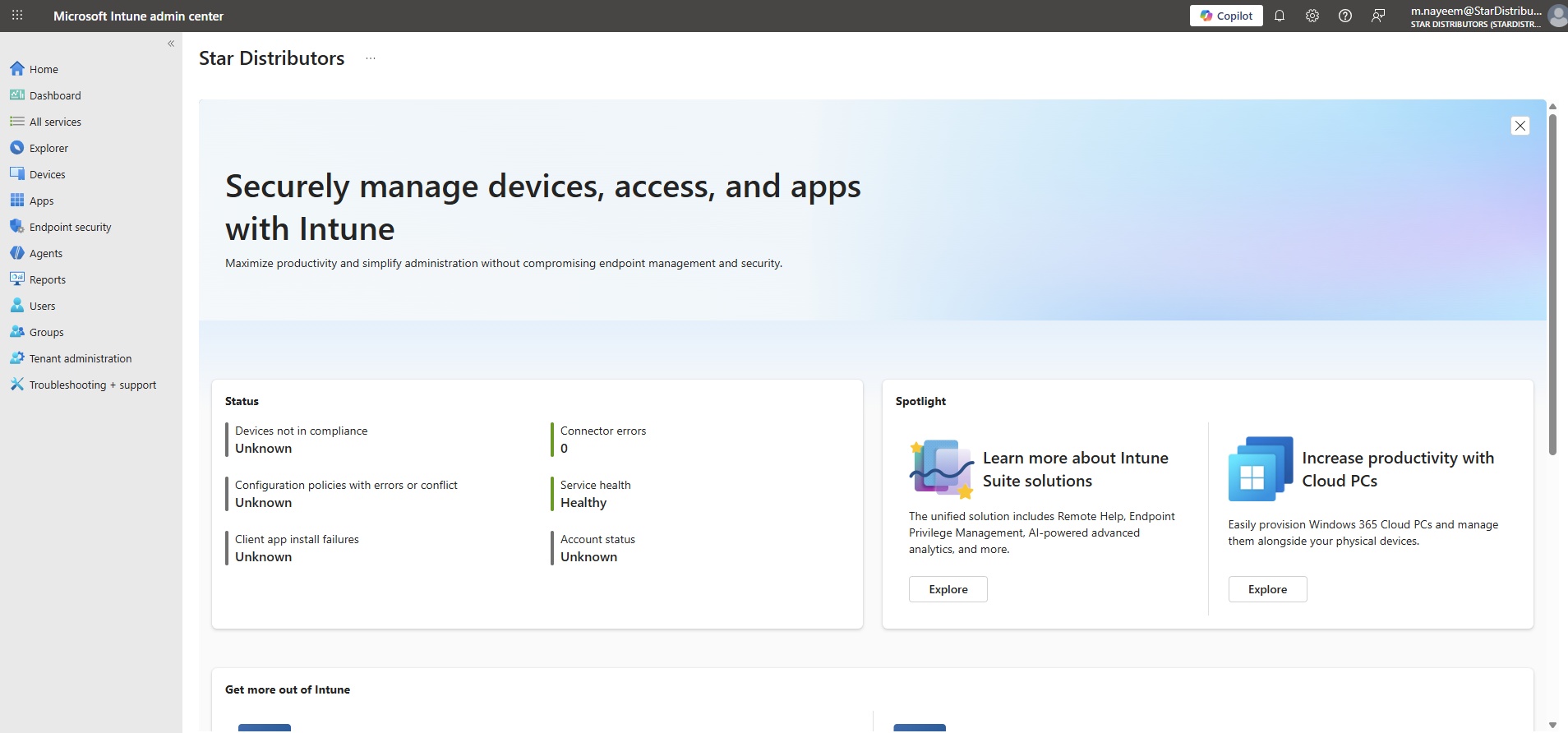
Dashboard
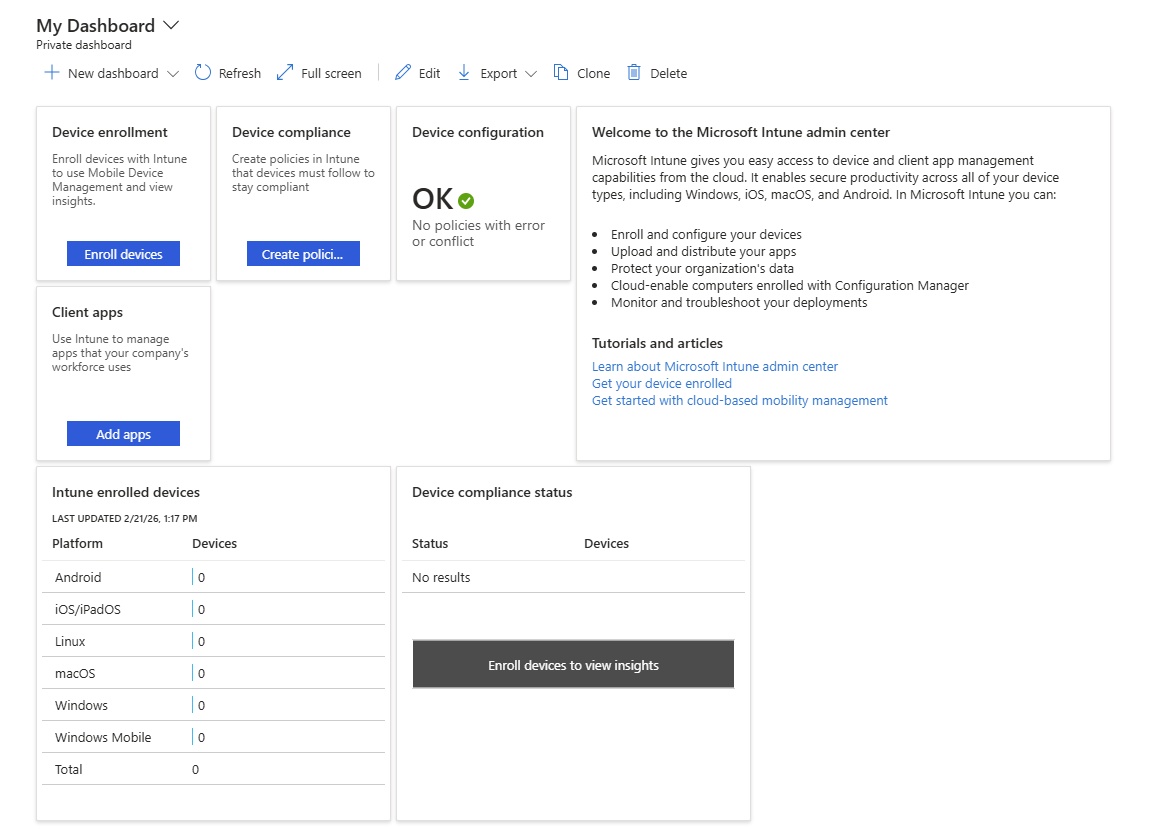
- New Dashboard: Create new dashboard
- Edit: Dashboard can be edited
- Export: Dashboard can be downloaded or print.
- Clone: Cashboard can be cloned
- Delete: Dashboard can be deleted.
- Devie enrollment: Number of devices enrolled with Intune.0
- Device compliance: Create Device Compliance policies.
- Device configuration: Policies with error or conflict.
- Client apps: Use Intune to manage apps that your company's workforce uses.
All Services

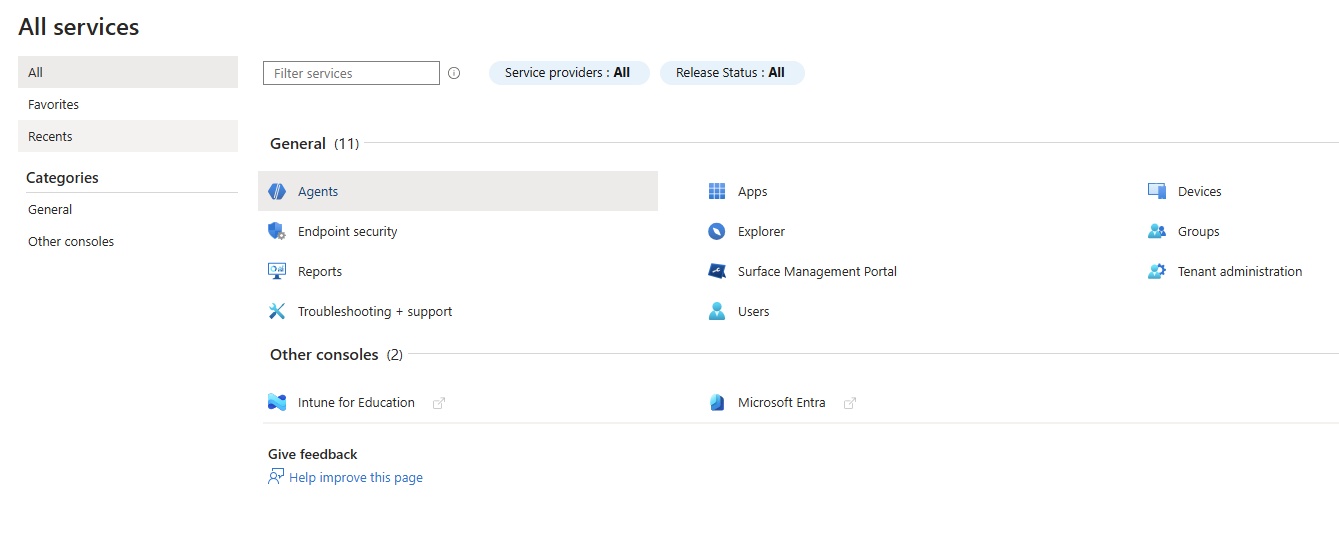
- General:
- Agents: Security Copilot agents.
- Apps: Manage apps
- Devices:
- Endpoint security:
- Explorer:
- Groups:
- Reports:
- Surgace management portal:
- Tnant administration:
- Users:
- Troubleshooting+sipport
- Other Consoles:
- Microsoft Entra
- code
Explorer
- code
- code
- code

Devices
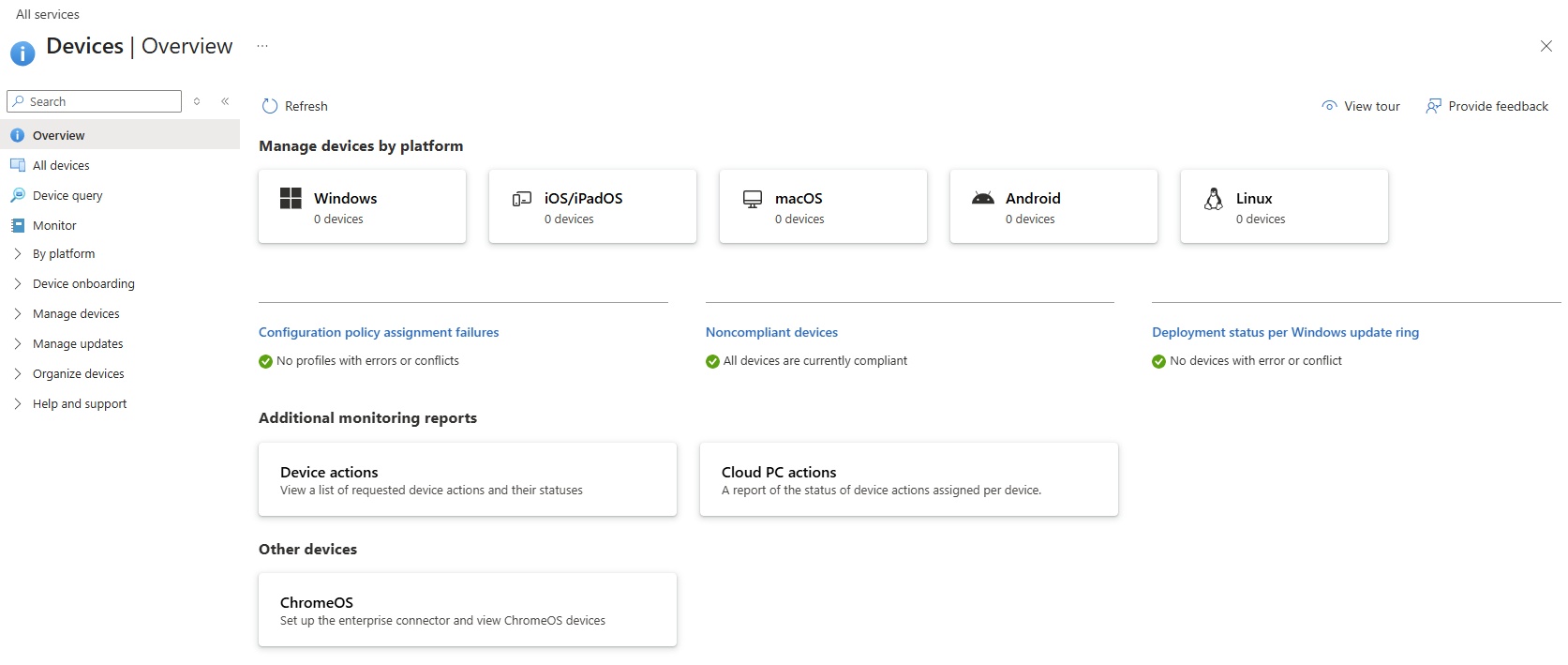
- Overview:
All devices:
- List of all devices enrolled with Intune including Windows, iOS/iPadOs, MacOS, Android, Linux etc.
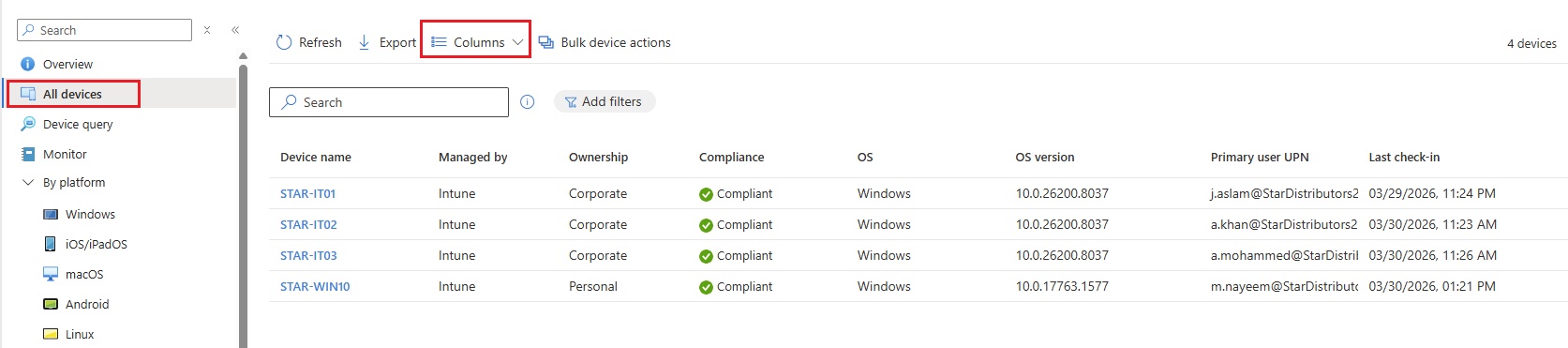
- To see more details, click column and add fields.
- Device name: computer name.
- Managed by: Intune is managing end devices.
- Ownership: Corporate or personal (when devices is Join those device to Microsoft Entra ID is called corporate ownership, and when it is enrolled only than it is called personal).
- Compliance: Device is compliant with all policies are successful.
- OS: Device OS and Version
- Primary user UPN: Primary user email is used to enroll device.
- Last check In: Last user check in or use computer.
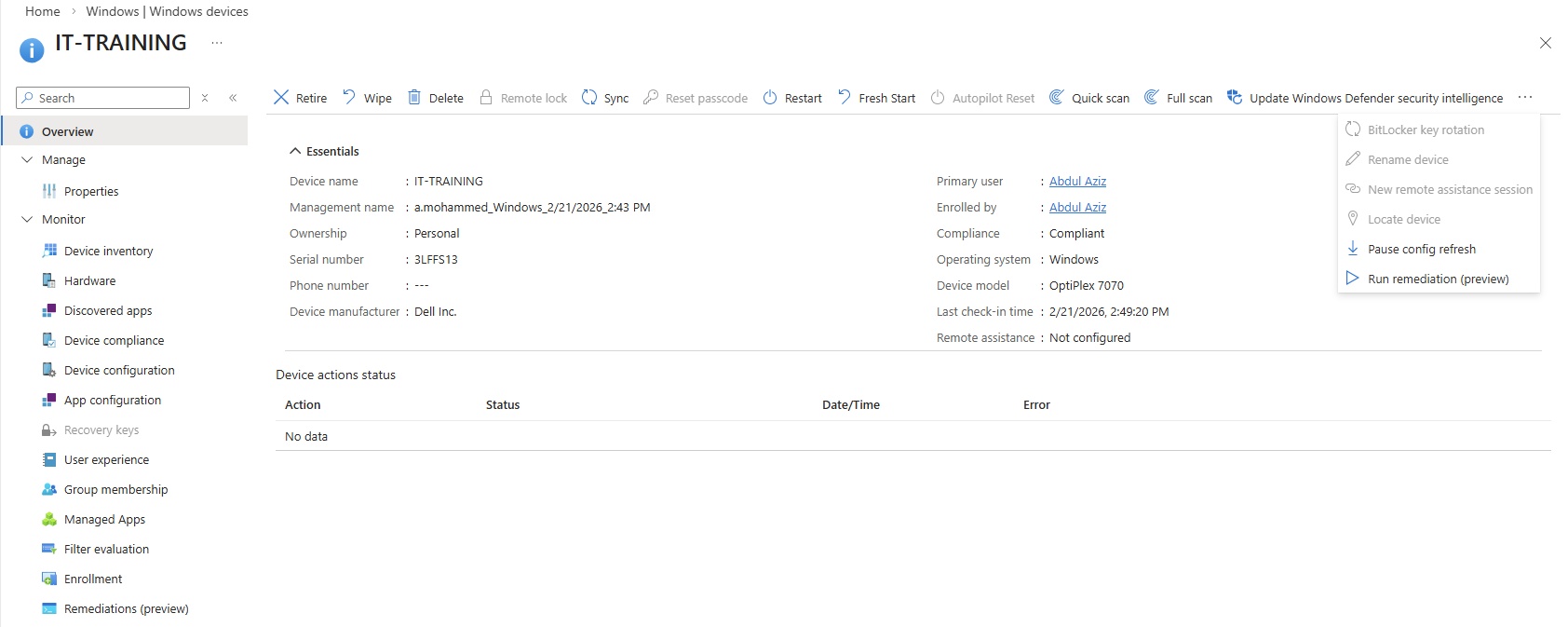
- Enrolled device:
- click on any enrolled device to view more details.
- Overview:
- Retire:
- Wipe:
- Delete:
- Remote lock:
- Sync:
- Reset passcode:
- Restart:
- Fresh Start:
- Autopilot Reset:
- Quick Scan:
- Full Scan:
- Updae Windows Defender security intelligence:
- Manage devices:
- Bitlocker key rotation:
- Rename device:
- New remote assistance session
- locate device:
- pause config refresh:
- Run remediation:
- Manage:
- Properties:
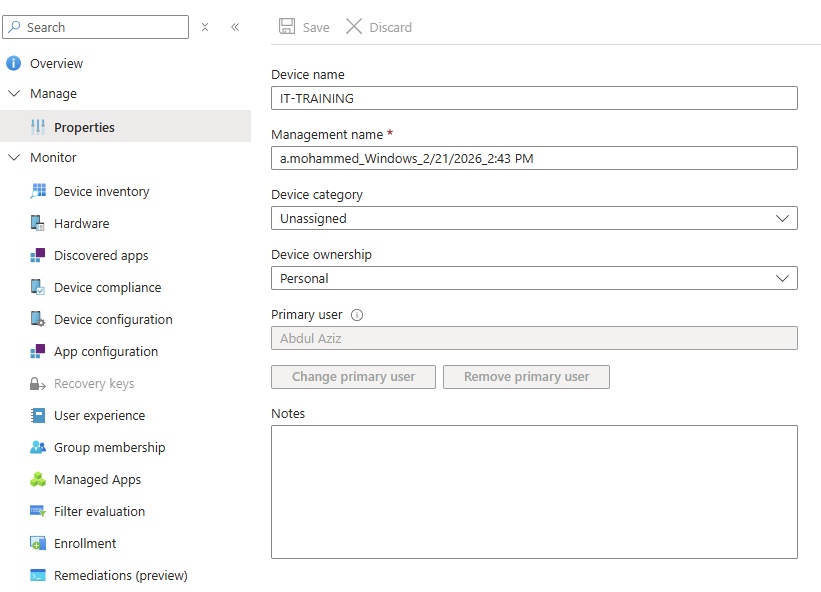
- Monitor:
- Device inventory:
- Hardware:
- Discovered apps:
- Device compliance:
- Device configuration:
- App configuration:
- Recovery keys:
- User experience:
- Group membership:
- Managed Apps:
- Filter evaluation:
- Enrollment:
- Remediations:
Device query:
- Run query
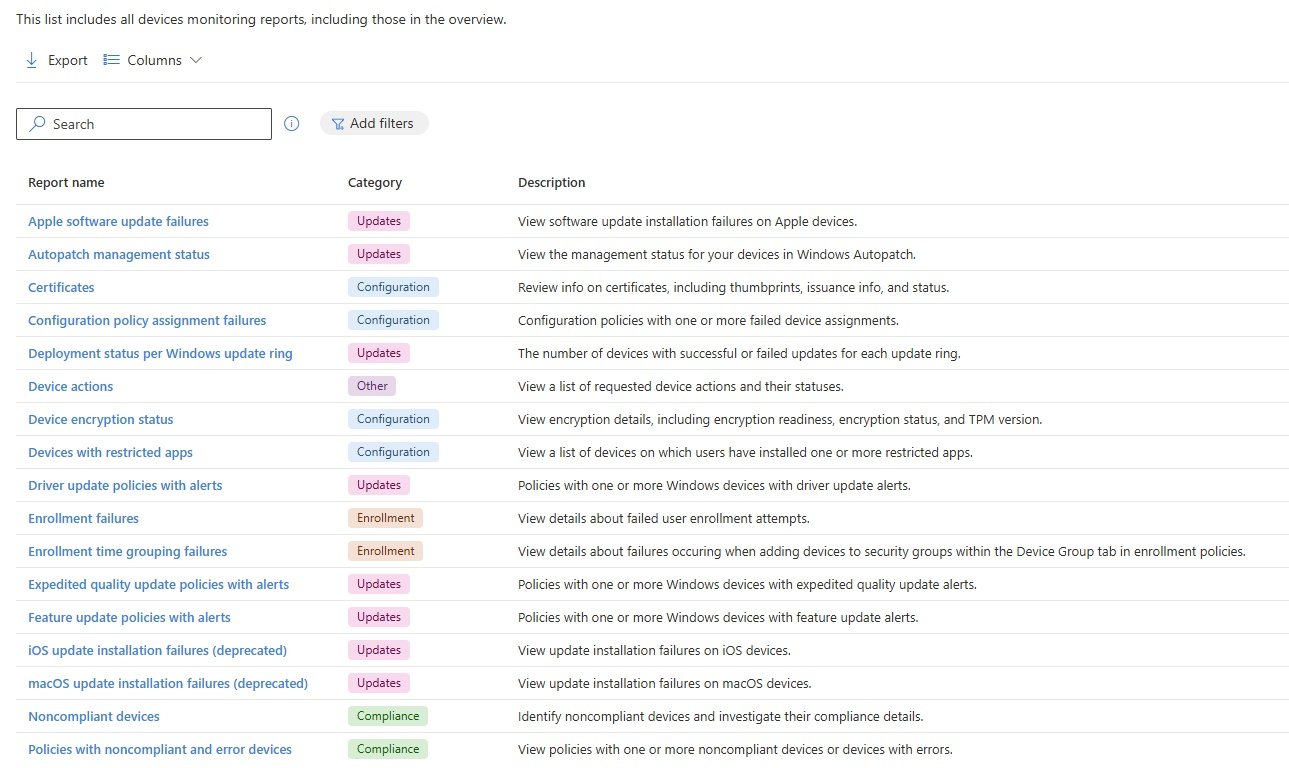
Monitor:
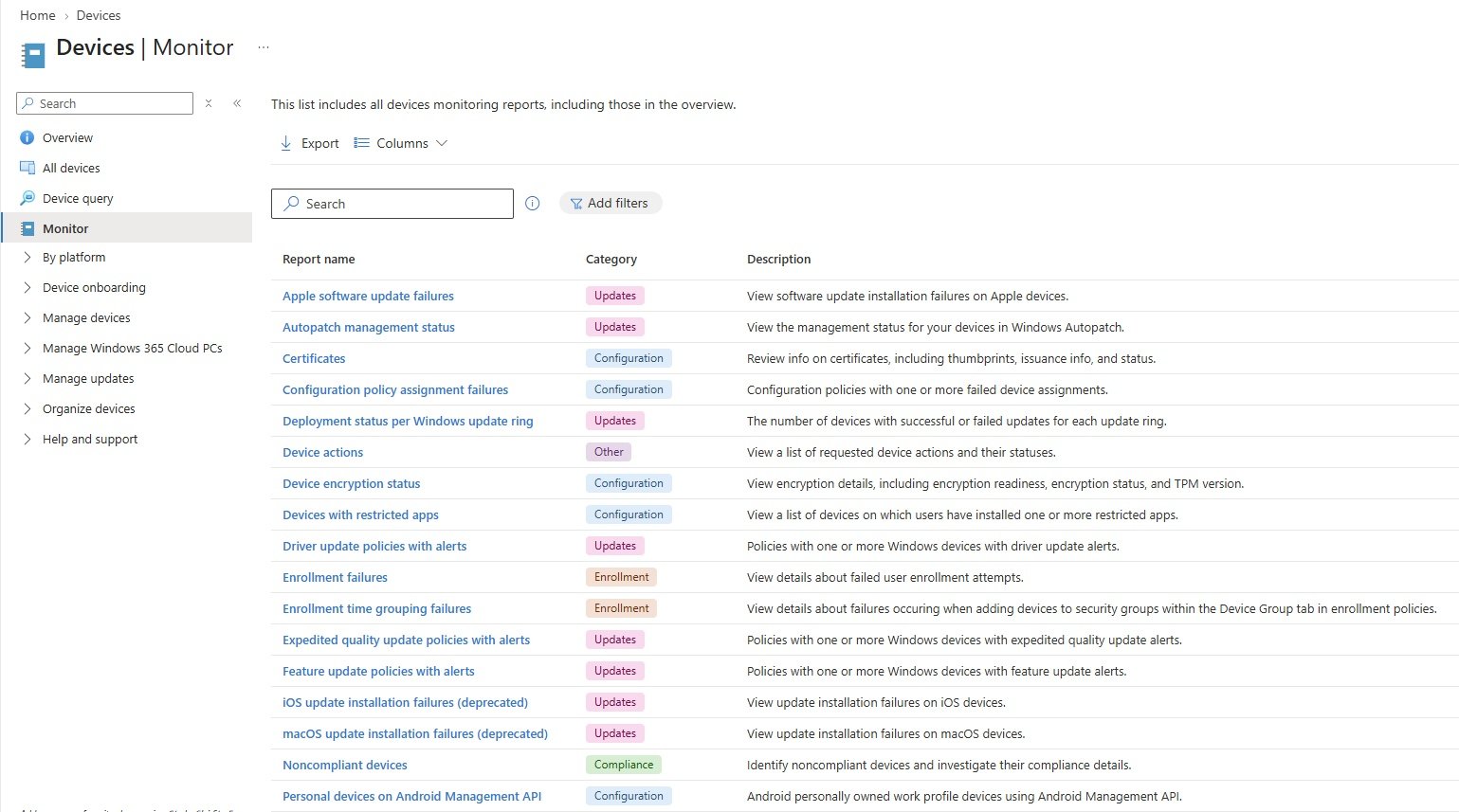
- This list includes all devices monitoring reports, including those in the overview.
- search Device Encryption report:
- Devices/Monitor/type Encryption and select encryption status
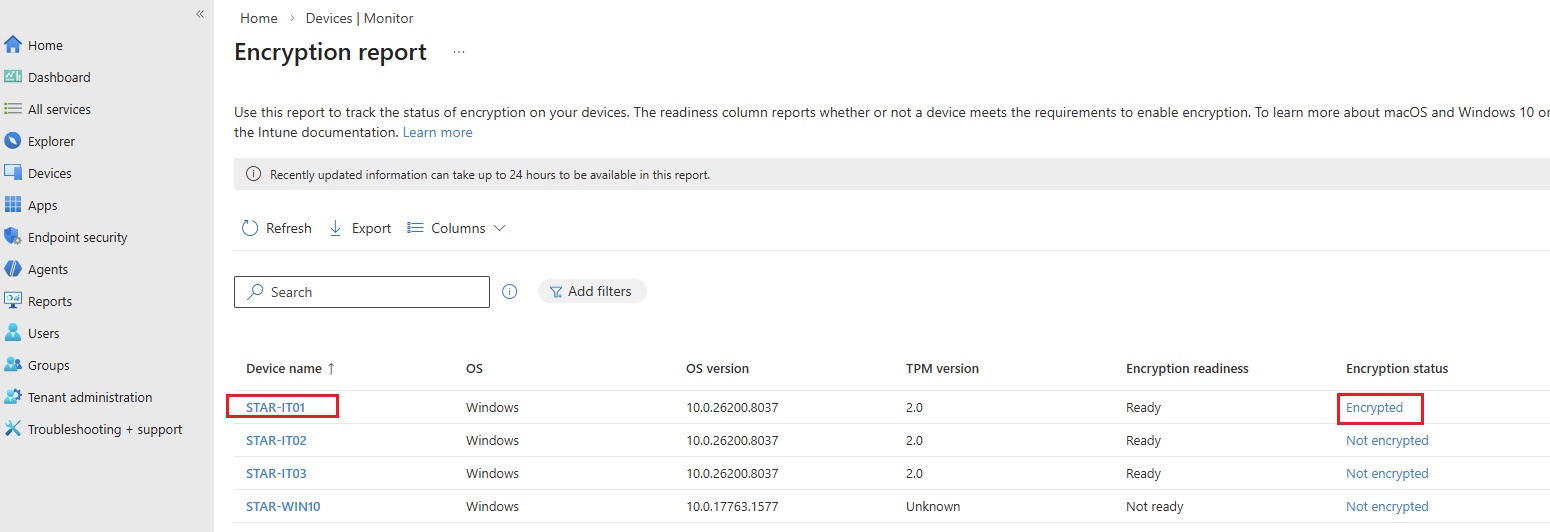
- Code
By Platform: platform specific configuration.
Windows Devices: Windows related configuration only.
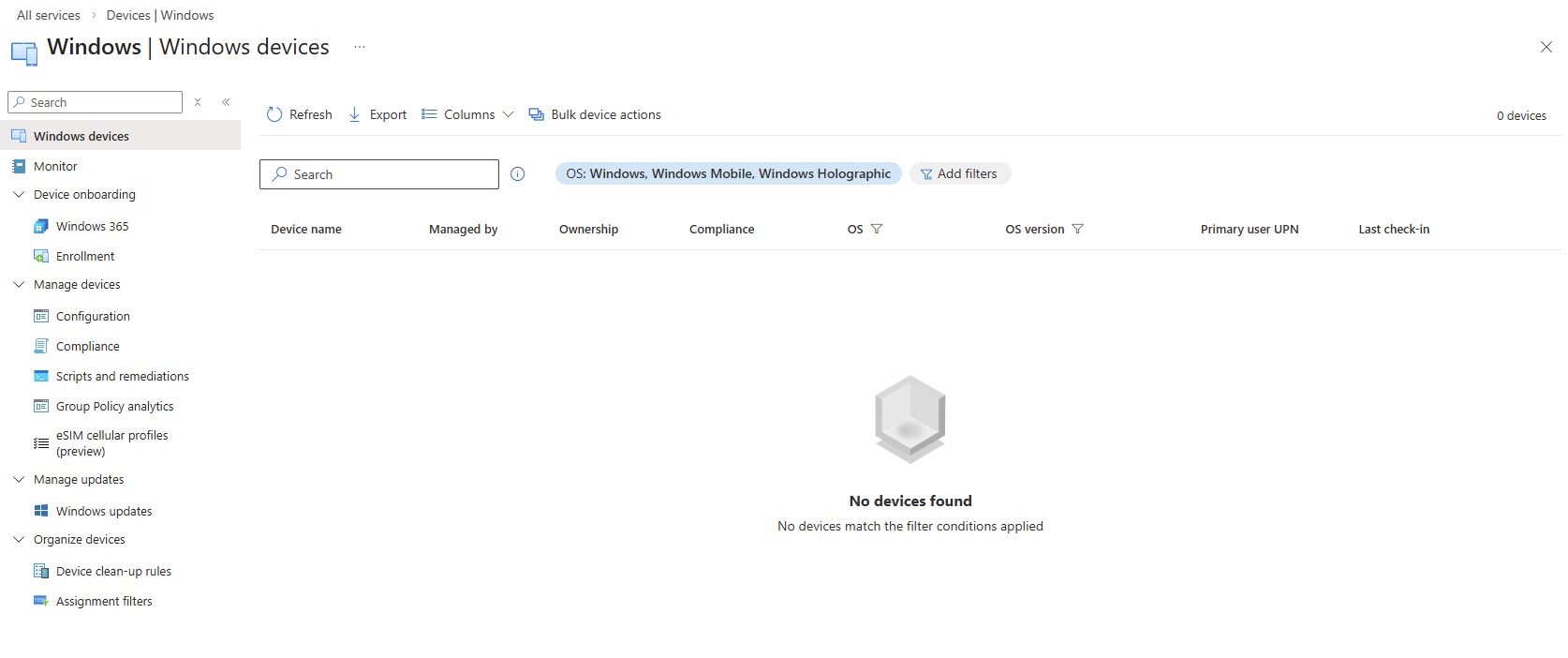
Monitor:
- This list includes all devices monitoring reports, including those in the overview.
Device onboarding
- Enrollment
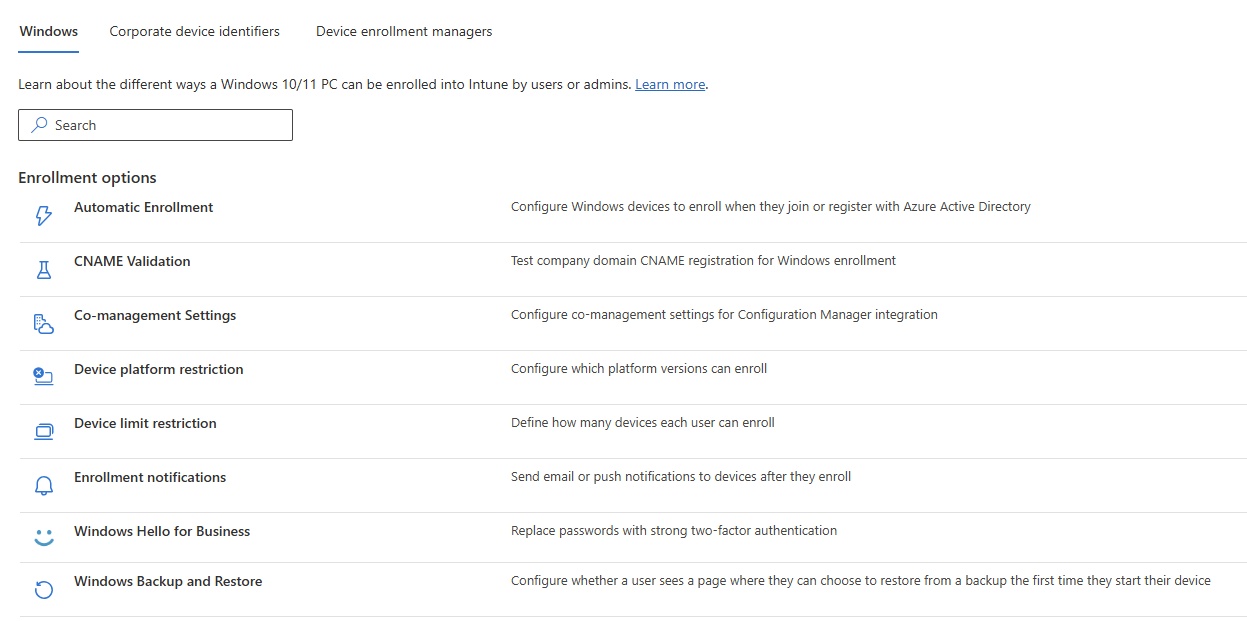
- Windows:
- Enrollment options
Automatic Enrollment
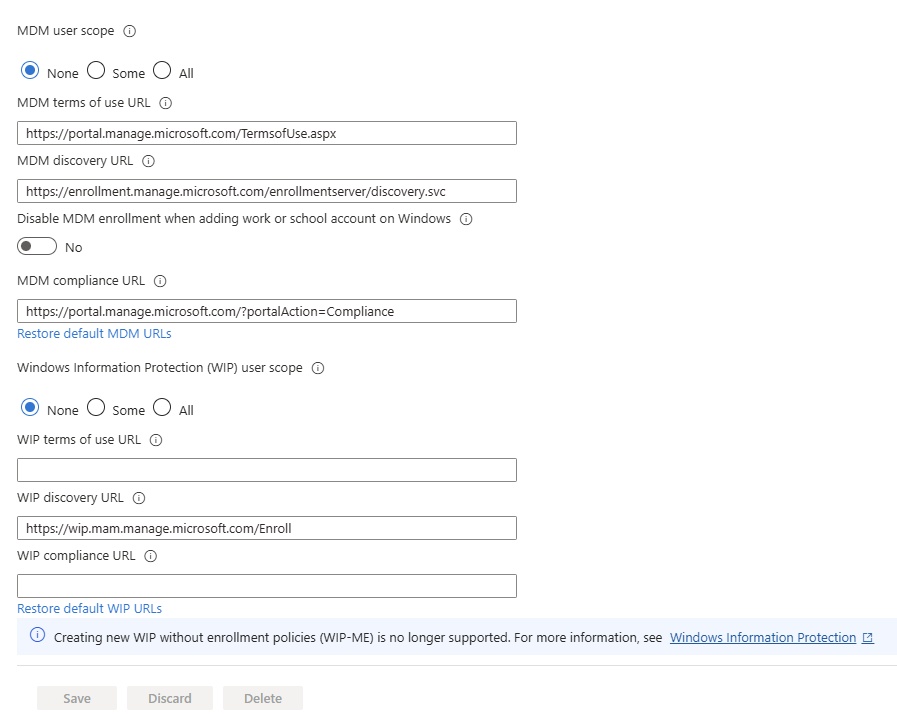
- MDM user scope: None, Some, All (Use MDM auto-enrollment to manage enterprise data on your employees' Windows devices. MDM auto-enrollment will be configured for Microsoft Entra joined devices and bring your own device scenarios.)
-
1️⃣ Registers the device with the organization
When a user signs in with their work account (Azure AD / Entra ID), the device is automatically enrolled into Intune.2️⃣ Applies security policies automatically
Examples:
Enforce PIN/password
Enable disk encryption (BitLocker)
Configure firewall settings
Block rooted/jailbroken devices3️⃣ Installs required apps
Microsoft 365 apps
Company apps
VPN profiles
Wi-Fi configurations -
4️⃣ Enables compliance monitoring
Ensures the device:
Has antivirus enabled
Is up to date
Meets company security requirements5️⃣ Allows remote management
IT can:
Wipe lost/stolen devices
Lock devices remotely
Reset passwords
Remove company data🔹 When Is It Used?
MDM auto-enrollment is commonly used when:
Joining a device to Azure AD (Entra ID)
During Windows Autopilot setup
When a user logs into a corporate PC for the first time
Enrolling mobile devices into company management🔹 Why It’s Important
Without auto-enrollment:
Users must manually enroll devices.
Devices might miss security policies.
IT has less control and visibility.
With auto-enrollment:
Zero-touch provisioning
Strong security from day one
Reduced IT workload
Better compliance and auditing🔹 Simple Example
An employee buys a new laptop.
They sign in with their company email.
The device automatically enrolls into Intune.
Company apps install automatically.
Security settings are applied.
The device becomes compliant.
No IT intervention required.
-
- MDM terms of use URL:
- MDM discovery URK:
- Disable MDM enrollment when adding work or school account on windows:
- MDM compliance URL:
- Windows informaiton protection (WIP) user scope: None, Some, All
- WIP terms of use URL:
- WIP discovery URL:
- WIP compliance URL:
CNAME Validation
- Code
Co-management Settings
- Code
Device Platform restriction
- Code
Enrollment notifications
- Code
Windows Hello for Business
- Windows Hello for Business settings lets users access their devices using a gesture, such as biometric authentication, or a PIN. Learn more
-
- Maximum PIN length: 127
- Lowercase letters in PIN: Not allowed, Enabled, Disabled
- Uppercase letters in PIN: Not allowed, Enabled, Disabled
- Special characters in PIN: Not allowed, Enabled, Disabled
- PIN expiration (days): Never or number of days select.
- Remember PIN history: No or number of days select.
- Allow biometric authentication: If allowed, Windows Hello for Business can authenticate using gestures, such as face and fingerprint. Users must still configure a PIN in case of failure. Yes/No
- Use enhanced anti-spoofing, when available: Not configured, Enabled, Disabled
- Allow phone sign-in: If allowed, users with Microsoft Entra joined desktops may use a portable, registered device as a companion for desktop authentication. The companion device must be configured with a Windows Hello for Business PIN.: Yes/ No
- Enable enhanced sign in security: This setting removes need for a password. If enabled, For systems with one secure modality (face or fingerprint) and one insecure modality (fingerprint or face), only the secure sensor can be used for sign-in and the insecure sensor(s) will be blocked. Not Configured, Enhanced sign - in security wil be enabled on sysems with capable hardware, Enhanced sign - in security wil be disabled on all systems.
- Use security keys for sign-in: Use security keys for sign-in provides the capacity for remotely turning ON/OFF Windows Hello Security Keys for all computers in a customer's organization. Not configured, Enabled, Disabled
-
- Windows Backup and Restore:
- Configure whether a user sees a page where they can choose to restore from a backup the first time they start their device. Note, this feature is not available for Government Community Cloud or Department of Defense. Learn more about restoring backups
- Code
Windows Backup and Restore
- Code
- Windows Autopilot device preparation
Device preparation policies
- Code
- Windows Autopilot
Devices
- Code
Deployment profiles
- Code
Enrollment Status page
- Code
Intune Connector for Active Direcory
- Code
Corporate device identifiers
- +Add
Device enrollment managers
- +Add
Manage Devices
- Configuration:
- Go to Manage Devices in all platform area for details. Go to Devices\Manage Devices.
- Compliance:
- Code
- Scripts and remediations:
- Code
- Group Policy analytics:
- Configuriing GPO using Intune:
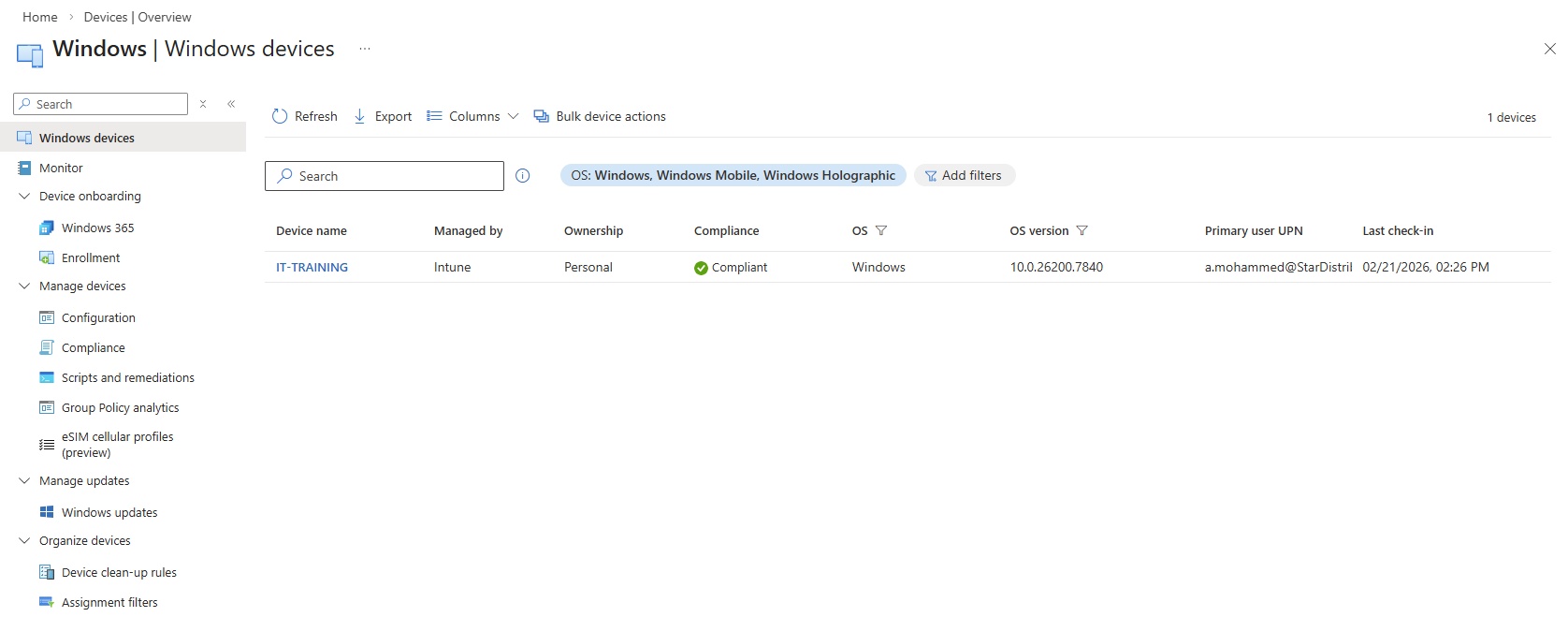
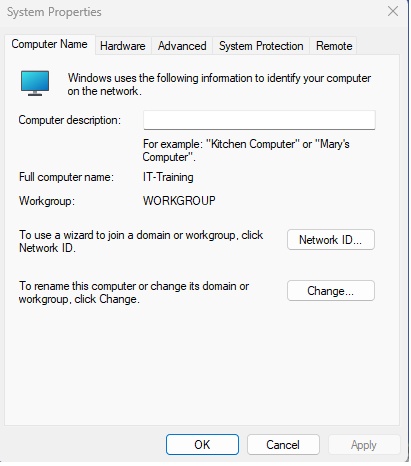
- currently IT-training (Windows 11 pc) is enrolled in Intune MDM devices.
- This device is in workgroup: win+r and type sysdm.cpl
- Configuring a policy to block access of control panel with Intune.
- Go to intune portal/Manage devices/Configuration/
- eSIM cellular profiles:
- Code
- Configuration:
Manage Windows 365 Cloud Pcs
- Cloud PC Overview
- Monitor Cloud PCs
- All Cloud PCs
- All Cloud Apps
- Provision Cloud PCs
- Cloud PC Settings
Manage Updates:
- Windows updates
Organize devices:
- Device clean-up rules
- Assignment filters:
Lab: Device Enrollment & Register: Onboarding Windows Devices
- Windows supported devices:
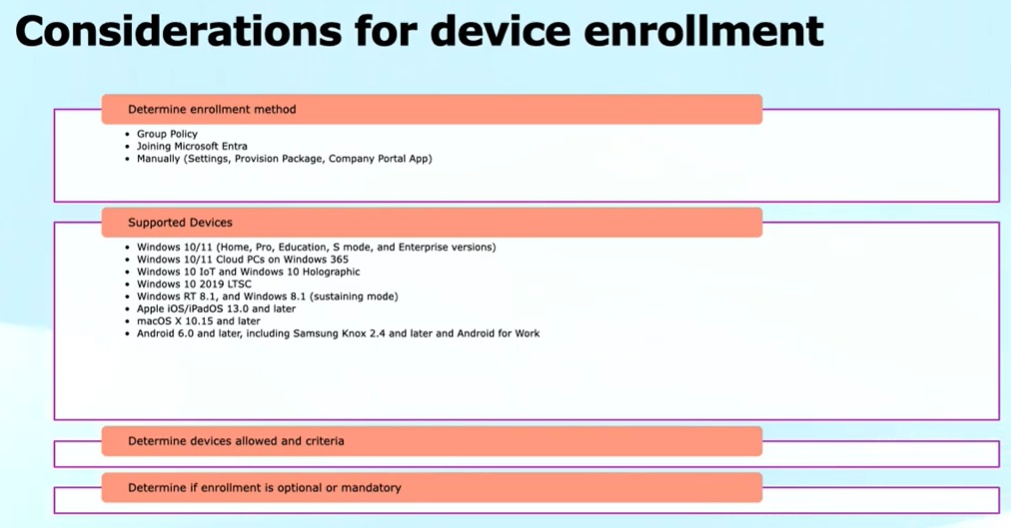
- Enroll types:
- Automated enrollments
- User driven enrollments
- Bulk enrollments
- Autopilots
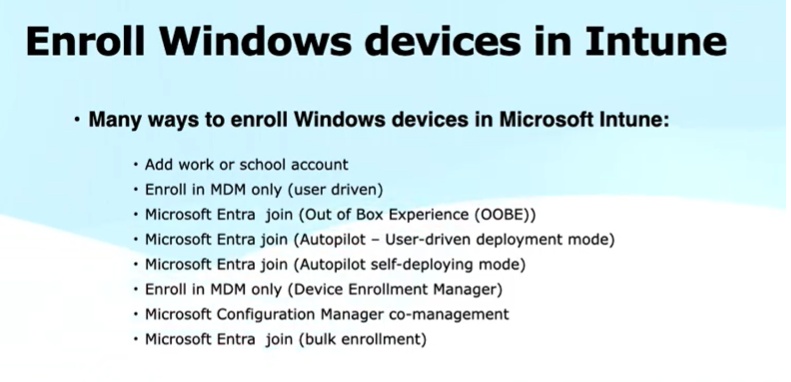
- Ways to Enroll Windows Devices
- Windows 11 Device Enrollment:
- Device Identity: https://learn.microsoft.com/en-us/entra/identity/devices/
- Intune portal: https://intune.microsofst.com
- Step 1: Assign License: Skip this step if a user already assigned O365 E3 license.
- Create Group and Users and assign Intune license to Group. You dont need to assign license to individual users.
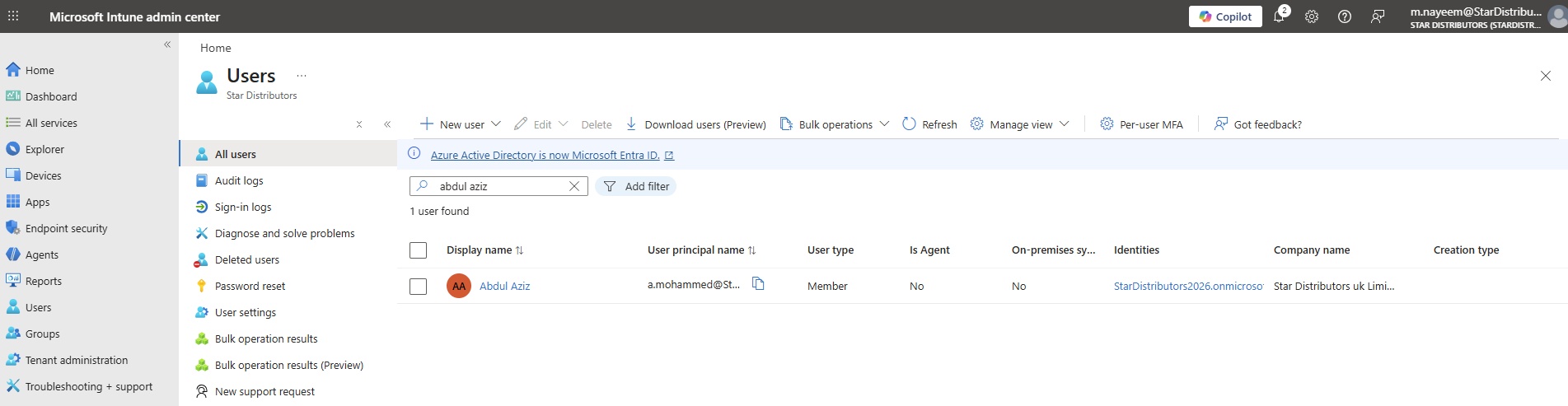
- User: Create a user (abdul aziz) from entra admin https://entra.microsoft.com
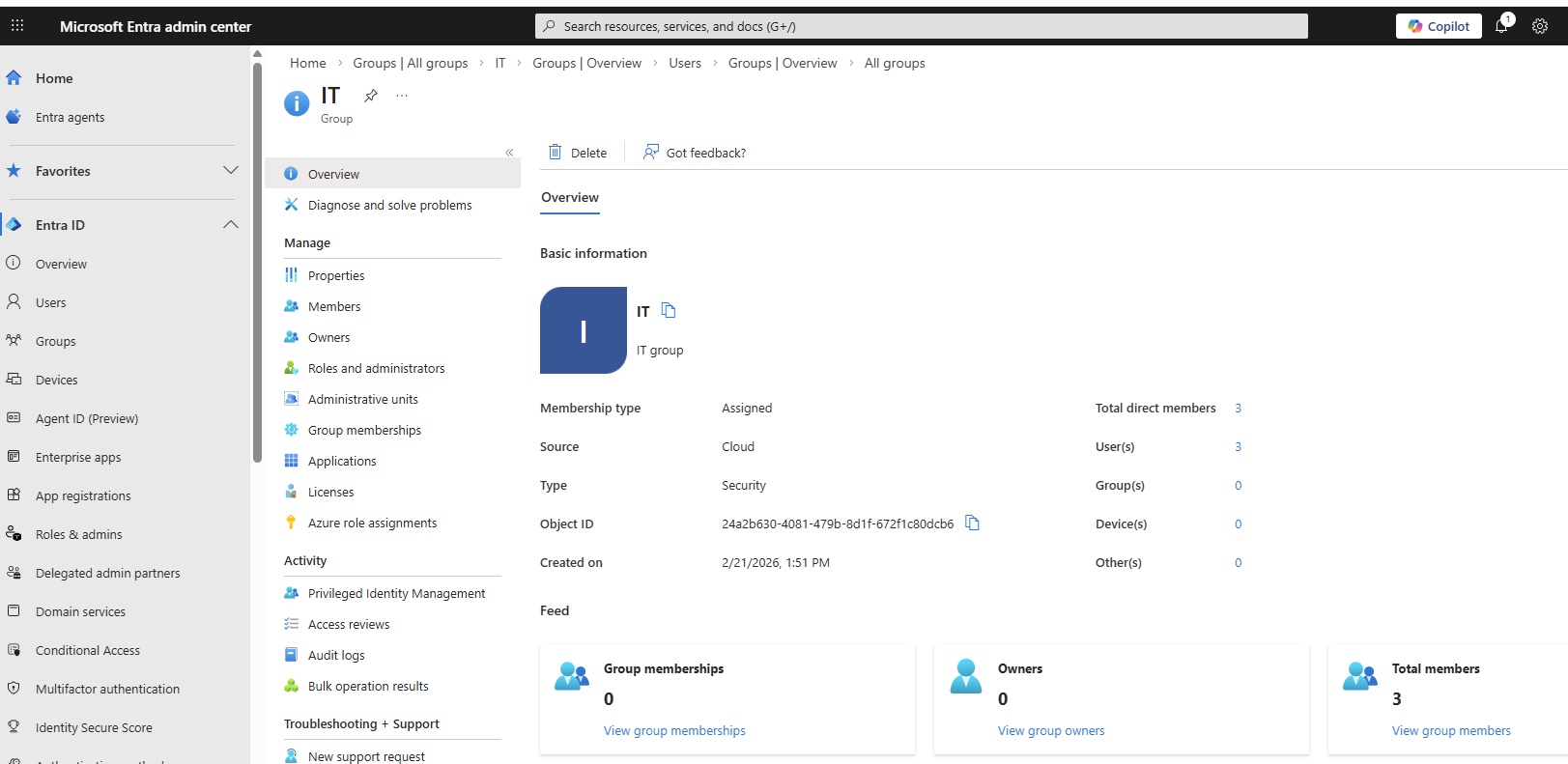
- Group: Create a group (IT) and attach users (abdulaziz, aftab, junaid). from entra admin (security group) https://entra.microsoft.com
- Assing Intune License to group (IT): Assign license from https://admin.cloud.microsoft.com, Microsoft has changed assigning licenses and now all licenses should be assigned from admin center.
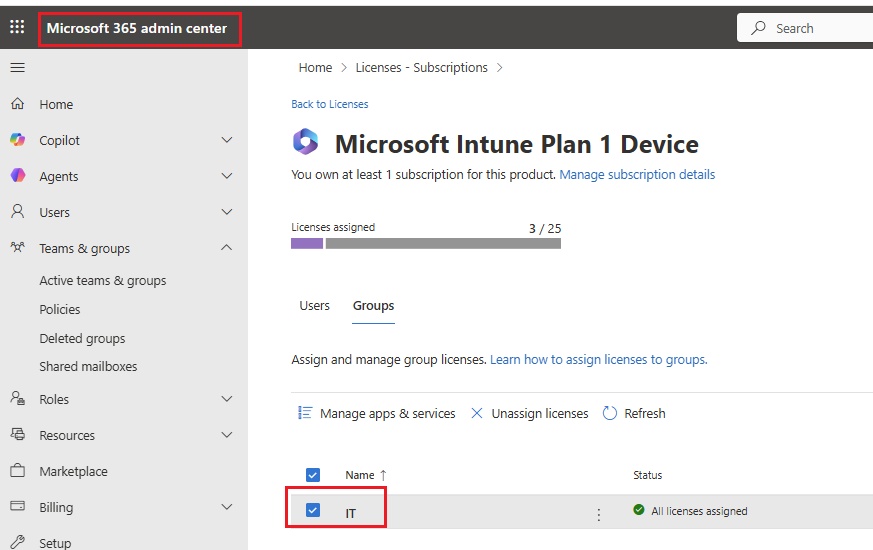
- Step 2.1: Enrolling windows 11 PC
- Set host name: STAR-LN-IT-D01
- Unregister from domain, add to WORKGROUP.
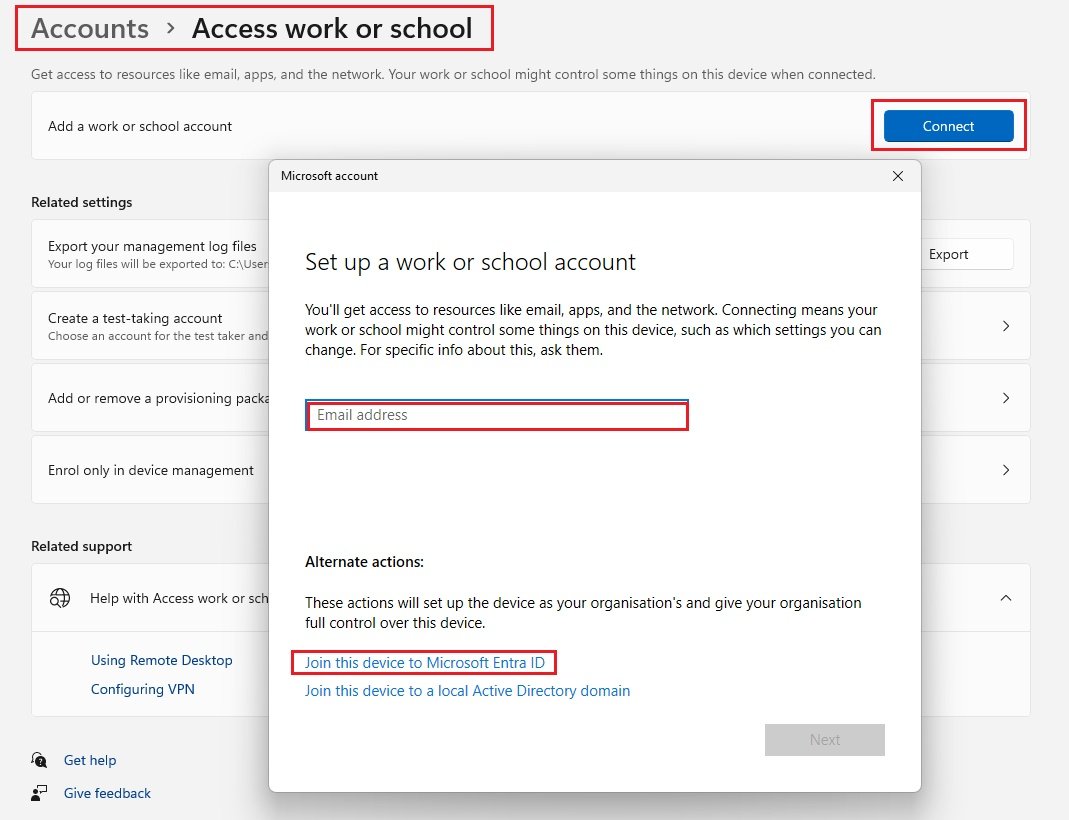
- Right click on start/settings/accounts/Access work or school/Connect/Join this device to Microsoft Entra ID
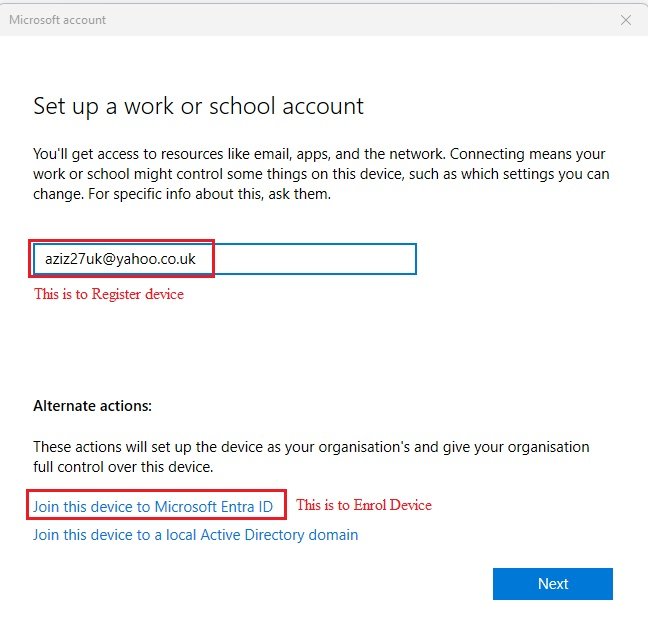
- enter email (a.mohammed@stardistributors2026.onmicrosoft.com) and password, MFA code
- Click join.
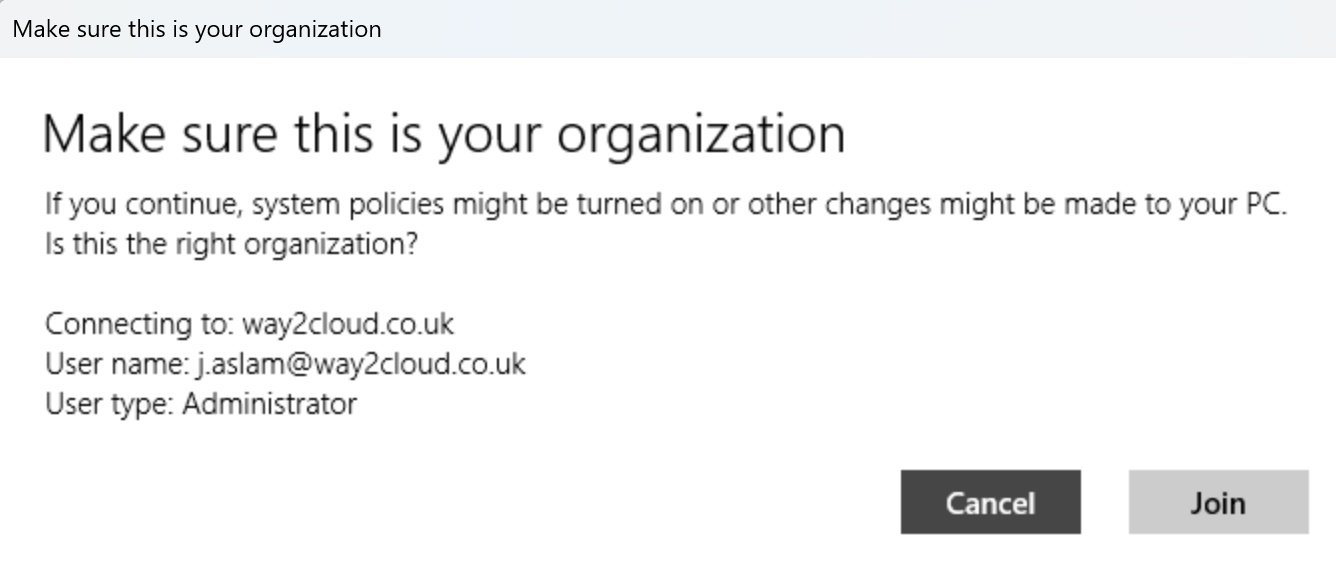
- Please wait while we setup your device: It will take some time to enroll the device.
- Common error: This device is already joined.
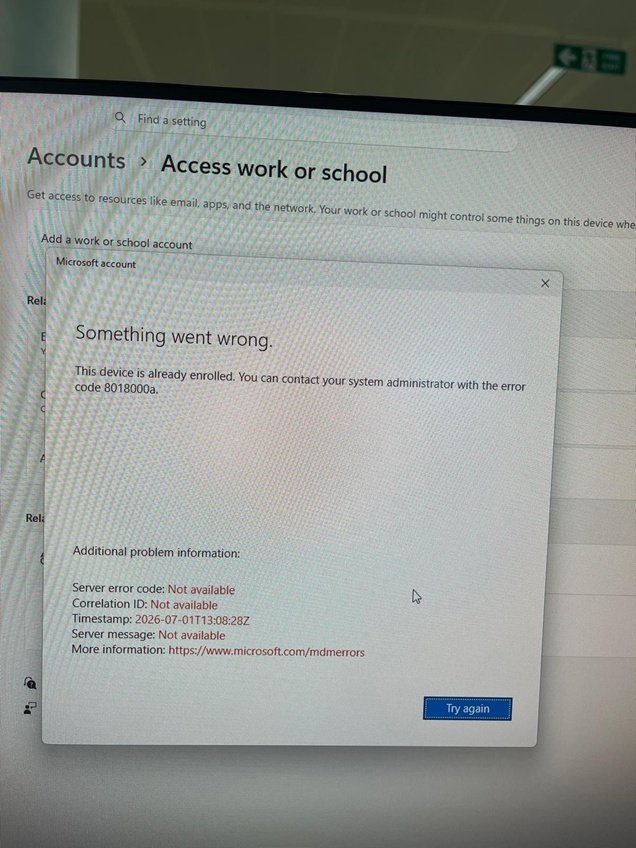
- Solution: Delete enrollments from registry and restart the computer and try again.
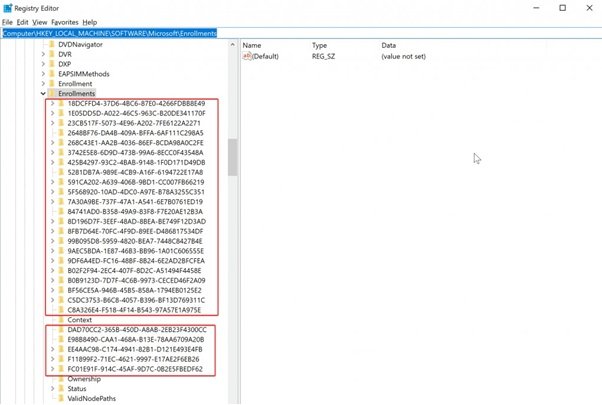
- Once device is enrolled, sign out from admin account and sign in with email and password by clicking other user.
- a.mohammed@stardistributors2026.onmicrosoft.com) and password,
- You will be asked to generate PIN for additional login credential.
- Check enrolled device details:
- C:\dsregcmd /status (Open command prompt and run)
- Sync with Intune:
- Go to Accounts\click enrolled email and click sync
- Step 2.2: Enrolling Windows 10 PC
- Enrolling Windows 10 PC
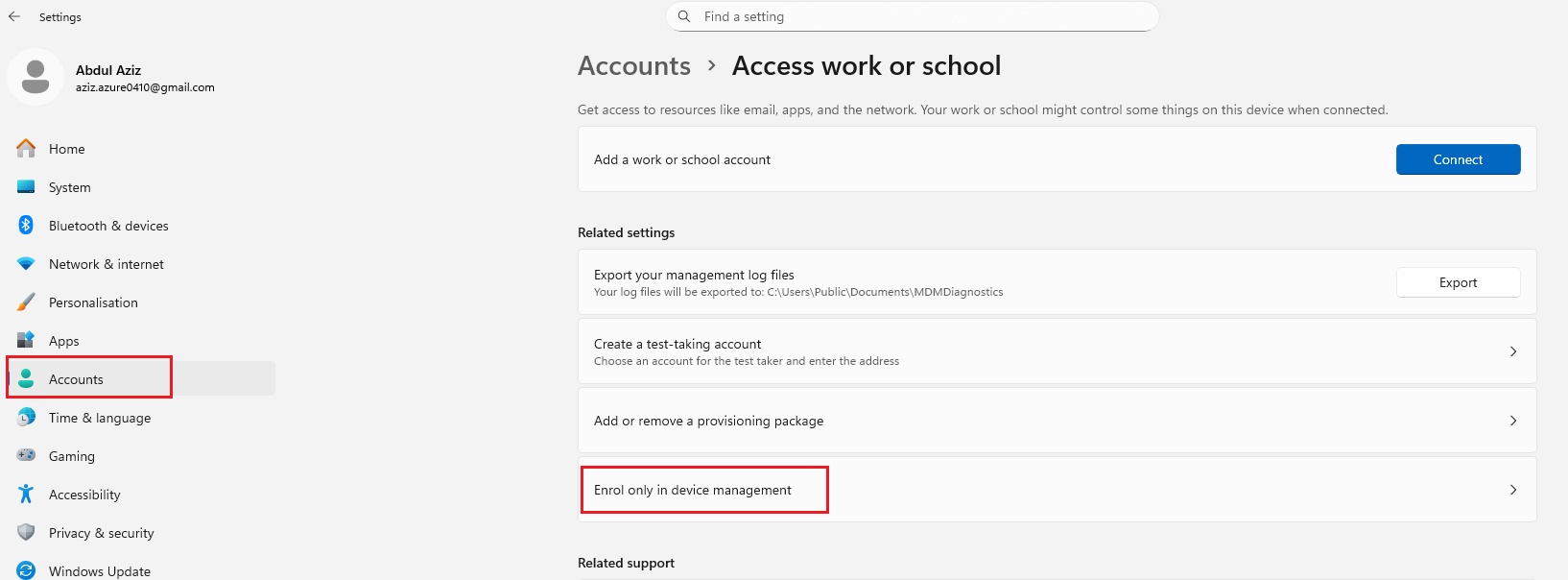
- Right click on start/settings/accounts/access work or school/Enrol only in device management/enter email (a.mohammed@stardistributors2026.onmicrosoft.com) in windows 10
- Connecting to a service: a.mohammed@stardistributors2026.onmicrosoft.com and password (will take some to register), connected to Star Distributors MDM.
- MDM server url paste it (Go to intune/enrollment/Automatic Enrollment/copy MDM discovery url) in windows 10
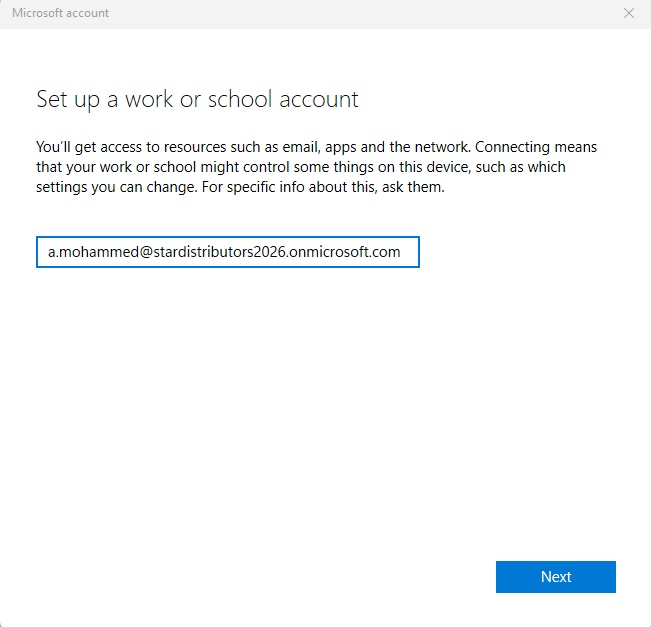
- It will take some time to enroll:
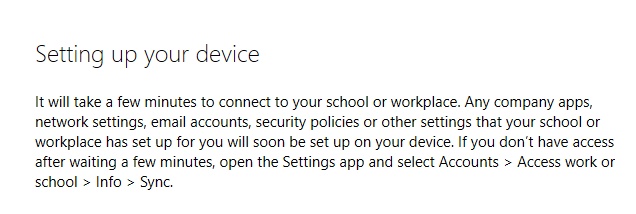
- Step 3: Verify in Intune
- Check: go to intune portal/devices/By platform/Windows
- Sync:
- Now synchronize the settings: Go to Intune/Devices and click sync or Go to endpoint devices/accounts/sync. Intune endpoint devices typically sync automatically every 8 hours after initial enrollment, though this varies by platform and recent activity. Newly enrolled devices check in more frequently—roughly every 3 minutes for the first 15 minutes, then every 15 minutes for 2 hours—to accelerate policy application.
- Disconnect the Device:
- Go to computer/settings/Accounts/Work or School/select work or school account and Disconnect.
Device Enrollment errors & Troubleshooting, Something went wrong, This feature is not supported.
- Something went wrong, mdm device join with intune getting error this feature is not supported coe 80180014
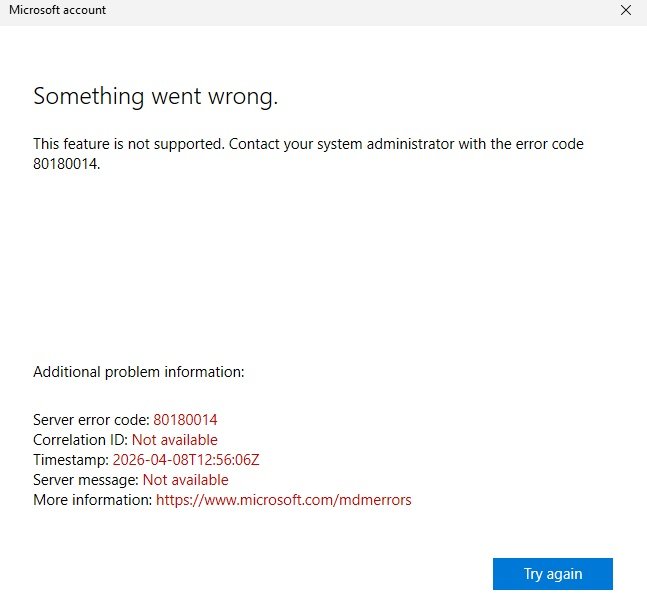
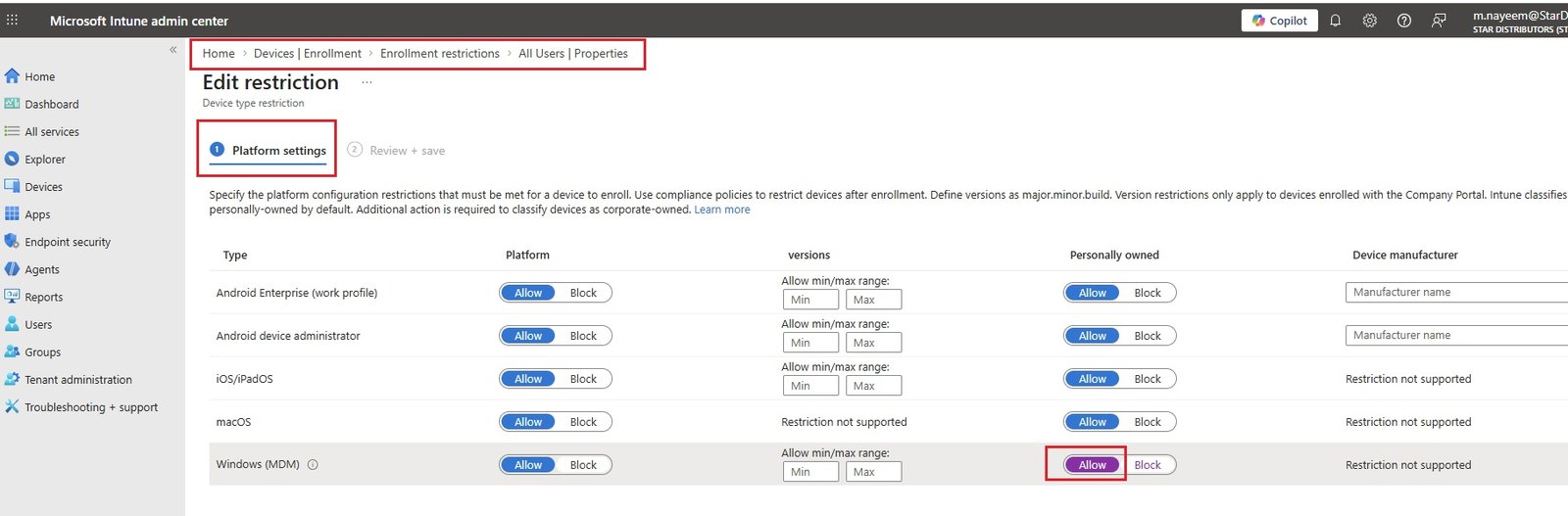
- Solution: The Intune error 80180014 (This feature is not supported) typically occurs because device enrollment restrictions in Microsoft Intune block personal devices, but the device is not recognized as corporate-owned.
- Go to microsoft intune/Devices/Enrollment/Device Platform Restriction/All users (any custom policy)/properties/Platform settings/Edit/ and click Allow. save it.
Manage Enrolled Devices:
- click on enrolled device.
- Overview:
- Retire:
- Wipe:
- Delete:
- Remote lock:
- Sync:
- Reset passcode:
- Restart:
- Fresh Start:
- Autopilot Reset:
- Quick Scan:
- Full Scan:
- Updae Windows Defender security intelligence:
- Manage devices:
- Bitlocker key rotation:
- Rename device:
- New remote assistance session
- locate device:
- pause config refresh:
- Run remediation:
- Manage:
- Properties:
- Monitor:
- Device inventory:
- Hardware:
- Discovered apps:
- Device compliance:
- Device configuration:
- App configuration:
- Recovery keys:
- User experience:
- Group membership:
- Managed Apps:
- Filter evaluation:
- Enrollment:
- Remediations:
- Code
Apple mobile: iphone related configuration only.
- To enable the enrollment of mobile devices, the MDM authoritiy must be set in the Intune cofiguration.
- By defaul Intune allows enrollment of Windows, Android and Samsung Knox devices. For Apple MDM push certificate is required.
- code
- code
macOS: macOS related configuration only.
- Intune requires an Apple MDM Push certificate to manage Apple devices, and supports multiple enrollment methods. Set up the MDM push certificate to begin. Learn more.
- Prerequisites: Apple MDM push certificate
- Bulk Enrollment methods
- Apple Configurator:
- Enrollment program tokens:
- Enrollment Options
- Enrollment types:
- Device platform restrictions:
- Device limit restrictions:
- Enrollment notifications:
- code
- code
Android: Android related configuration only.
- To enable the enrollment of mobile devices, the MDM authoritiy must be set in the Intune cofiguration.
- By defaul Intune allows enrollment of Windows, Android and Samsung Knox devices. For Apple MDM push certificate is required.
- Select an Android management solution and enrollment profile type to start setting up devices in Intune. If using an Android Enterprise solution, make sure to link your organization's Google Play account to Intune before doing anything else. Learn more.
- Prerequisites: Managed Google play
- Bulk enrollment methods
- Zero-touch enrollment:
- Enrollment profiles
- Personally owned devices with work profile:
- Corporate-owned dedicated devices:
- Corporate-owned, fully managed user devices:
- Corporate-owned devices with work profile:
- Android open soce project(AOSP)
- Corporate-owned, user-associated devices:
- Corporate-owned, userless devices:
- Android device administrator
- Prerequisites: Personal and corporate-owned devices with device administrator privileges
- Enrollment options
- Device platform restriction:
- Device limit restriction:
- Enrollment notifications:
- code
- code
Linux Devices: Linux related configuration only.
- code
- code
- code
Device onboarding: All platforms configuration.
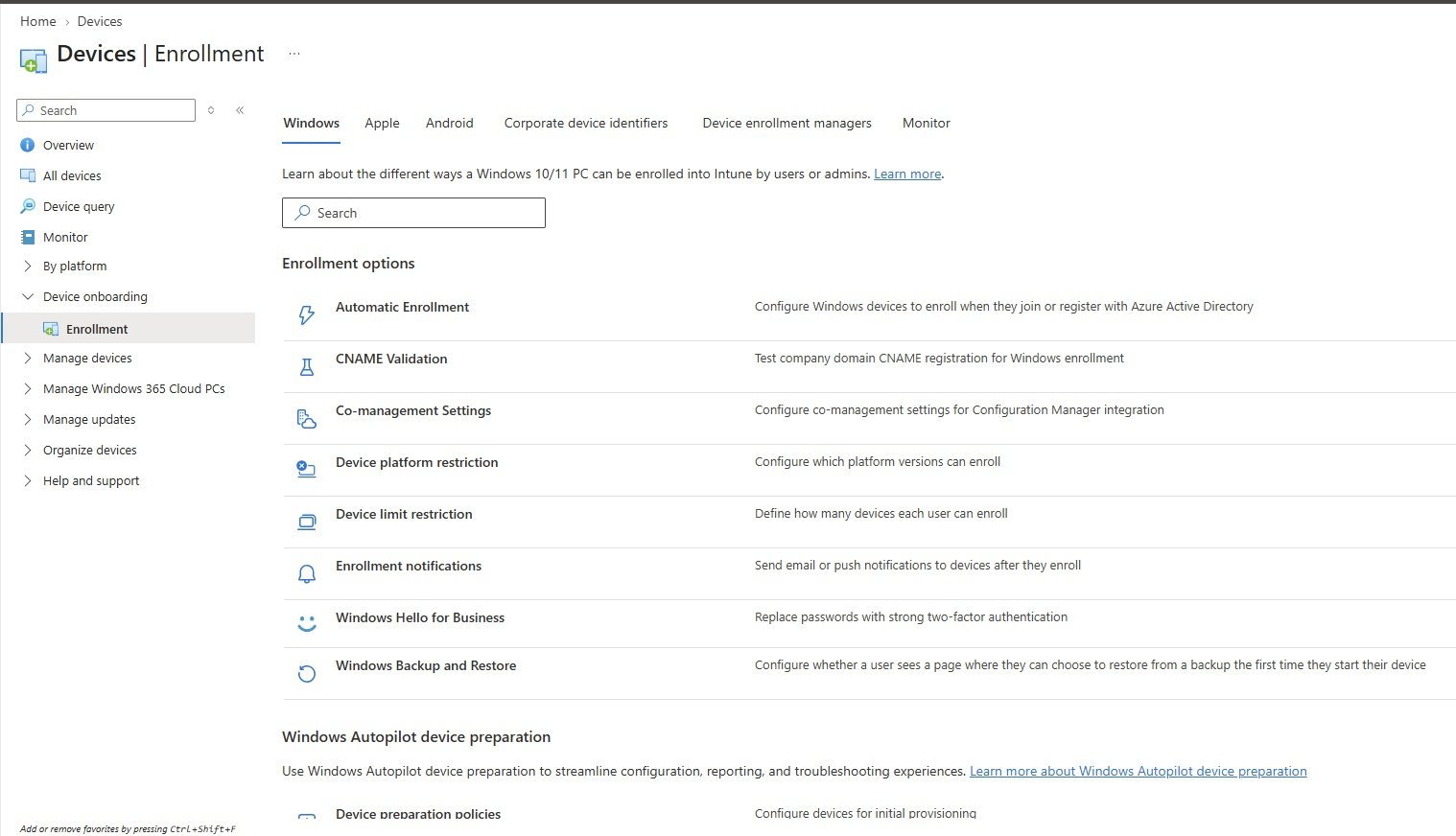
- Configuration of all platforms are available here, specific platform configuration can be in By platform.
- Windows: This section is similar to Devices/By platform/Windows/Enrollment. check their for all details.
Apple: This section is similar to Devices/By platform/macOS/Enrollment. check their for all details.
- Intune requires an Apple MDM Push certificate to manage Apple devices, and supports multiple enrollment methods. Set up the MDM push certificate to begin. Learn more.
- Prerequisites: Apple MDM push certificate
- Bulk Enrollment methods
- Apple Configurator:
- Enrollment program tokens:
- Enrollment Options
- Enrollment types:
- Device platform restrictions:
- Device limit restrictions:
- Enrollment notifications:
Android: This section is similar to Devices/By platform/Android devices/Enrollment. check their for all details.
- Select an Android management solution and enrollment profile type to start setting up devices in Intune. If using an Android Enterprise solution, make sure to link your organization's Google Play account to Intune before doing anything else. Learn more.
- Prerequisites: Managed Google play
- Bulk enrollment methods
- Zero-touch enrollment:
- Enrollment profiles
- Personally owned devices with work profile:
- Corporate-owned dedicated devices:
- Corporate-owned, fully managed user devices:
- Corporate-owned devices with work profile:
- Android open soce project(AOSP)
- Corporate-owned, user-associated devices:
- Corporate-owned, userless devices:
- Android device administrator
- Prerequisites: Personal and corporate-owned devices with device administrator privileges
- Enrollment options
- Device platform restriction:
- Device limit restriction:
- Enrollment notifications:
Corporate device identifiers: This section is similar to Devices/By platform/Wndows. check their for all details.
- +Add
Device enrollmnt managers: This section is similar to Devices/By platform/Wndows. check their for all details.
- +Add
Monitor:
- Enrollment failures:
- Windows Autopilot deployments:
- Windows Autopilot device preparation deployment status:
Manage devices
Configuration: Device Profiles
- Policies: Create new policy or shows list of existing policies.
- Create a profile:
- Platform:
- Android device administrator
- Android (AOSP)
- Android Enterprise
- iOS/iPadOS
- Linux
- MacOS
- tvOS
- VisionOS
- Windows 10 or later
- Windows 8.1 and later
- Profile type: depends upon platform selection.
- Settings catalog:
- Properties catalog:
- Templates:
- BIOS configuration and other settings
- Custom
- Delivery optimization
- Device firmware configuration interface
- Device restrictions:
- App Store
- app_store.jpg
- Cellular and connectivity
- cellular_connectivity.jpg
- Cloud and Storage
- cloud_storage.jpg
- Cloud Printer
- cloud_printer.jpg
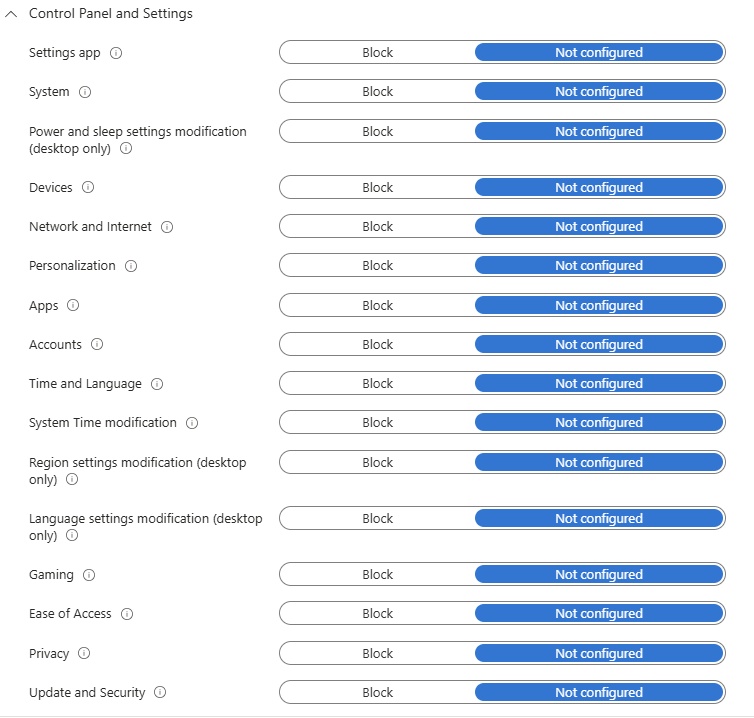
- Control Panel and settings
- Display
- display.jpg
- General
- general.jpg
- Locked Screen Experience
- lock_screenl.jpg
- Messaging
- messaging.jpg
- Microsoft Edge Legacy
- Edge_legacy.jpg
- Network proxy
- network_proxy.jpg
- Password
- password.jpg
- Per-app privacy exceptions
- Add
- personalization
- Desktop background picture URL (Desktop only)
- Printer
- printer.jpg
- Privacy
- privacy.jpg
- Projection
- projection.jpg
- Reporting and Telemetry
- reporting_telemetry.jpg
- Search
- search.jpg
- Start
- start.jpg
- Microsoft Defender SmartScreen
- defender_smartscreen.jpg
- Windows Spotlight
- windows_spotlight.jpg
- Microsoft Defender Antivirus
- defender_antivirus.jpg
- Power Settings
- power_settings.jpg
- App Store
- Device restrictions (Windows 10 team)
- Domain join
- domain_join.jpg
- Edition upgrade and mode switch
- Email
- email.jpg
- Endpoint protection
- Microsoft Defender Application Guard
- Windows Firewall
- Microsoft Defender SmartScreen
- Windows Encryption
- Microsoft Defender Exploit Guard
- Microsoft Defender Application Control
- Microsoft Defender Credential Guard
- Microsoft Defender Security Center
- Local device security options
- Xbox services
- User rights
- imported administrative templates
- Kiosk
- Microsoft Defender for Endpoint (Desktop devices running Windows 10 or later)
- Network boundary
- PKCS certificate
- PKCS imported certificate
- Properties catalog
- SCEP certificate
- Secure assessment
- Shared multi-user device
- Trusted certificate
- VPN
- vpn.jpg
- Wi-fi
- wifi.jpg
- Windows health monitoring
- Wired network
- Create.
- Platform:
- Import ADMX: Import or shows list of imported ADMX
- Monitor: List of various reports
Lab: Block Control Panel: Create new policy to block control panel to users:
- Create new policy:
- Platform: select from drop down: windows 10 & later
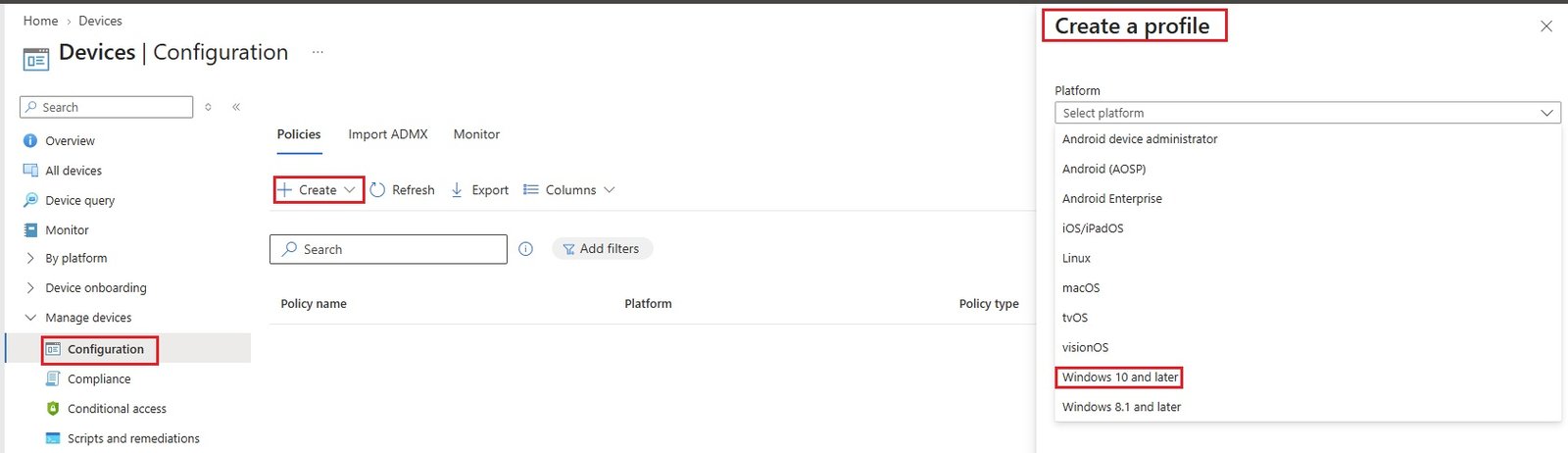
- Profile type: select from drop down:Settigns catalog, Properties catalog, Templates(select imported administrative template), create
- Basics:
- Name:star_ctrl_pnl_block
- Description: control panel block policy
- Configuration settings:
- Computer configuration:
- user configuration:control panel/prohibit access to control panel and pc/Enable
- Note: if it stuck at loading, just finish the policy and edit configuration settings.
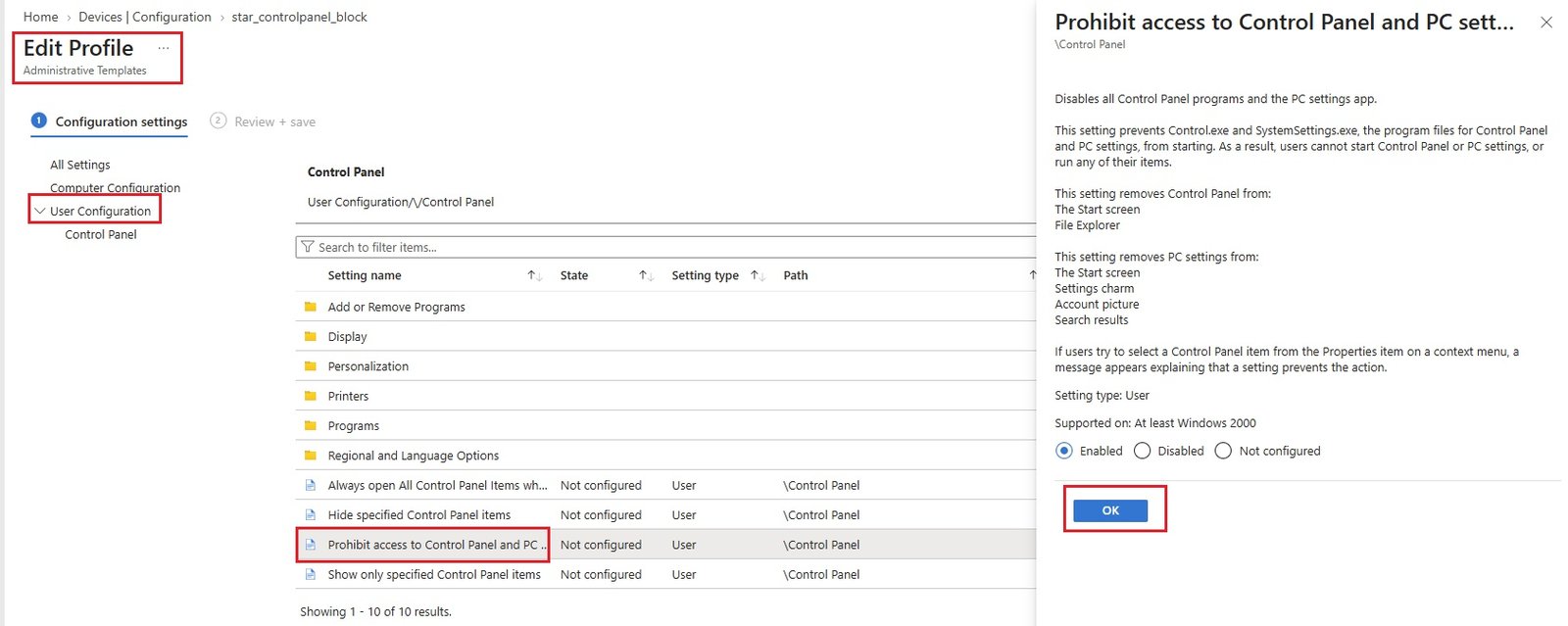
- Scope tags:
- Default
- Assignments: Included / Excluded groups or users. choose.
- Add groups (IT), Add all users, Add all devices
- Create a group and add users if need to assign to a particular users not to all. Go to Groups / New group / Group type = security/Group Name=Controlpanel_block/Entra roles assigned to group=No/Membership = Assigned/owerners/members select and create.
- Review+Create:
- Go to particular device and click sync so that policy takes affect.
- Go to that device, open cmd prompt and run gpupdate /force.
- Try to access control panel from the machine: will get error:
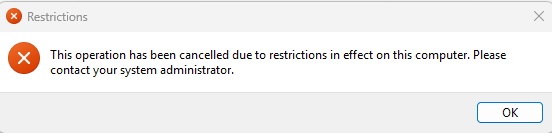
- Check the status of profile:
- Go to Devices/manage devices/Configuration/Policies/star_ctrl_pnl_block/
- takes time to implement policy.
- Export:
Lab: Gaming Block:
- Create new policy:
- Platform: select from drop down: windows 10 & later
- Profile type: select from drop down:Settigns catalog, Properties catalog, Templates(select device restriction), create
- Basics:
- Name:gaming_block
- Description: users unable to access gaming
- Configuration settings:
- Control Panel and Settings/gaming/block
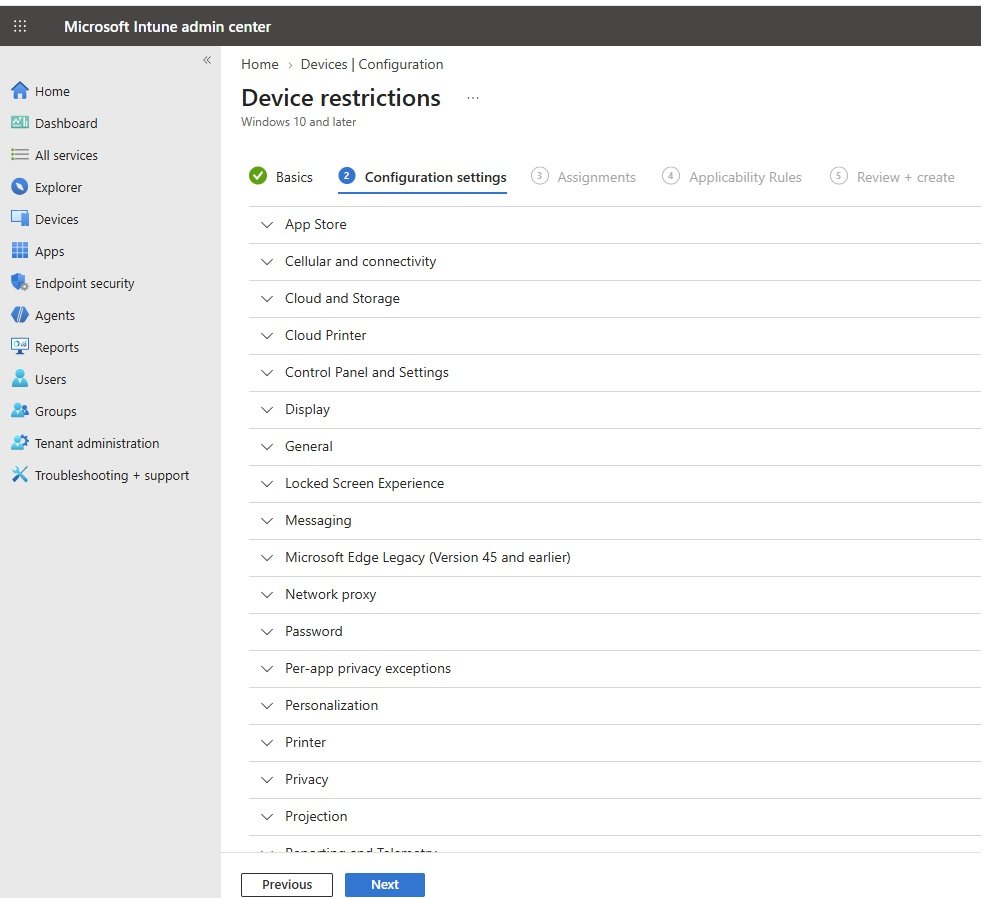
- Scope tags:
- Default
- Assignments: Included / Excluded groups or users. choose.
- Add groups (IT), Add all users, Add all devices
- Create a group and add users if need to assign to a particular users not to all. Go to Groups / New group / Group type = security/Group Name=gaming_block/Entra roles assigned to group=No/Membership = Assigned/owerners/members select and create.
- Applicability rule:
- Define rule to which this rule is applied.
- leave empty
- Review+Create:
- Go to particular device and click sync so that policy takes affect.
- Go to that device, open cmd prompt and run gpupdate /force.
- you cannot view gaming option in settings.
Lab:
- Code
- Code
- Code
- Code
Lab:
- Code
- Code
- Code
- Code
Lab:
- Code
- Code
- Code
- Code
Lab:
- Code
- Code
- Code
- Code
Lab:
- Code
- Code
- Code
- Code
Lab:
- Code
- Code
- Code
- Code
Compliance:
Policies:
- Create policy
- Platform: select platform
- Android device administrator
- Android (AOSP),
- Android Enterprise,
- iOs/iPadiOs,
- Linux,
- macOS,
- windows 10 and later,
- Windows 8.0 and later
- Profile type: depends upon platform selection.
- Templates: If templates no visible than
- Templates contain groups of settings, organized by functionality. Use a template when you don't want to build policies manually or want to configure devices to access corporate networks, such as configuring WiFi or VPN. Learn more
- Windows 10/11 compliance policy.
- Choose and create than enter following details.
- Templates: If templates no visible than
- Basics
- Name: enter name
- Description: enter description
- Compliance settings: choose from the following
- Custom Compliance
- compliance1.jpg
- Device Health
- Use these settings to confirm that a device has protective measures enabled at boot time. Learn more
- compliance2.jpg
- Device Properties
- compliance3.jpg
- Configuration Manager Compliance
- Require device compliance from Configuration Manager: Require / Not configured.
- System Security
- compliance4.jpg
- Microsoft Defender for Endpoint
- compliance5.jpg
- Microsoft Defender for Endpoint rules:
- Windows Subsysem for Linux (WSL)
- compliance6.jpg
- Custom Compliance
- Actions for noncompliance
- Mark device noncompliant:
- Send email to end user
- Add device to retire list
- Immediately: days define
- Message template: select
- Additional receipients: define.
- Mark device noncompliant:
- Assignments
- Included groups: select group or users
- Excluded groups: select groups
- Review + Create.
- Platform: select platform
- Create policy
Notifications:
- Create or edit notification message templates.
- Example: Created template will be use in actions for non compliance and send email.
Retire noncompliant devices:
- List of devices which are non compliant.
Compliance settings:
- Mark devices with no compliance policy assigned as = compliant
- Compliance status validity period days = 30
Scripts:
- +Add
Monitor:
- Device compliance status:
- Noncompliant devices report:
- Policies with noncompliant and error devices:
Lab: non compliant device if defender is not configured. Access denied to O365.
- Condition: Mark device non compliant if defender is not configured on Endoint Devices. Non compliant devices will not access outlook define in conditional access policy. Grant access once device is compliant.
- Create policy:
- Go to Manage devices/Compliance/create policy
- Platform = windows 10 or later
- Profile type = Windows 10/11 compliance policy.
- Create.
- Basics:
- lab_noncompliance_defender1.jpg
- Compliance settings:
- System Security
- lab_noncompliance_defender2.jpg
- Actions for non compliance:
- lab_noncompliance_defender3.jpg
- Assignments
- choose group (Editorial, 2 users)
- Review + create.
- Check the policy:
- Go to manage devices/compliance/compliance settings
- Mark devices with no compliance policy assigned as: disable.
- lab_noncompliance_defender4.jpg
- save it
- Check device is compliant or non compliant?
- Go to Devices/Windows. If it is compliant
- Logon to computer which is entra joined with editorial user.
- Disable defender in windows 11.
- To temporarily turn off Windows Defender real-time protection in Windows 11, open Windows Security, go to Virus & threat protection, click Manage settings, and toggle Real-time protection to Off.
- Sync with intune: Go to Accounts/Access work or school/select the user/info/sync
- Policies status:
- Go to Devices/Manage devices/Polices:
- lab_noncompliance_defender5.jpg
- Create a conditional access policy to Deny access to office 365 applications.
- Go to Devices/Conditional Access/Create new policy
- Name:
- Code
Lab:
- Code
- Code
- Code
- Code
Lab:
- Code
- Code
- Code
- Code
Lab:
- Code
- Code
- Code
- Code
Lab:
- Code
- Code
- Code
- Code
Conditional access:
- Redirect to Azure conditional access
- Users are able to login to outlook.office.com with username and password without system asking to configure MFA. Need to enable the MFA.
- Configure Enable MFA for per-user:
- Login to Entra admin portal with global admin account: entra.microsoft.com
- search Multifactor Authentication and open it.
- MFA1.jpg
- Click on Configure: Additional cloud-based multifactor authentication settings.
- It will open Per-user multifactor authentication, you will have Users and Service settings. You can also open per-user MFA from Users/all users/per user MFA.
- MFA2.jpg
- Users:
- you can select users and enable/disable MFA and other user related MFA settings.
- MFA3.jpg
- Users will be required to configure MFA and provide additional information. Microsoft authenticator app.
- User will be given option to check to remember/do not ask for MFA for next 90 days.
- Disable MFa:
- Go to per-user MFA and choose user and disable MFA.
- Go to outlook.office.com and login with user credentals, system will not ask for MFA.
- Service settings:
- MFA4.jpg
- Configure Conditional Access for MFA:
- Entra admin center (entra.microsoft.com): Go to Entra ID/Conditional Access
- Intune admin center: intune.microsoft.com: Go to Devices/Manage Devices/Conditional Access
- Azure:portal.azure.com: Go to Microsoft Entra ID/Manage/Protect/Conditional Access
- You will be redirected to conditional access from the above 3 places.
- Create Access policy:MFA required for Office 365 applicaiton access.
- Create new policy:
- Name: MFA for Office 365
- Assignments/ Users or agents: Control access based on who the policy will apply to, such as users and groups, agents, workload identities, directory roles, or external guests. Learn more
- Users and Groups:
- Include: None, All users, Select users and groups
- Guest or external users: Includes B2B Collaboration, B2B direct connect and other types of external users. Learn more
- Directory roles: Assign policy to built-in directory roles.Learn more
- Users and groups: select and choose users or group.
- MFA5.jpg
- Exclude:
- Include: None, All users, Select users and groups
- Target resources: Control access based on all or specific apps, agents, internet resources, actions, or authentication context. Learn more .
- Resources (formerly cloud apps):
- Include: None, All agent resources, All resources (formerly 'all cloud apps'), select resources (Office 365)
- MFA6.jpg
- Exclude: If need to exclude choose resource.
- User actions: Register security information, Register or join devices.
- Authentication context: Authentication context is used to secure application data and actions in apps like SharePoint and Microsoft Cloud App Security. Learn more need to configure first and choose.
- Resources (formerly cloud apps):
- Network: Control user access based on their network or physical location. Learn more
- Configure: yes/no, if yes
- Include:
- MFA7.jpg
- Exclude
- Conditions:
- Device platform: any device
- MFA8.jpg
- Locations:
- MFA9.jpg
- Client apps:
- MFA10.jpg
- Filter for devices:
- MFA11.jpg
- Authentication flows:
- MFA12.jpg
- Access controls:
- When these conditions met than grant access to user by providing MFA.
- MFA13.jpg
- Users and Groups:
- Enable policy: Report-only, on, off
- Create.
- Error: Security defaults must be disabled to enable Conditional Access policy.
- It looks like you're about to manage your organization's security configurations. That's great! You must first disable security defaults before enabling a Conditional Access policy.
- Go to Entra ID/ Manage/Properties/Manage security defaults/Disable
- once it is disabled than security defaults cannot be revert.
- keep policy off and save it.
- MFA14.jpg
- Microsoft-managed policies:
- Microsoft managed policies are not visible: If tenant has Security Defaults enabled, lacks a qualifying license (Entra ID P1/P2), or the phased rollout has not yet targeted your specific directory region.
- Microsfot will enable 4 policies.
- Code
- Code
Scripts and remediations:
- Create and run script packages on devices to proactively find and fix the top support issues in your organization. Use this table to see the status of your deployed script packages and to monitor the detection and remediation results. Results are shown as number of devices affected. Learn more.
Group policy analytics:
- Use Group Policy analytics to analyze your on-prem Group Policy Objects (GPO) and determine your level of modern management support. Click "Import" to begin the analysis, and "Migrate" when you're ready to move your settings to modern management.
eSIM cellular profiles:
-
Import eSIM cellular activation codes provided by your mobile operator and deploy them to your eSIM LTE PCs running Windows 10 or later. Learn more
-
- policy sets
- Device categories
- Partner portals:
Manage Windows 365 Cloud PCs
- code
- code
- code
Manage updates
- Windows updates: redirect to Devices/By platform/Windows/manage updates/windows updates.
- Apple updates (deprecated)
- Android FOTA deployments
Organize devices
- code
- code
- code
Help and support
- code
- code
- code
Apps
All Apps
- All configured apps will list here.
Deploy Microsoft 365 Apps for Windows 10 and later
- Create
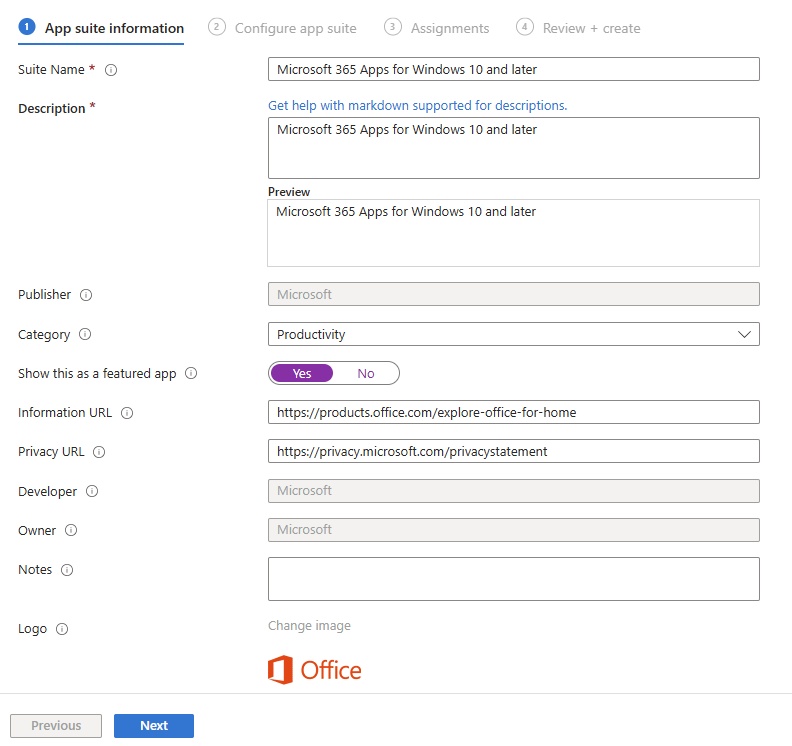
- Add Microsoft 365 Apps to install your choice of Microsoft 365 Apps on managed devices running Windows 10 or later. Users must have an account and license to use these apps.
- Select app type: list of apps available , choose Microsoft 365 Apps/Windows 10 and later.
- App information:
- Configure app suite
- Configuration settings format: Configuration designer, Enter XML data
- Configure app suite
- Select office apps: 8 selected (Access, Excel, OneNote, Outlook, Powerpoint, Publisher, Teams, Word)
- Select other office apps (License required): project online desktop client, Visio online plan 2: None selected
- App Suite information: These settings apply to all apps you have selected in the suite. Learn more
- Architecture: 32 bit or 64 bit
- Default file format: Office Open Document Format, Office Open XML Format
- Update Channel: Defines how often the app is updated with new features. Learn more: Current channel, current channel (prview), Monthly enterprise channel, Semi-annual enterprise channel, semi-annual enterprise channel(preview)
- Remove otherversions: yes/no
- Version to install : Latest/specific
- Specific Version: choose if specific is selected
- Properties
- Use chared computer activation: yes/No
- Accept the Microsoft Software license Terms on behalf of users: yes/no
- Install background service for Microsoft search in Bing: Yes/No
- Languages: select if needed (Default is english if no language selected)
- Assignments:
- Required
- Add group
- Add all users: selected
- Add all devices
- Availble fro enrolled devices: Select the groups for which you want to make this app available. Available for enrolled devices apps are displayed in the Company Portal app and website for users to optionally install. Available assignments are only valid for User Groups, not device groups.
- Add group: group added
- Uninstall
- Add group
- Add all users
- Add all devices
- Review and create
- Sync:
- Now synchronize the settings: Go to Intune/Devices/all devices/select device and click sync or Go to endpoint devices/accounts/sync. Intune endpoint devices typically sync automatically every 8 hours after initial enrollment, though this varies by platform and recent activity. Newly enrolled devices check in more frequently—roughly every 3 minutes for the first 15 minutes, then every 15 minutes for 2 hours—to accelerate policy application.
- Check client computer, office (online) apps has been installed.
- Check status:
- Go to Intune/Apps/All apps/Microsoft 365 Apps for Windows/overview
Deploy/Manage Microsoft Office 365 Apps for Enterprise using Intune
- Create
Deploy Chrome on Windows Endpoint Devices
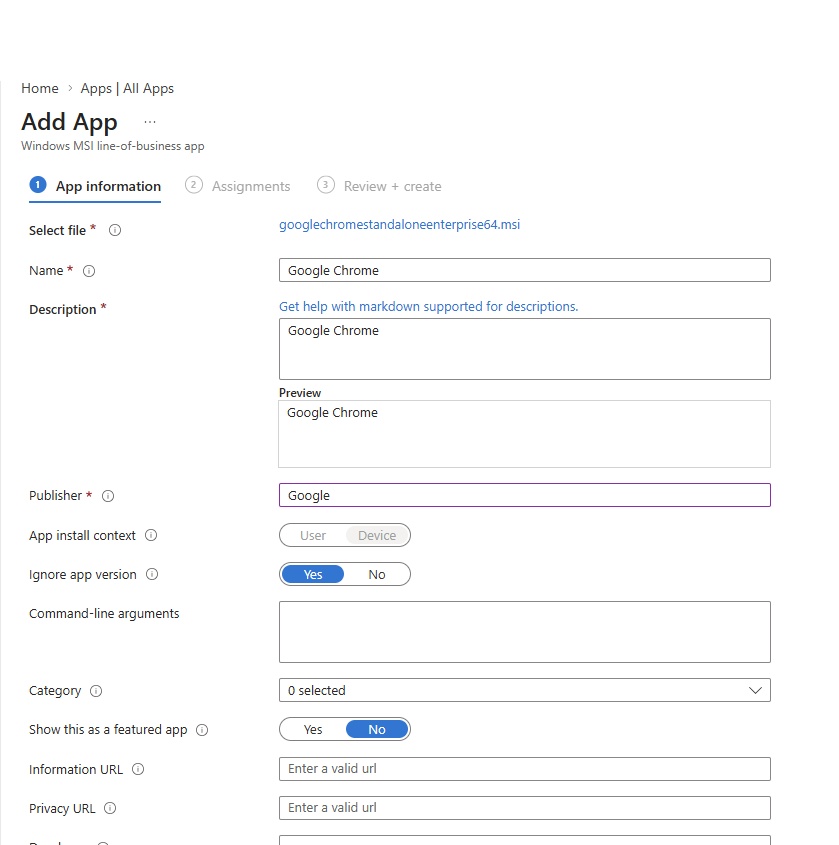
- Download google chrome stand alone enterprise 64 msi (make sure bundle is not selected, msi selected)
- Go to Intune/Apps/App Apps/ Create
- App type: Line-of-business app
- App information: Select file/click app package file/locate downloaded googlechromestandaloneenterprise64.msi
- Download and add logo if needed.
- Assignments:
- Required
- Add group
- Add all users: selected
- Add all devices
- Availble fro enrolled devices: Select the groups for which you want to make this app available. Available for enrolled devices apps are displayed in the Company Portal app and website for users to optionally install. Available assignments are only valid for User Groups, not device groups.
- Add group: group added
- Uninstall
- Add group
- Add all users
- Add all devices
- Review and create: Uploading started and takes some time.
- Sync:
- Now synchronize the settings: Go to Intune/Devices/all devices/select device and click sync or Go to endpoint devices/accounts/sync. Intune endpoint devices typically sync automatically every 8 hours after initial enrollment, though this varies by platform and recent activity. Newly enrolled devices check in more frequently—roughly every 3 minutes for the first 15 minutes, then every 15 minutes for 2 hours—to accelerate policy application.
- Check client computer, office (online) apps has been installed.
- code
Monitor
- code
- code
- code
Platform
- Windows: Add / manage windows based apps here, you can also perform same actions in All Apps.
- IOS/IPadOS: Add / manage IOS/IPadOs based apps here, you can also perform same actions in All Apps.
- macOS: Add / manage macOS based apps here, you can also perform same actions in All Apps.
- Android: Add / manage Android based apps here, you can also perform same actions in All Apps.
Manage apps
- code
- code
- code
organize apps
- code
- code
- code
Help and support
Endpoint Security - Defender
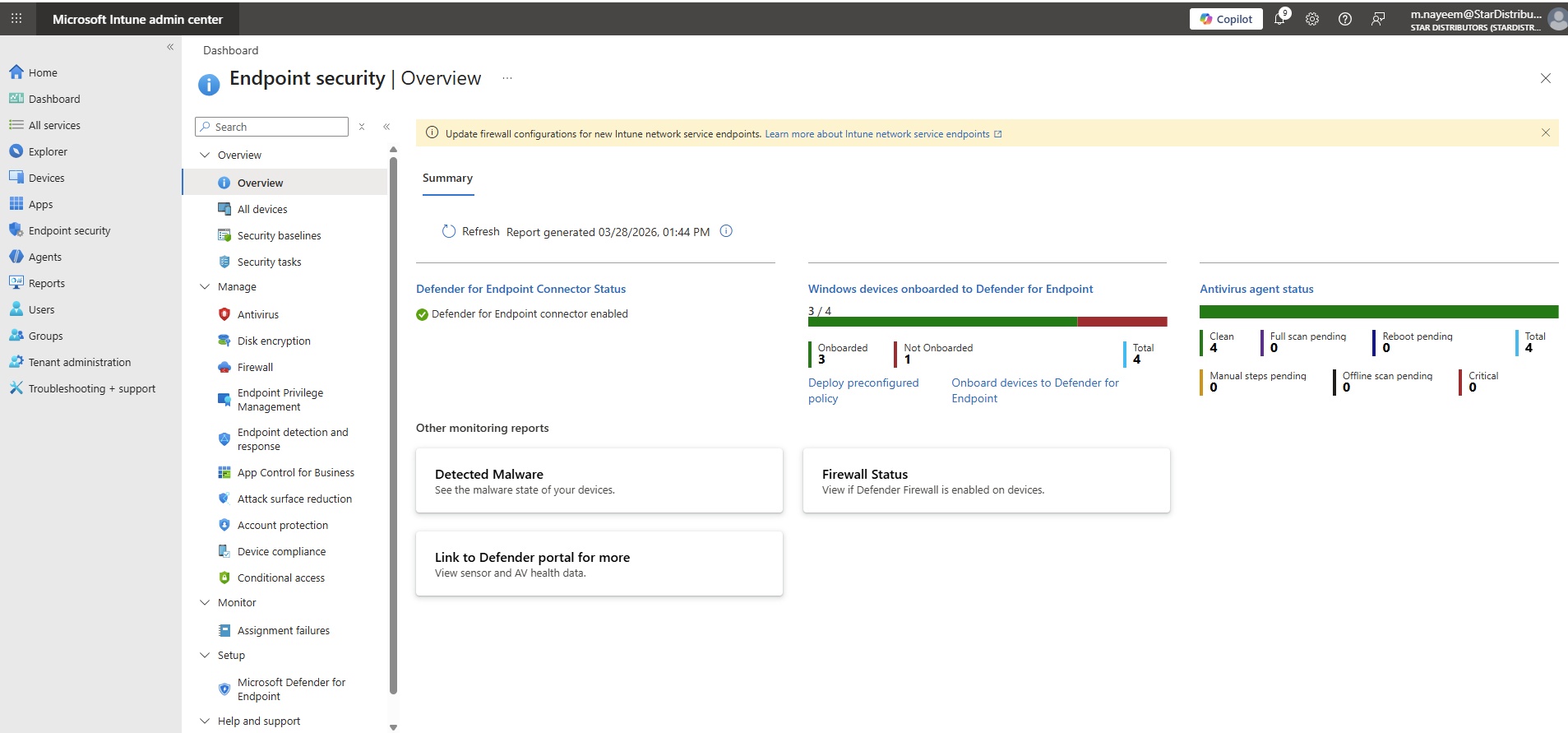
Overview
- code
- code
- code
All Devices
- List of all devices.
- To see more details, click column and add fields.
Security baseline
- Use security baselines to apply Microsoft-recommended security configuration settings to your enrolled devices.Learn more
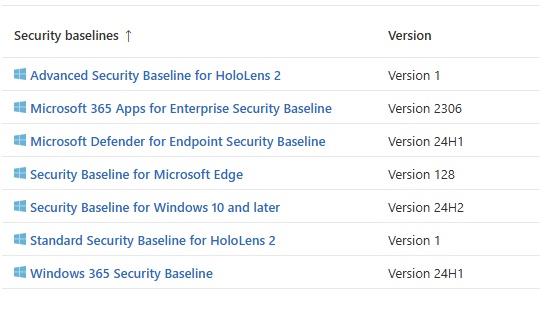
- code
Security tasks
- Security tasks help Intune and Security admins work together to address vulnerabilities. Tasks are created in Microsoft Defender Vulnerability Management and completed in Microsoft Intune.Learn more about security tasks.
- code
- code
Antivirus
- Summary
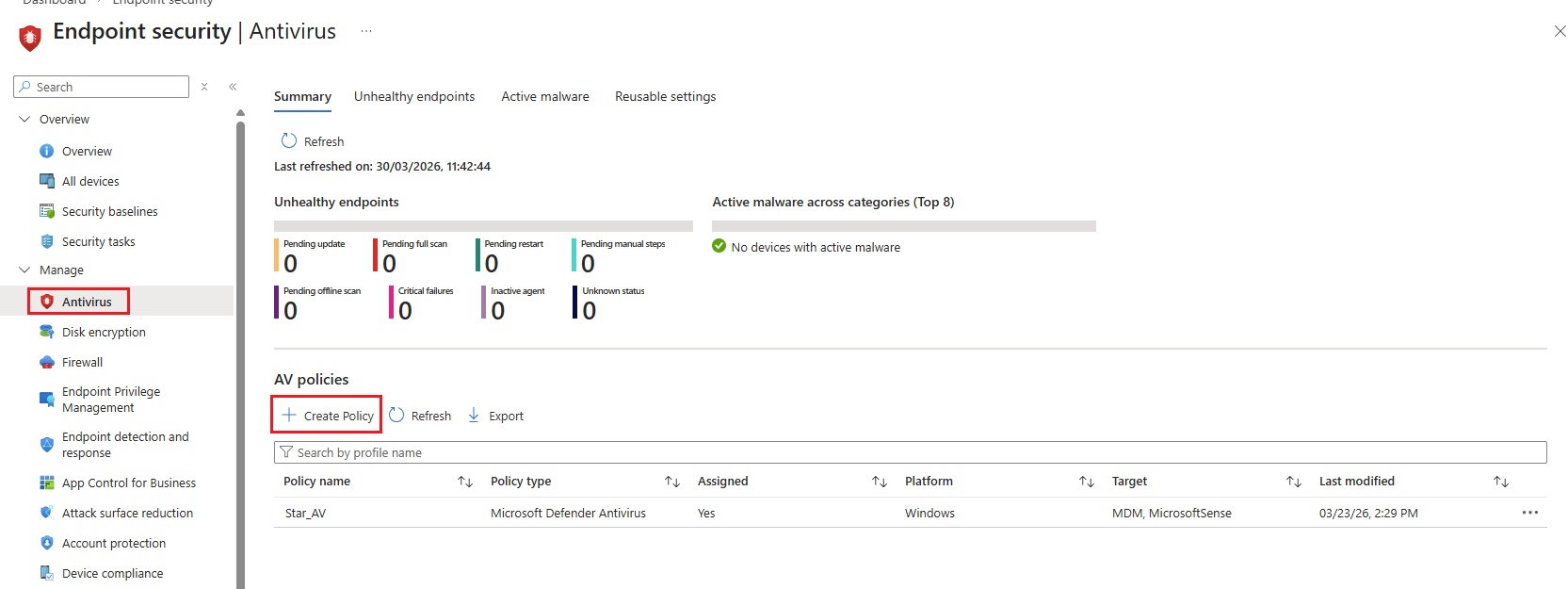
Create Policy:
- Platform:
- Windows
- MacOS
- Linux
- Windows(Configmgr)
- Selct a profile:
- Defender update controls,
- Microsoft Defender Antivirus exclusions,
- Microsoft Defender Antivirus,
- Windows Security Experince.
- Microsoft Defender Antivirus: Windows Defender Antivirus is the next-generation protection component of Microsoft Defender for Endpoint. Next-generation protection brings together machine learning, big-data analysis, in-depth threat resistance research, and cloud infrastructure to protect devices in your enterprise organization.
This policy applies to: Windows 10, Windows 11, and Windows Server
The settings in this policy can be targeted to: MDM, Microsoft Sense supported devices - Create.
- Basics
- Name = Star_AV
- Description
- Configuration settings
- Defender
- Allow Archive Scanning: Allows or disallows scanning of archives.
- Not Configured
- Not Allowed. Turn off scanning on archived files.
- Allowed. Scans the archive files. (Default)
- Allow Behavior Monitoring: Allows or disallows Windows Defender Behavior Monitoring functionality.
- Not Configured
- Not Allowed. Turn off scanning on archived files.
- Allowed. Scans the archive files. (Default)
- Allow Cloud Protection: To best protect your PC, Windows Defender will send information to Microsoft about any problems it finds. Microsoft will analyze that information, learn more about problems affecting you and other customers, and offer improved solutions.
- Not Configured
- Not Allowed. Turn off scanning on archived files.
- Allowed. Scans the archive files. (Default)
- Allow Email Scanning: Allows or disallows scanning of email.
- Not Configured
- Not Allowed. Turn off scanning on archived files.
- Allowed. Scans the archive files. (Default)
- Allow Full Scan On Mapped Network Drives: Allows or disallows a full scan of mapped network drives.
- Not Configured
- Not Allowed. Turn off scanning on archived files.
- Allowed. Scans the archive files. (Default)
- Allow Full Scan Removable Drive Scanning: Allows or disallows a full scan of removable drives. During a quick scan, removable drives may still be scanned.
- Not Configured
- Not Allowed. Turn off scanning on archived files.
- Allowed. Scans the archive files. (Default)
- [Deprecated] Allow Intrusion Prevention System: Allows or disallows Windows Defender Intrusion Prevention functionality. This setting is deprecated and no longer has impact on devices.
- Not Configured
- Not Allowed. Turn off scanning on archived files.
- Allowed. Scans the archive files. (Default)
- Allow scanning of all downloaded files and attachments: Allows or disallows Windows Defender IOAVP Protection functionality.
- Not Configured
- Not Allowed. Turn off scanning on archived files.
- Allowed. Scans the archive files. (Default)
- Allow Realtime Monitoring: Allows or disallows Windows Defender Realtime Monitoring functionality.
- Not Configured
- Not Allowed. Turn off scanning on archived files.
- Allowed. Scans the archive files. (Default)
- Allow Scanning Network Files: Allows or disallows a scanning of network files.
- Not Configured
- Not Allowed. Turn off scanning on archived files.
- Allowed. Scans the archive files. (Default)
- Allow Script Scanning: Allows or disallows Windows Defender Script Scanning functionality.
- Not Configured
- Not Allowed. Turn off scanning on archived files.
- Allowed. Scans the archive files. (Default)
- Allow User UI Access: Allows or disallows user access to the Windows Defender UI. If disallowed, all Windows Defender notifications will also be suppressed.
- Not Configured
- Not Allowed. Turn off scanning on archived files.
- Allowed. Scans the archive files. (Default)
- Avg CPU Load Factor: Represents the average CPU load factor for the Windows Defender scan (in percent). The default value is 50.
- Configured
- Not Configured
- Archive Max Depth: Specify the maximum folder depth to extract from archive files for scanning. If this configuration is off or not set, the default value (0) is applied, and all archives are extracted up to the deepest folder for scanning.
- Not Configured
- Configured
- Archive Max Size: Specify the maximum size, in KB, of archive files to be extracted and scanned. If this configuration is off or not set, the default value (0) is applied, and all archives are extracted and scanned regardless of size.
- Not Configured
- Configured
- Check For Signatures Before Running Scan: This policy setting allows you to manage whether a check for new virus and spyware definitions will occur before running a scan. This setting applies to scheduled scans as well as the command line mpcmdrun -SigUpdate, but it has no effect on scans initiated manually from the user interface. If you enable this setting, a check for new definitions will occur before running a scan. If you disable this setting or do not configure this setting, the scan will start using the existing definitions. Supported values:0 (default) - Disabled1 - EnabledOMA-URI Path: . /Vendor/MSFT/Policy/Config/Defender/CheckForSignaturesBeforeRunningScan
- Not Configured
- Not Allowed. Turn off scanning on archived files.
- Allowed. Scans the archive files. (Default)
- Cloud Block Level: This policy setting determines how aggressive Windows Defender Antivirus will be in blocking and scanning suspicious files. Value type is integer. If this setting is on, Windows Defender Antivirus will be more aggressive when identifying suspicious files to block and scan; otherwise, it will be less aggressive and therefore block and scan with less frequency. For more information about specific values that are supported, see the Windows Defender Antivirus documentation site. NoteThis feature requires the Join Microsoft MAPS setting enabled in order to function.
- Not Configured
- Not Allowed. Turn off scanning on archived files.
- Allowed. Scans the archive files. (Default)
- Cloud Extended Timeout: This feature allows Windows Defender Antivirus to block a suspicious file for up to 60 seconds, and scan it in the cloud to make sure it's safe. Value type is integer, range is 0 - 50. The typical cloud check timeout is 10 seconds. To enable the extended cloud check feature, specify the extended time in seconds, up to an additional 50 seconds. For example, if the desired timeout is 60 seconds, specify 50 seconds in this setting, which will enable the extended cloud check feature, and will raise the total time to 60 seconds. NoteThis feature depends on three other MAPS settings the must all be enabled- Configure the 'Block at First Sight' feature; Join Microsoft MAPS; Send file samples when further analysis is required.
- Not Configured
- Not Allowed. Turn off scanning on archived files.
- Allowed. Scans the archive files. (Default)
- Days To Retain Cleaned Malware: Time period (in days) that quarantine items will be stored on the system. The default value is 0, which keeps items in quarantine, and does not automatically remove them.
- Not Configured
- Configured
- Disable Catchup Full Scan: This policy setting allows you to configure catch-up scans for scheduled full scans. A catch-up scan is a scan that is initiated because a regularly scheduled scan was missed. Usually these scheduled scans are missed because the computer was turned off at the scheduled time. If you disable or do not configure this setting, catch-up scans for scheduled full scans will be turned on. If a computer is offline for two consecutive scheduled scans, a catch-up scan is started the next time someone logs on to the computer. If there is no scheduled scan configured, there will be no catch-up scan run. If you enable this setting, catch-up scans for scheduled full scans will be disabled. Supported values:0 - Disabled1 - Enabled (default)OMA-URI Path: . /Vendor/MSFT/Policy/Config/Defender/DisableCatchupFullScan
- Not Configured
- Not Allowed. Turn off scanning on archived files.
- Allowed. Scans the archive files. (Default)
- Disable Catchup Quick Scan: This policy setting allows you to configure catch-up scans for scheduled quick scans. A catch-up scan is a scan that is initiated because a regularly scheduled scan was missed. Usually these scheduled scans are missed because the computer was turned off at the scheduled time. If you enable this setting, catch-up scans for scheduled quick scans will be turned on. If a computer is offline for two consecutive scheduled scans, a catch-up scan is started the next time someone logs on to the computer. If there is no scheduled scan configured, there will be no catch-up scan run. If you disable or do not configure this setting, catch-up scans for scheduled quick scans will be turned off. Supported values:0 - Disabled1 - Enabled (default)OMA-URI Path: . /Vendor/MSFT/Policy/Config/Defender/DisableCatchupQuickScan
- Not Configured
- Not Allowed. Turn off scanning on archived files.
- Allowed. Scans the archive files. (Default)
- Enable Low CPU Priority: This policy setting allows you to enable or disable low CPU priority for scheduled scans. If you enable this setting, low CPU priority will be used during scheduled scans. If you disable or do not configure this setting, not changes will be made to CPU priority for scheduled scans. Supported values:0 - Disabled (default)1 - Enabled
- Not Configured
- Not Allowed. Turn off scanning on archived files.
- Allowed. Scans the archive files. (Default)
- Enable Network Protection: This policy allows you to turn network protection on (block/audit) or off. Network protection protects employees using any app from accessing phishing scams, exploit-hosting sites, and malicious content on the Internet. This includes preventing third-party browsers from connecting to dangerous sites. Value type is integer. If you enable this setting, network protection is turned on and employees can't turn it off. Its behavior can be controlled by the following options: Block and Audit. If you enable this policy with the Block option, users/apps will be blocked from connecting to dangerous domains. You will be able to see this activity in Windows Defender Security Center. If you enable this policy with the Audit option, users/apps will not be blocked from connecting to dangerous domains. However, you will still see this activity in Windows Defender Security Center. If you disable this policy, users/apps will not be blocked from connecting to dangerous domains. You will not see any network activity in Windows Defender Security Center. If you do not configure this policy, network blocking will be disabled by default.
- Not Configured
- Not Allowed. Turn off scanning on archived files.
- Allowed. Scans the archive files. (Default)
- Allow Archive Scanning: Allows or disallows scanning of archives.
- Exclude Extensions: Allows an administrator to specify a list of file type extensions to ignore during a scan. Each file type in the list must be separated by a |. For example, lib|obj. Learn more
- + Add
- - Remove
- Import
- Export
- Exclude Paths: Allows an administrator to specify a list of directory paths to ignore during a scan. Each path in the list must be in a new line. Learn more
- + Add
- - Remove
- Import
- Export
- Exclude Processes: Allows an administrator to specify a list of files opened by processes to ignore during a scan. ImportantThe process itself is not excluded from the scan, but can be by using the Defender/ExcludedPaths policy to exclude its path. Each file type must be separated by a |. For example, C:\Example. exe|C:\Example1. exe. Learn more
- + Add
- - Remove
- Import
- Export
- PUA Protection: Specifies the level of detection for potentially unwanted applications (PUAs). Windows Defender alerts you when potentially unwanted software is being downloaded or attempts to install itself on your computer.
- Not Configured
- PUA Protection off. Windows Defender will not protect against potentially unwanted applications. (Default)
- PUA Protection on. Detected items are blocked. They will show in history along with other threats.
- Audit mode. Windows defender will detect potentialy unwanted applications.
- Real Time Scan Direction: Controls which sets of files should be monitored. Note If AllowOnAccessProtection is not allowed, then this configuration can be used to monitor specific files.
- Not Configured
- Monitor all files (bi-directional). Default
- Monitor incoming files.
- Monitor outgoing files.
- Scan Parameter: Selects whether to perform a quick scan or full scan.
- Not Configured
- Quick scan (Default)
- Full Scan
- Schedule Quick Scan Time: Selects the time of day that the daily Windows Defender quick scan should run. For example, a value of 0=12:00AM, a value of 60=1:00AM, a value of 120=2:00, and so on, up to a value of 1380=11:00PM. The default value is 120
- Not Configured
- Configured
- Schedule Scan Day: Selects the day that the Windows Defender scan should run. Note The scan type will depends on what scan type is selected in the Defender/ScanParameter setting.
- Not Configured
- Every day (default)
- Sunday
- Monday
- Tuesday
- Wednesday
- Thursday
- Friday
- Saturday
- No scheduled scan
- Schedule Scan Time: Selects the time of day that the weekly Windows Defender scan should run. Note The scan type will depends on what scan type is selected in the Defender/ScanParameter setting. For example, a value of 0=12:00AM, a value of 60=1:00AM, a value of 120=2:00, and so on, up to a value of 1380=11:00PM. The default value is 120.
- Not configured
- Configured
- Signature Update Fallback Order: This policy setting allows you to define the order in which different definition update sources should be contacted. The value of this setting should be entered as a pipe-separated string enumerating the definition update sources in order. Possible values are:InternalDefinitionUpdateServerMicrosoftUpdateServerMMPCFileSharesFor example: InternalDefinitionUpdateServer | MicrosoftUpdateServer | MMPCIf you enable this setting, definition update sources will be contacted in the order specified. Once definition updates have been successfully downloaded from one specified source, the remaining sources in the list will not be contacted. If you disable or do not configure this setting, definition update sources will be contacted in a default order. OMA-URI Path: . /Vendor/MSFT/Policy/Config/Defender/SignatureUpdateFallbackOrder Learn more
- + Add
- - Remove
- Import
- Export
- Signature Update File Shares Sources: This policy setting allows you to configure UNC file share sources for downloading definition updates. Sources will be contacted in the order specified. The value of this setting should be entered as a pipe-separated string enumerating the definition update sources. For example: \unc1\Signatures | \unc2\SignaturesThe list is empty by default. If you enable this setting, the specified sources will be contacted for definition updates. Once definition updates have been successfully downloaded from one specified source, the remaining sources in the list will not be contacted. If you disable or do not configure this setting, the list will remain empty by default and no sources will be contacted. OMA-URI Path: . /Vendor/MSFT/Policy/Config/Defender/SignatureUpdateFileSharesSources Learn more
- + Add
- - Remove
- Import
- Export
- Signature Update Interval: Specifies the interval (in hours) that will be used to check for signatures, so instead of using the ScheduleDay and ScheduleTime the check for new signatures will be set according to the interval. A value of 0 means no check for new signatures, a value of 1 means to check every hour, a value of 2 means to check every two hours, and so on, up to a value of 24, which means to check every day. The default value is 8. OMA-URI Path: . /Vendor/MSFT/Policy/Config/De
- Not configured
- Configured
- Submit Samples Consent: Checks for the user consent level in Windows Defender to send data. If the required consent has already been granted, Windows Defender submits them. If not, (and if the user has specified never to ask), the UI is launched to ask for user consent (when Defender/AllowCloudProtection is allowed) before sending data.
- Not Configured
- Always prompt
- Send safe samples automatically (Default)
- Never send
- Send all samples automatically.
- Disable Local Admin Merge: When this value is set to false, it allows a local admin the ability to specify some settings for complex list type that will then merge /override the Preference settings with the Policy settings
- Not configured
- Enable local admin merge(default)
- Disable local admin merge
- Allow on Access Protection: Allows or disallows Windows Defender On Access Protection functionality.
- Not configured
- Not allowed.
- Allowed (Default)
- Threat Severity Default Action
- Defender
- Scope tags
- Assignments
- Review + Create
- Platform:
Unhealthy Endpoints:
- Code
Active Malware:
- Code
Reusable Settings:
- +Add
Lab- MDE Client Endpoint AV Exclusion Policy:
- Create policy:
- Platform = Windows
- Profile = Microsoft Defender Antivirus
- Create
- Basics:
- Name: MDE Client Endpoint AV Exclusion Policy:
- Configuration settings:
- Excluded Extensions:
- + Add = .txt
- scope tags: Default
- Assignments:
- Group - IT (4 users)
- Review + Create
Lab - MDE Client Endpoint AV Policy:
- Create policy:
- Platform = Windows
- Profile = Microsoft Defender Antivirus
- Create
- Basics:
- Name: MDE Client Endpoint AV Exclusion Policy:
- Configuration settings:
- Allow Behavior Monitoring Allowed. Turns on real-time behavior monitoring.
- scope tags: Default
- Assignments:
- Group - IT (4 users)
- Review + Create
Lab - NGP Windows default policy:
- Create policy:
- Platform = Windows
- Profile = Microsoft Defender Antivirus
- Create
- Basics:
- Name: MDE Client Endpoint AV Exclusion Policy:
- Configuration settings:
- scope tags: Default
- Assignments:
- Group - IT (4 users)
- Review + Create
Disk encryption
- BitLocker provides additional data protection layer by using the encryption/decryption technology.
- Its a data protection feature that integrates with the O/S and addresses the threats of data theft or exposure from lost, stolen or inappropriately decomissioned computers.
- BitLocker provides the most protection when used a Trusted Platform Module TPM version 1.2 or later.
- Create Endpoint Security Disk Enctyption Policy for BitLocker:
- Go to Intune admin center -->Endpoint Security -->Disk encryption --> Create Policy
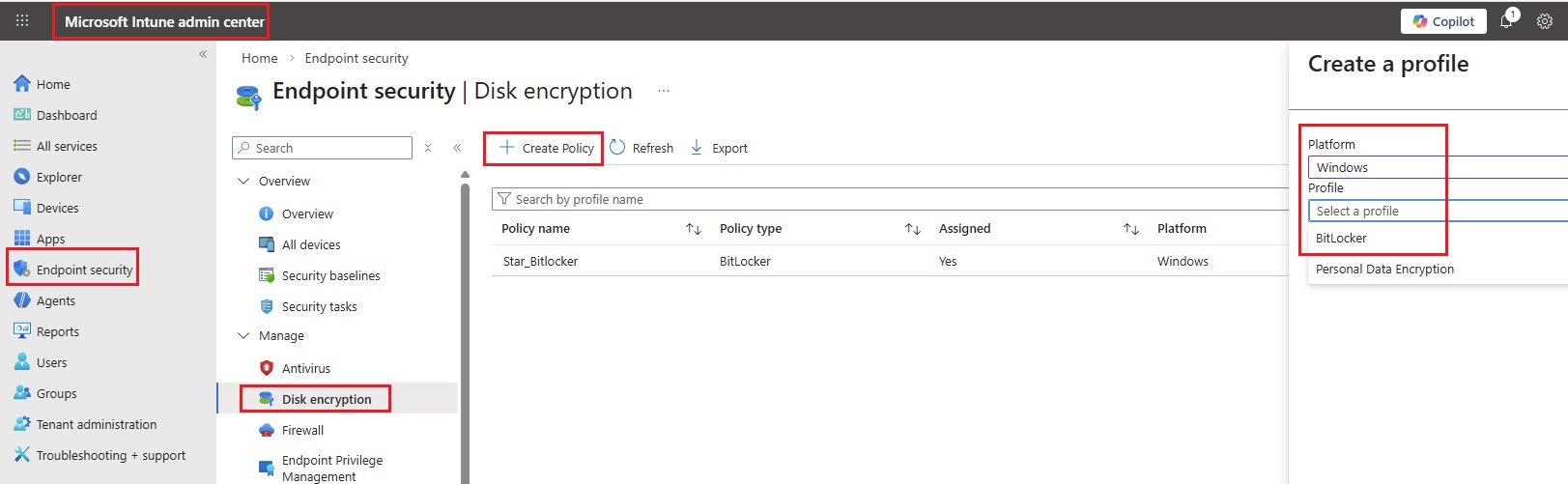
- Platform = Windows 10 and later
- Profile = Bitlocker
- Click create
- Basics
- Name = Star_bitlocker
- Description = Bitlocker policy for Endpoints
- Configuration settings
- BitLocker:
- Require Device Enctyption: Allows the Admin to require encryption to be turned on using BitLocker\Device Encryption. The format is integer. Sample value for this node to enable this policy: 1 Disabling the policy will not turn off the encryption on the system drive. But will stop prompting the user to turn it on. If you want to disable this policy use the following SyncML: 101./Device/Vendor/MSFT/BitLocker/RequireDeviceEncryptionint0
- Not Configured
- Disabled (Default)
- Enabled
- Allow Warning For Other Disk Encryption: Allows Admin to disable all UI (notification for encryption and warning prompt for other disk encryption) and turn on encryption on the user machines silently. Warning: When you enable BitLocker on a device with third party encryption, it may render the device unusable and will require reinstallation of Windows. Note: This policy takes effect only if "RequireDeviceEncryption" policy is set to 1. The format is integer. The expected values for this policy are: 1 = This is the default, when the policy is not set. Warning prompt and encryption notification is allowed. 0 = Disables the warning prompt and encryption notification. Starting in Windows 10, next major update, the value 0 only takes affect on Entra ID joined devices. Windows will attempt to silently enable BitLocker for value 0. If you want to disable this policy use the following SyncML: 110./Device/Vendor/MSFT/BitLocker/AllowWarningForOtherDiskEncryptionint0
- Not Configured
- Disabled (Default)
- Enabled
- Configure Recovery Password Rotation: Allows Admin to configure Numeric Recovery Password Rotation upon use for OS and fixed drives on Entra ID and Hybrid domain joined devices. When not configured, Rotation is turned on by default for Entra ID only and off on Hybrid. The Policy will be effective only when Active Directory back up for recovery password is configured to required. For OS drive: Turn on "Do not enable Bitlocker until recovery information is stored to AD DS for operating system drives" For Fixed drives: Turn on "Do not enable Bitlocker until recovery information is stored to AD DS for fixed data drives" Supported Values: 0 - Numeric Recovery Passwords rotation OFF. 1 - Numeric Recovery Passwords Rotation upon use ON for Entra ID joined devices. Default value 2 - Numeric Recovery Passwords Rotation upon use ON for both Entra ID and Hybrid devices If you want to disable this policy use the following SyncML: 112./Device/Vendor/MSFT/BitLocker/ConfigureRecoveryPasswordRotationint0
- Not Configured
- Refresh off (Default)
- Refresh on for Entra Id-joined devices
- Refresh on for both Entra ID-joined and hybrid-joined devices
- Require Device Enctyption: Allows the Admin to require encryption to be turned on using BitLocker\Device Encryption. The format is integer. Sample value for this node to enable this policy: 1 Disabling the policy will not turn off the encryption on the system drive. But will stop prompting the user to turn it on. If you want to disable this policy use the following SyncML: 101./Device/Vendor/MSFT/BitLocker/RequireDeviceEncryptionint0
- BitLocker Drive Encryption:
- Choose drive encryption method and cipher strength (Windows 10 [Version 1511] and later): This policy setting allows you to configure the algorithm and cipher strength used by BitLocker Drive Encryption. This policy setting is applied when you turn on BitLocker. Changing the encryption method has no effect if the drive is already encrypted, or if encryption is in progress. If you enable this policy setting you will be able to configure an encryption algorithm and key cipher strength for fixed data drives, operating system drives, and removable data drives individually. For fixed and operating system drives, we recommend that you use the XTS-AES algorithm. For removable drives, you should use AES-CBC 128-bit or AES-CBC 256-bit if the drive will be used in other devices that are not running Windows 10 (Version 1511). If you disable or do not configure this policy setting, BitLocker will use AES with the same bit strength (128-bit or 256-bit) as the "Choose drive encryption method and cipher strength (Windows Vista, Windows Server 2008, Windows 7)" and "Choose drive encryption method and cipher strength" policy settings (in that order), if they are set. If none of the policies are set, BitLocker will use the default encryption method of XTS-AES 128-bit or the encryption method specified by the setup script.”
- Not Configured
- Disabled (Default)
- Enabled
- Provide the unique identifiers for your organization: This policy setting allows you to associate unique organizational identifiers to a new drive that is enabled with BitLocker. These identifiers are stored as the identification field and allowed identification field. The identification field allows you to associate a unique organizational identifier to BitLocker-protected drives. This identifier is automatically added to new BitLocker-protected drives and can be updated on existing BitLocker-protected drives using the manage-bde command-line tool. An identification field is required for management of certificate-based data recovery agents on BitLocker-protected drives and for potential updates to the BitLocker To Go Reader. BitLocker will only manage and update data recovery agents when the identification field on the drive matches the value configured in the identification field. In a similar manner, BitLocker will only update the BitLocker To Go Reader when the identification field on the drive matches the value configured for the identification field. The allowed identification field is used in combination with the "Deny write access to removable drives not protected by BitLocker" policy setting to help control the use of removable drives in your organization. It is a comma separated list of identification fields from your organization or other external organizations. You can configure the identification fields on existing drives by using manage-bde.exe. If you enable this policy setting, you can configure the identification field on the BitLocker-protected drive and any allowed identification field used by your organization. When a BitLocker-protected drive is mounted on another BitLocker-enabled computer the identification field and allowed identification field will be used to determine whether the drive is from an outside organization. If you disable or do not configure this policy setting, the identification field is not required. Note: Identification fields are required for management of certificate-based data recovery agents on BitLocker-protected drives. BitLocker will only manage and update certificate-based data recovery agents when the identification field is present on a drive and is identical to the value configured on the computer. The identification field can be any value of 260 characters or fewer.
- Not Configured
- Disabled (Default)
- Enabled
- Choose drive encryption method and cipher strength (Windows 10 [Version 1511] and later): This policy setting allows you to configure the algorithm and cipher strength used by BitLocker Drive Encryption. This policy setting is applied when you turn on BitLocker. Changing the encryption method has no effect if the drive is already encrypted, or if encryption is in progress. If you enable this policy setting you will be able to configure an encryption algorithm and key cipher strength for fixed data drives, operating system drives, and removable data drives individually. For fixed and operating system drives, we recommend that you use the XTS-AES algorithm. For removable drives, you should use AES-CBC 128-bit or AES-CBC 256-bit if the drive will be used in other devices that are not running Windows 10 (Version 1511). If you disable or do not configure this policy setting, BitLocker will use AES with the same bit strength (128-bit or 256-bit) as the "Choose drive encryption method and cipher strength (Windows Vista, Windows Server 2008, Windows 7)" and "Choose drive encryption method and cipher strength" policy settings (in that order), if they are set. If none of the policies are set, BitLocker will use the default encryption method of XTS-AES 128-bit or the encryption method specified by the setup script.”
- Operating System Drives:
- Enforce drive encryption type on operating system drives: This policy setting allows you to configure the encryption type used by BitLocker Drive Encryption. This policy setting is applied when you turn on BitLocker. Changing the encryption type has no effect if the drive is already encrypted or if encryption is in progress. Choose full encryption to require that the entire drive be encrypted when BitLocker is turned on. Choose used space only encryption to require that only the portion of the drive used to store data is encrypted when BitLocker is turned on. If you enable this policy setting the encryption type that BitLocker will use to encrypt drives is defined by this policy and the encryption type option will not be presented in the BitLocker setup wizard. If you disable or do not configure this policy setting, the BitLocker setup wizard will ask the user to select the encryption type before turning on BitLocker.
- Not Configured
- Disabled (Default)
- Enabled
- Require additional authentication at startup: This policy setting allows you to configure whether BitLocker requires additional authentication each time the computer starts and whether you are using BitLocker with or without a Trusted Platform Module (TPM). This policy setting is applied when you turn on BitLocker. Note: Only one of the additional authentication options can be required at startup, otherwise a policy error occurs. If you want to use BitLocker on a computer without a TPM, select the "Allow BitLocker without a compatible TPM" check box. In this mode either a password or a USB drive is required for start-up. When using a startup key, the key information used to encrypt the drive is stored on the USB drive, creating a USB key. When the USB key is inserted the access to the drive is authenticated and the drive is accessible. If the USB key is lost or unavailable or if you have forgotten the password then you will need to use one of the BitLocker recovery options to access the drive. On a computer with a compatible TPM, four types of authentication methods can be used at startup to provide added protection for encrypted data. When the computer starts, it can use only the TPM for authentication, or it can also require insertion of a USB flash drive containing a startup key, the entry of a 6-digit to 20-digit personal identification number (PIN), or both. If you enable this policy setting, users can configure advanced startup options in the BitLocker setup wizard. If you disable or do not configure this policy setting, users can configure only basic options on computers with a TPM. Note: If you want to require the use of a startup PIN and a USB flash drive, you must configure BitLocker settings using the command-line tool manage-bde instead of the BitLocker Drive Encryption setup wizard.
- Not Configured
- Disabled (Default)
- Enabled
- Configure minimum PIN length for startup: This policy setting allows you to configure whether BitLocker requires additional authentication each time the computer starts and whether you are using BitLocker with or without a Trusted Platform Module (TPM). This policy setting is applied when you turn on BitLocker. Note: Only one of the additional authentication options can be required at startup, otherwise a policy error occurs. If you want to use BitLocker on a computer without a TPM, select the "Allow BitLocker without a compatible TPM" check box. In this mode either a password or a USB drive is required for start-up. When using a startup key, the key information used to encrypt the drive is stored on the USB drive, creating a USB key. When the USB key is inserted the access to the drive is authenticated and the drive is accessible. If the USB key is lost or unavailable or if you have forgotten the password then you will need to use one of the BitLocker recovery options to access the drive. On a computer with a compatible TPM, four types of authentication methods can be used at startup to provide added protection for encrypted data. When the computer starts, it can use only the TPM for authentication, or it can also require insertion of a USB flash drive containing a startup key, the entry of a 6-digit to 20-digit personal identification number (PIN), or both. If you enable this policy setting, users can configure advanced startup options in the BitLocker setup wizard. If you disable or do not configure this policy setting, users can configure only basic options on computers with a TPM. Note: If you want to require the use of a startup PIN and a USB flash drive, you must configure BitLocker settings using the command-line tool manage-bde instead of the BitLocker Drive Encryption setup wizard.
- Not Configured
- Disabled (Default)
- Enabled
- Allow enhanced PINs for startup: This policy setting allows you to configure a minimum length for a Trusted Platform Module (TPM) startup PIN. This policy setting is applied when you turn on BitLocker. The startup PIN must have a minimum length of 4 digits and can have a maximum length of 20 digits. If you enable this policy setting, you can require a minimum number of digits to be used when setting the startup PIN. If you disable or do not configure this policy setting, users can configure a startup PIN of any length between 6 and 20 digits. NOTE: If minimum PIN length is set below 6 digits, Windows will attempt to update the TPM 2.0 lockout period to be greater than the default when a PIN is changed. If successful, Windows will only reset the TPM lockout period back to default if the TPM is reset.
- Not Configured
- Disabled (Default)
- Enabled
- Disallow standard users from changing the PIN or password: This policy setting allows you to configure whether or not standard users are allowed to change BitLocker volume PINs, provided they are able to provide the existing PIN first. This policy setting is applied when you turn on BitLocker. If you enable this policy setting, standard users will not be allowed to change BitLocker PINs or passwords. If you disable or do not configure this policy setting, standard users will be permitted to change BitLocker PINs and passwords.
- Not Configured
- Disabled (Default)
- Enabled
- Allow devices compliant with InstantGo or HSTI to opt out of pre-boot PIN: This policy setting allows users on devices that are compliant with InstantGo or Microsoft Hardware Security Test Interface (HSTI) to not have a PIN for pre-boot authentication. This overrides the "Require startup PIN with TPM" and "Require startup key and PIN with TPM" options of the "Require additional authentication at startup" policy on compliant hardware. If you enable this policy setting, users on InstantGo and HSTI compliant devices will have the choice to turn on BitLocker without pre-boot authentication. If this policy is not enabled, the options of "Require additional authentication at startup" policy apply.
- Not Configured
- Disabled (Default)
- Enabled
- Enable use of BitLocker authentication requiring preboot keyboard input on slates: This policy setting allows users to turn on authentication options that require user input from the pre-boot environment, even if the platform lacks pre-boot input capability. The Windows touch keyboard (such as that used by tablets) isn't available in the pre-boot environment where BitLocker requires additional information such as a PIN or Password. If you enable this policy setting, devices must have an alternative means of pre-boot input (such as an attached USB keyboard). If this policy is not enabled, the Windows Recovery Environment must be enabled on tablets to support the entry of the BitLocker recovery password. When the Windows Recovery Environment is not enabled and this policy is not enabled, you cannot turn on BitLocker on a device that uses the Windows touch keyboard. Note that if you do not enable this policy setting, options in the "Require additional authentication at startup" policy might not be available on such devices. These options include: - Configure TPM startup PIN: Required/Allowed - Configure TPM startup key and PIN: Required/Allowed - Configure use of passwords for operating system drives.
- Not Configured
- Disabled (Default)
- Enabled
- Choose how BitLocker-protected operating system drives can be recovered: This policy setting allows you to control how BitLocker-protected operating system drives are recovered in the absence of the required startup key information. This policy setting is applied when you turn on BitLocker. The "Allow certificate-based data recovery agent" check box is used to specify whether a data recovery agent can be used with BitLocker-protected operating system drives. Before a data recovery agent can be used it must be added from the Public Key Policies item in either the Group Policy Management Console or the Local Group Policy Editor. Consult the BitLocker Drive Encryption Deployment Guide on Microsoft TechNet for more information about adding data recovery agents. In "Configure user storage of BitLocker recovery information" select whether users are allowed, required, or not allowed to generate a 48-digit recovery password or a 256-bit recovery key. Select "Omit recovery options from the BitLocker setup wizard" to prevent users from specifying recovery options when they turn on BitLocker on a drive. This means that you will not be able to specify which recovery option to use when you turn on BitLocker, instead BitLocker recovery options for the drive are determined by the policy setting. In "Save BitLocker recovery information to Active Directory Domain Services", choose which BitLocker recovery information to store in AD DS for operating system drives. If you select "Backup recovery password and key package", both the BitLocker recovery password and key package are stored in AD DS. Storing the key package supports recovering data from a drive that has been physically corrupted. If you select "Backup recovery password only," only the recovery password is stored in AD DS. Select the "Do not enable BitLocker until recovery information is stored in AD DS for operating system drives" check box if you want to prevent users from enabling BitLocker unless the computer is connected to the domain and the backup of BitLocker recovery information to AD DS succeeds. Note: If the "Do not enable BitLocker until recovery information is stored in AD DS for operating system drives" check box is selected, a recovery password is automatically generated. If you enable this policy setting, you can control the methods available to users to recover data from BitLocker-protected operating system drives. If this policy setting is disabled or not configured, the default recovery options are supported for BitLocker recovery. By default a DRA is allowed, the recovery options can be specified by the user including the recovery password and recovery key, and recovery information is not backed up to AD DS.
- Not Configured
- Disabled (Default)
- Enabled
- Configure pre-boot recovery message and URL: This policy setting lets you configure the entire recovery message or replace the existing URL that are displayed on the pre-boot key recovery screen when the OS drive is locked. If you select the "Use default recovery message and URL" option, the default BitLocker recovery message and URL will be displayed in the pre-boot key recovery screen. If you have previously configured a custom recovery message or URL and want to revert to the default message, you must keep the policy enabled and select the "Use default recovery message and URL" option. If you select the "Use custom recovery message" option, the message you type in the "Custom recovery message option" text box will be displayed in the pre-boot key recovery screen. If a recovery URL is available, include it in the message. If you select the "Use custom recovery URL" option, the URL you type in the "Custom recovery URL option" text box will replace the default URL in the default recovery message, which will be displayed in the pre-boot key recovery screen. Note: Not all characters and languages are supported in pre-boot. It is strongly recommended that you test that the characters you use for the custom message or URL appear correctly on the pre-boot recovery screen.
- Not Configured
- Disabled (Default)
- Enabled
- Enforce drive encryption type on operating system drives: This policy setting allows you to configure the encryption type used by BitLocker Drive Encryption. This policy setting is applied when you turn on BitLocker. Changing the encryption type has no effect if the drive is already encrypted or if encryption is in progress. Choose full encryption to require that the entire drive be encrypted when BitLocker is turned on. Choose used space only encryption to require that only the portion of the drive used to store data is encrypted when BitLocker is turned on. If you enable this policy setting the encryption type that BitLocker will use to encrypt drives is defined by this policy and the encryption type option will not be presented in the BitLocker setup wizard. If you disable or do not configure this policy setting, the BitLocker setup wizard will ask the user to select the encryption type before turning on BitLocker.
- Fixed Data Drives:
- Enforce drive encryption type on fixed data drives: This policy setting allows you to configure the encryption type used by BitLocker Drive Encryption. This policy setting is applied when you turn on BitLocker. Changing the encryption type has no effect if the drive is already encrypted or if encryption is in progress. Choose full encryption to require that the entire drive be encrypted when BitLocker is turned on. Choose used space only encryption to require that only the portion of the drive used to store data is encrypted when BitLocker is turned on. If you enable this policy setting the encryption type that BitLocker will use to encrypt drives is defined by this policy and the encryption type option will not be presented in the BitLocker setup wizard. If you disable or do not configure this policy setting, the BitLocker setup wizard will ask the user to select the encryption type before turning on BitLocker.
- Not Configured
- Disabled (Default)
- Enabled
- Choose how BitLocker-protected fixed drives can be recovered: This policy setting allows you to control how BitLocker-protected fixed data drives are recovered in the absence of the required credentials. This policy setting is applied when you turn on BitLocker. The "Allow data recovery agent" check box is used to specify whether a data recovery agent can be used with BitLocker-protected fixed data drives. Before a data recovery agent can be used it must be added from the Public Key Policies item in either the Group Policy Management Console or the Local Group Policy Editor. Consult the BitLocker Drive Encryption Deployment Guide on Microsoft TechNet for more information about adding data recovery agents. In "Configure user storage of BitLocker recovery information" select whether users are allowed, required, or not allowed to generate a 48-digit recovery password or a 256-bit recovery key. Select "Omit recovery options from the BitLocker setup wizard" to prevent users from specifying recovery options when they turn on BitLocker on a drive. This means that you will not be able to specify which recovery option to use when you turn on BitLocker, instead BitLocker recovery options for the drive are determined by the policy setting. In "Save BitLocker recovery information to Active Directory Domain Services" choose which BitLocker recovery information to store in AD DS for fixed data drives. If you select "Backup recovery password and key package", both the BitLocker recovery password and key package are stored in AD DS. Storing the key package supports recovering data from a drive that has been physically corrupted. If you select "Backup recovery password only," only the recovery password is stored in AD DS. Select the "Do not enable BitLocker until recovery information is stored in AD DS for fixed data drives" check box if you want to prevent users from enabling BitLocker unless the computer is connected to the domain and the backup of BitLocker recovery information to AD DS succeeds. Note: If the "Do not enable BitLocker until recovery information is stored in AD DS for fixed data drives" check box is selected, a recovery password is automatically generated. If you enable this policy setting, you can control the methods available to users to recover data from BitLocker-protected fixed data drives. If this policy setting is not configured or disabled, the default recovery options are supported for BitLocker recovery. By default a DRA is allowed, the recovery options can be specified by the user including the recovery password and recovery key, and recovery information is not backed up to AD DS
- Not Configured
- Disabled (Default)
- Enabled
- Deny write access to fixed drives not protected by BitLocker: This policy setting determines whether BitLocker protection is required for fixed data drives to be writable on a computer. If you enable this policy setting, all fixed data drives that are not BitLocker-protected will be mounted as read-only. If the drive is protected by BitLocker, it will be mounted with read and write access. If you disable or do not configure this policy setting, all fixed data drives on the computer will be mounted with read and write access.
- Not Configured
- Disabled (Default)
- Enabled
- Enforce drive encryption type on fixed data drives: This policy setting allows you to configure the encryption type used by BitLocker Drive Encryption. This policy setting is applied when you turn on BitLocker. Changing the encryption type has no effect if the drive is already encrypted or if encryption is in progress. Choose full encryption to require that the entire drive be encrypted when BitLocker is turned on. Choose used space only encryption to require that only the portion of the drive used to store data is encrypted when BitLocker is turned on. If you enable this policy setting the encryption type that BitLocker will use to encrypt drives is defined by this policy and the encryption type option will not be presented in the BitLocker setup wizard. If you disable or do not configure this policy setting, the BitLocker setup wizard will ask the user to select the encryption type before turning on BitLocker.
- Removable Data Drives:
- Control use of BitLocker on removable drives: This policy setting controls the use of BitLocker on removable data drives. This policy setting is applied when you turn on BitLocker. When this policy setting is enabled you can select property settings that control how users can configure BitLocker. Choose "Allow users to apply BitLocker protection on removable data drives" to permit the user to run the BitLocker setup wizard on a removable data drive. Choose "Allow users to suspend and decrypt BitLocker on removable data drives" to permit the user to remove BitLocker Drive encryption from the drive or suspend the encryption while maintenance is performed. Consult the BitLocker Drive Encryption Deployment Guide on Microsoft TechNet for more information on suspending BitLocker protection. If you do not configure this policy setting, users can use BitLocker on removable disk drives. If you disable this policy setting, users cannot use BitLocker on removable disk drives.
- Not Configured
- Disabled (Default)
- Enabled
- Deny write access to removable drives not protected by BitLocker: This policy setting configures whether BitLocker protection is required for a computer to be able to write data to a removable data drive. If you enable this policy setting, all removable data drives that are not BitLocker-protected will be mounted as read-only. If the drive is protected by BitLocker, it will be mounted with read and write access. If the "Deny write access to devices configured in another organization" option is selected, only drives with identification fields matching the computer's identification fields will be given write access. When a removable data drive is accessed it will be checked for valid identification field and allowed identification fields. These fields are defined by the "Provide the unique identifiers for your organization" policy setting. If you disable or do not configure this policy setting, all removable data drives on the computer will be mounted with read and write access. Note: This policy setting can be overridden by the policy settings under User Configuration\Administrative Templates\System\Removable Storage Access. If the "Removable Disks: Deny write access" policy setting is enabled this policy setting will be ignored.
- Not Configured
- Disabled (Default)
- Enabled
- Control use of BitLocker on removable drives: This policy setting controls the use of BitLocker on removable data drives. This policy setting is applied when you turn on BitLocker. When this policy setting is enabled you can select property settings that control how users can configure BitLocker. Choose "Allow users to apply BitLocker protection on removable data drives" to permit the user to run the BitLocker setup wizard on a removable data drive. Choose "Allow users to suspend and decrypt BitLocker on removable data drives" to permit the user to remove BitLocker Drive encryption from the drive or suspend the encryption while maintenance is performed. Consult the BitLocker Drive Encryption Deployment Guide on Microsoft TechNet for more information on suspending BitLocker protection. If you do not configure this policy setting, users can use BitLocker on removable disk drives. If you disable this policy setting, users cannot use BitLocker on removable disk drives.
- Scope tags:
- Assignments:
- select group to which this applies.
- Save
- Go to Endpoint machine --> settings-->Accounts-->work or school--> info --> sync.
- popup message: Encryption needed.
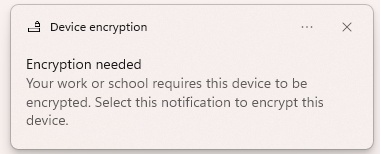
- check box: I don't have any other disk encrption software installed, encrypt all my disks.
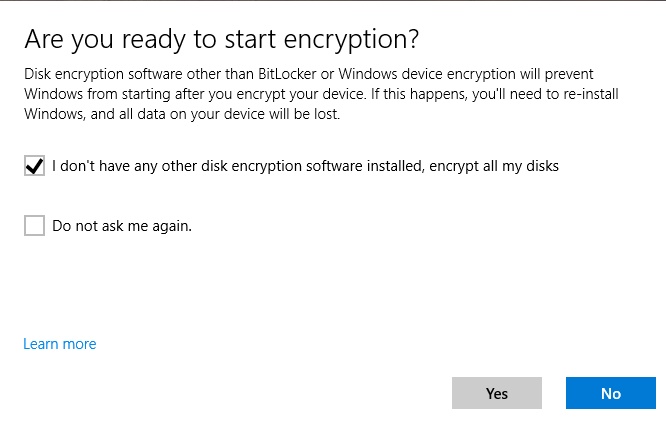
- Disk encryption will start.
- Enter the password
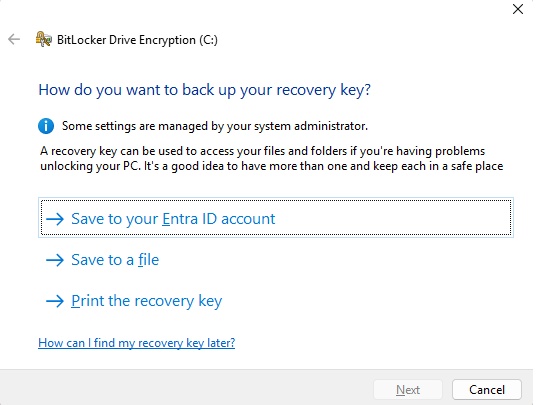
- Save to: your Azure AD account, Save to USB flash drive, Save to a file, print the recovery key: choose required.
- Click Activate Bitlocker.
- Device encrypt will start, once it is done, an icon will appear.
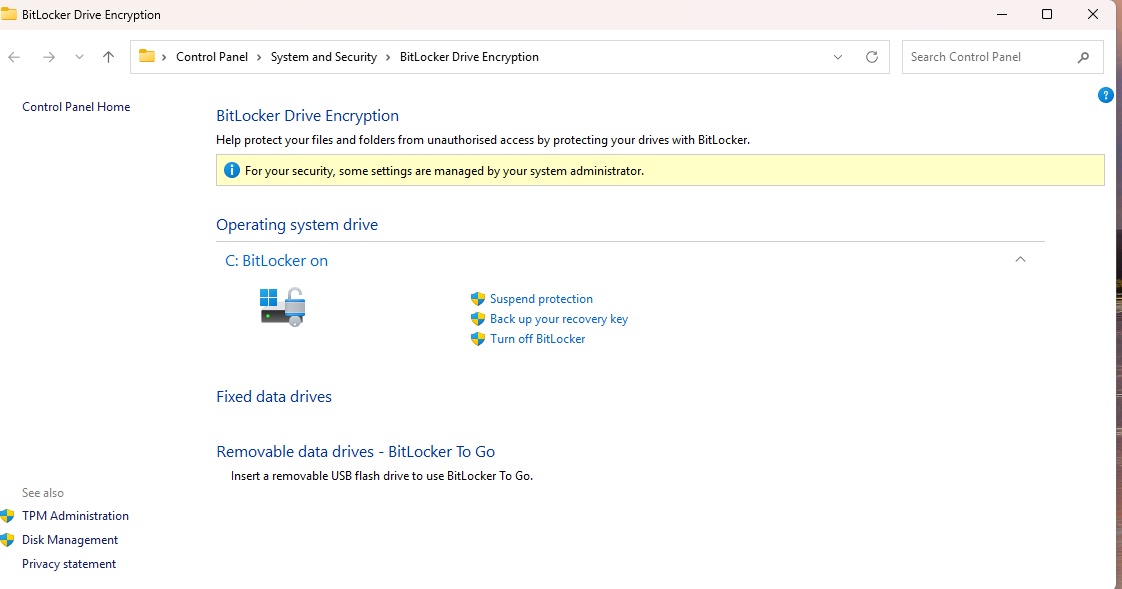
- Go to Intune admin center/Devices/All Device/click device/Recovery keys:
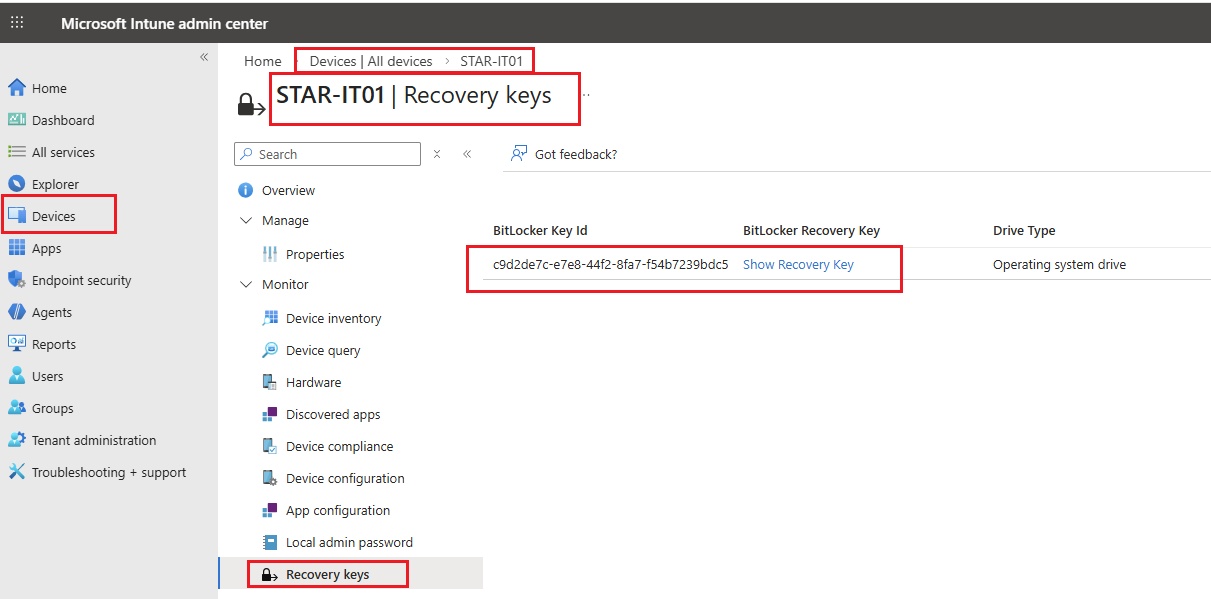
- click show recovery key:
- Report: Devices/Monitor/type Encryption and select encryption status
- Create Device Configuration Profile for BitLocker:
- Go to Intune admin center --> Devices --> Configuration Profiles --> Create New Policy
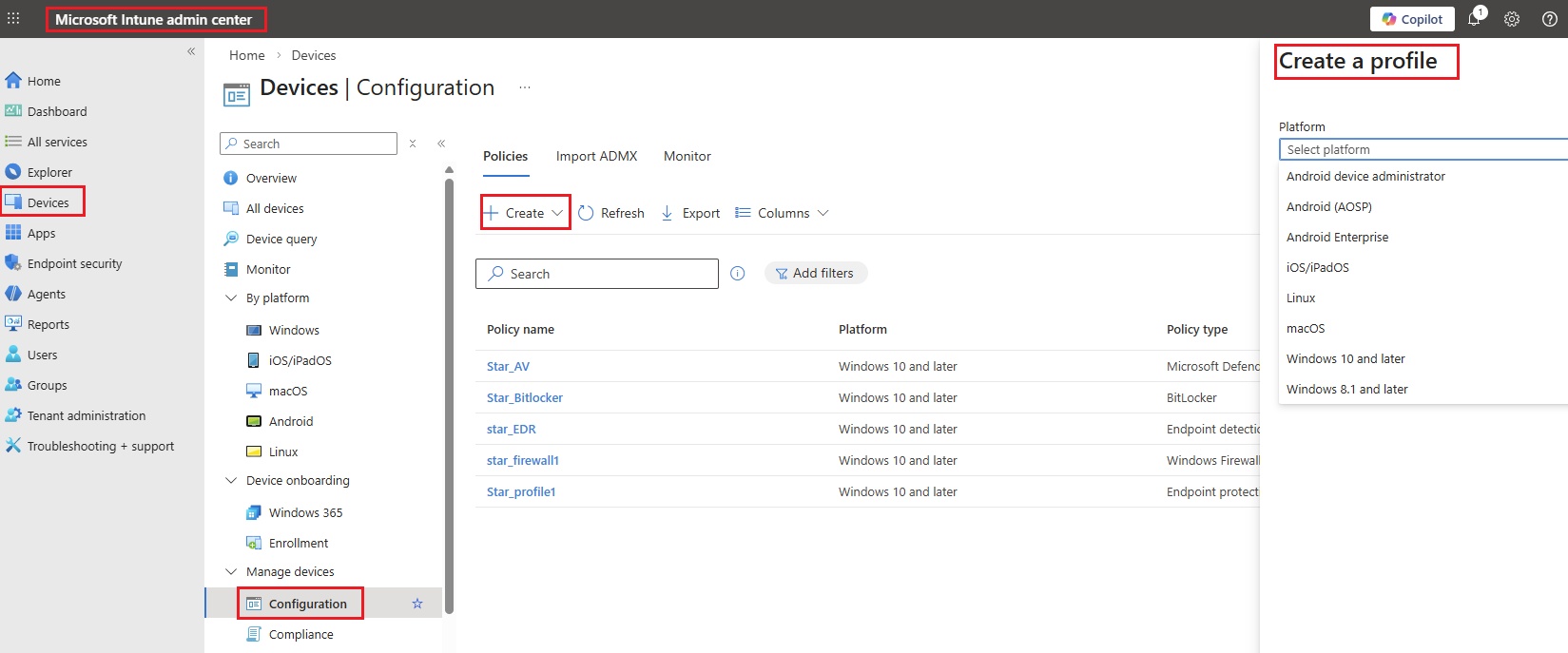
- Code
Firewall
- Firewall policies:
- Create.
- Lab: MDE Client Endpoint Firewall Policy
- Create a firewall policy for Defender.
- Select platform: Windows
- Profile: Windows Firewall
- create.
- Basics
- Name:
- Description
- Configuration settings:
-
Enable Domain Network Firewall True
Default Outbound Action Allow
Default Inbound Action for Domain Profile Block
Enable Private Network Firewall True
Default Inbound Action for Private Profile Block
Default Outbound Action Allow
Enable Public Network Firewall True
Default Outbound Action Allow
Default Inbound Action for Public Profile Block
-
- Scope tags: Default
- Assignments: IT Group
- Review + Create.
- Lab: MDE Client Endpoint Firewall Rules Policy
- Create a firewall policy for Defender.
- Select platform: Windows
- Profile: Windows Firewall Rules
- create.
- Basics
- Name: MDE Client Endpoint Firewall Rules Policy
- Description:
- Configuration settings:
- Firewall Rule Name:
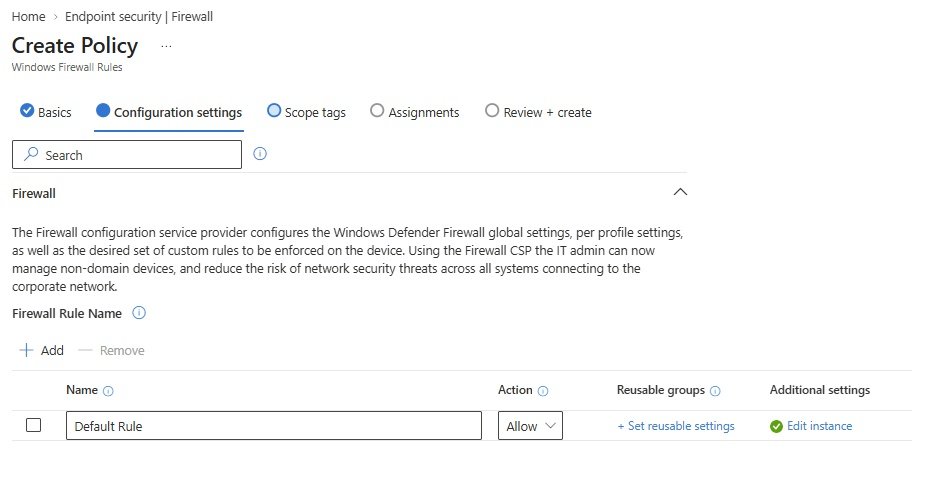
- Scope tags: Default
- Assignments: IT Group
- Review + Create.
- code
- Firewall policies:
Endpoint Privilege Management
- code
- code
- code
Endpoint detection and response (EDR)
- code
- code
- code
App Control for Business
- code
- code
- code
Attack Surface reduction
- What is ASR?
- Code
- Attack surface reduction rules target behaviors that malware and malicious apps typically use to infect computers, including: Executable files and scripts used in Office apps or web mail that attempt to download or run files Obfuscated or otherwise suspicious scripts Behaviors that apps don't usually initiate during normal day-to-day work
- Lab: Create MDE Client Endpoint ASR Policy
- Create policy
- Platform = Windows
- Profile = Attach Surface Reduction Rules
- Create.
- Basic
- Name: MDE Client Endpoint ASR Policy
- Description:
- Configuration Settings:
- Make all options Audit.
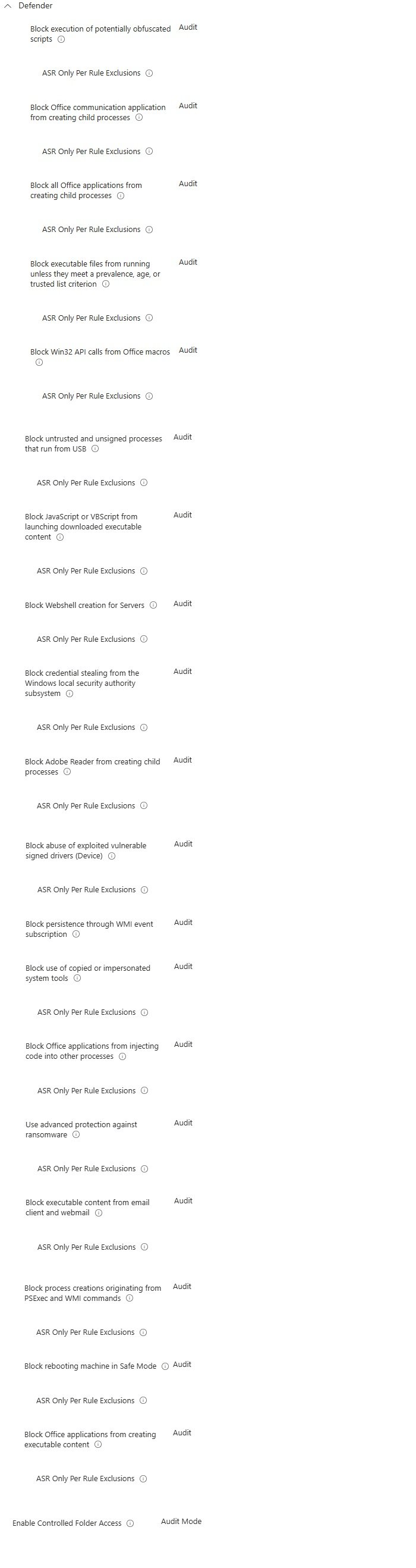
- Scope tags: Default
- Assignments:
- IT Group
- Review + Create
- code
- What is ASR?
Account Protection
- code
- code
- code
Device Compliance
- code
- code
- code
Conditional Access
- code
- code
- code
Monitor/Assignment Failures
- code
- code
- code
Setup/Microsoft Defender for Endpoint
- Microsoft Defender for Endpoint
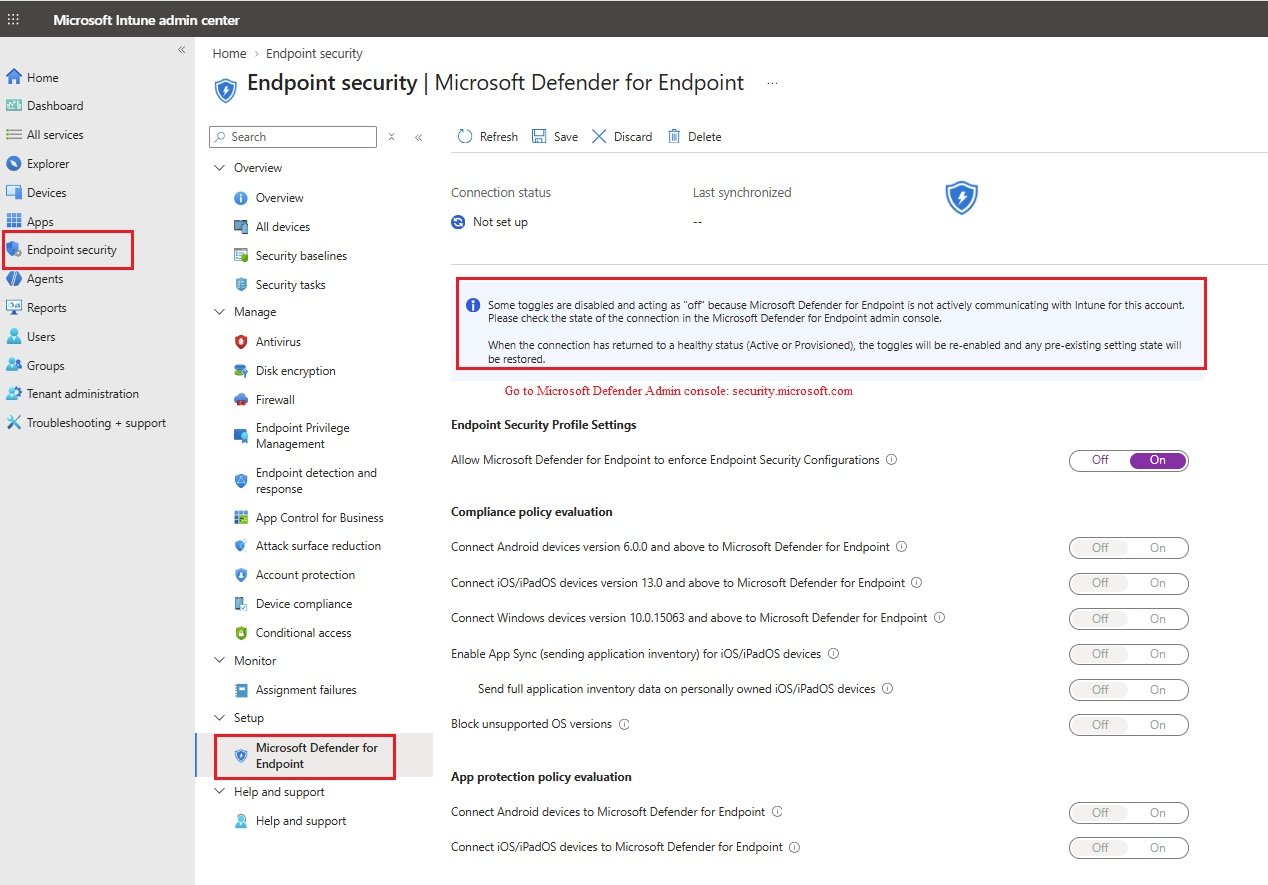
- Some toggles are disable and acting as "off", to enable them go to Microsoft Defender admin console /System/Settings/Endpoints/Endpoints/General/Optional features and enable Microsoft Intune connection.
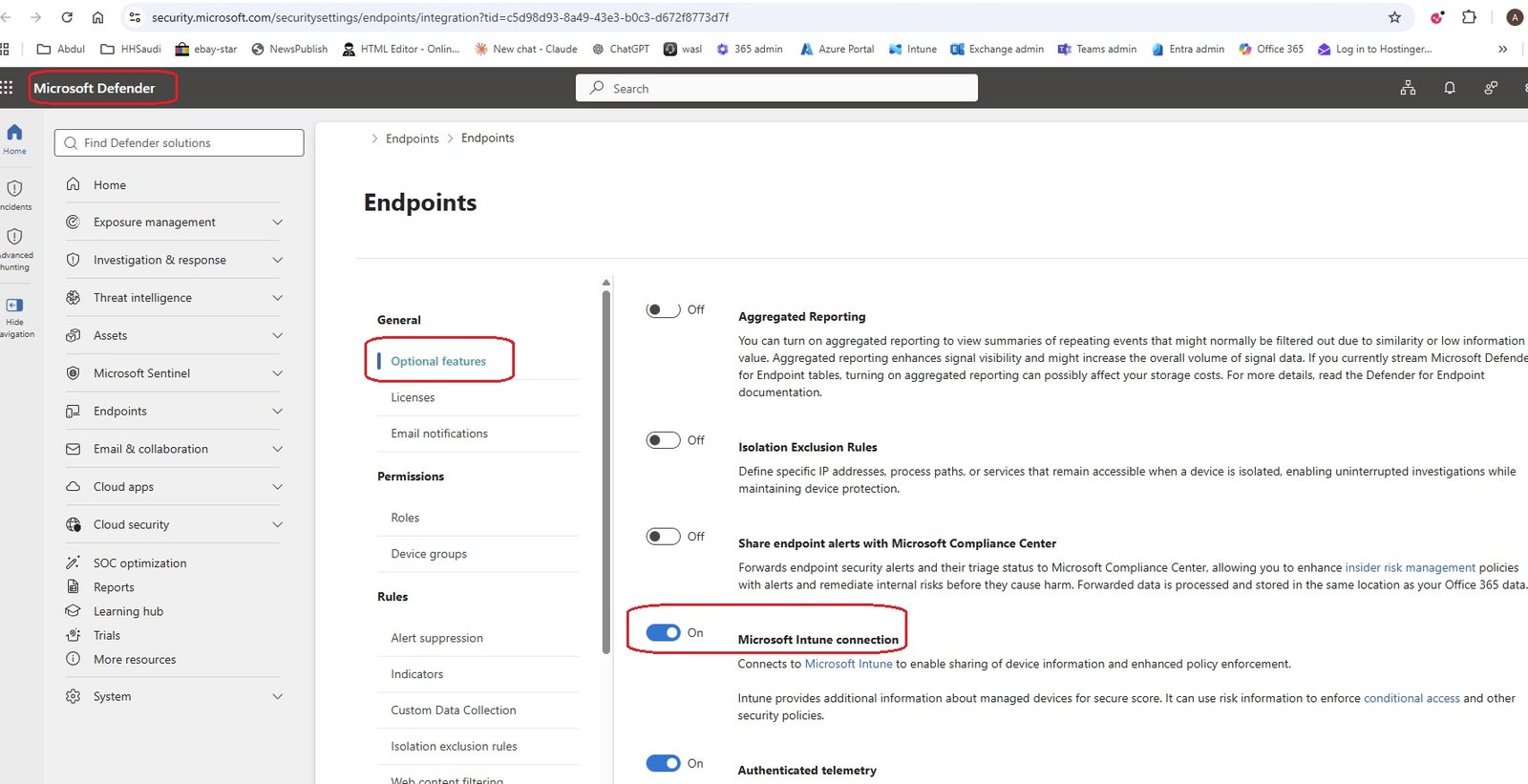
- now all toggles are enabled.
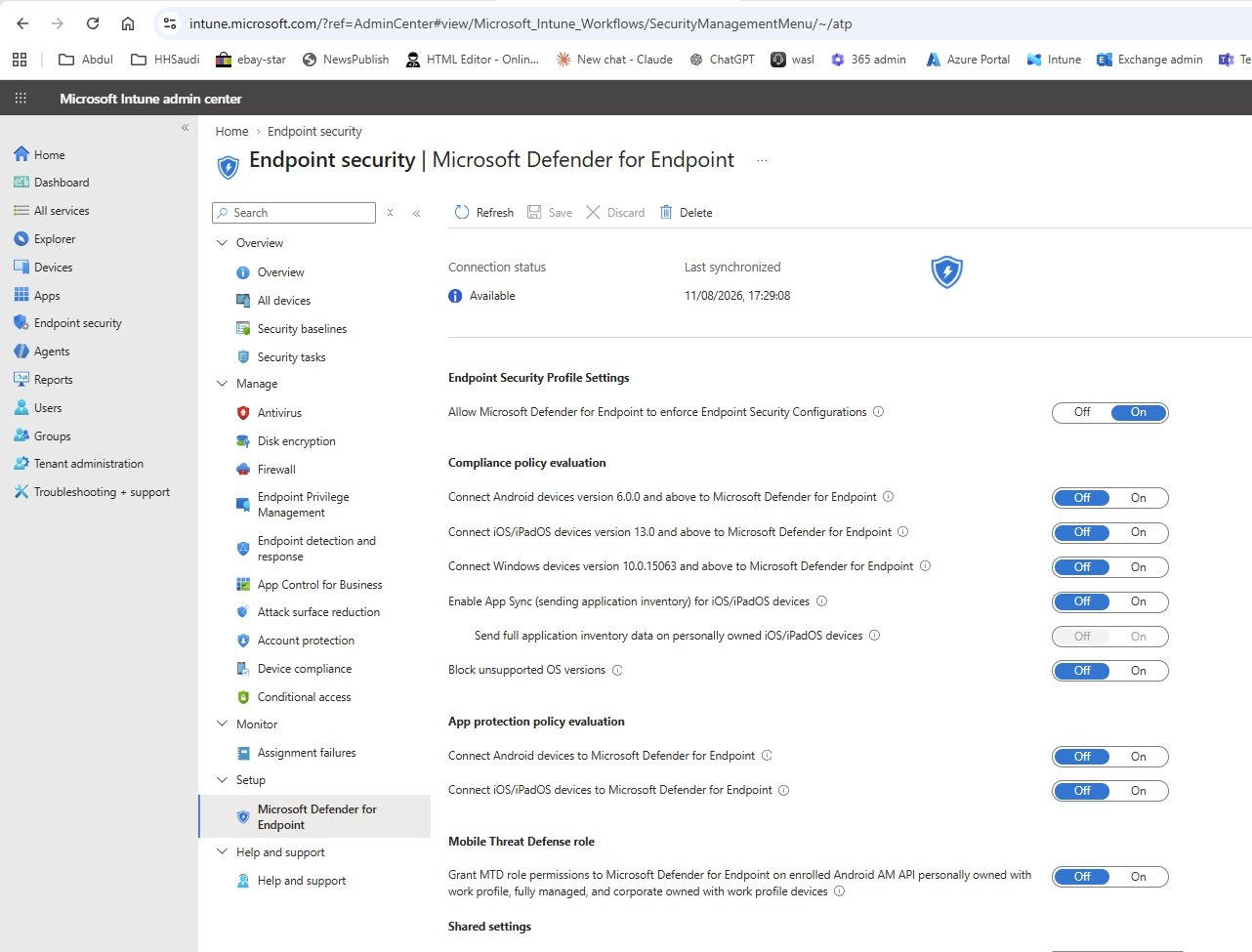
- code
- code
- Microsoft Defender for Endpoint
Help and Support
- code
- code
- code
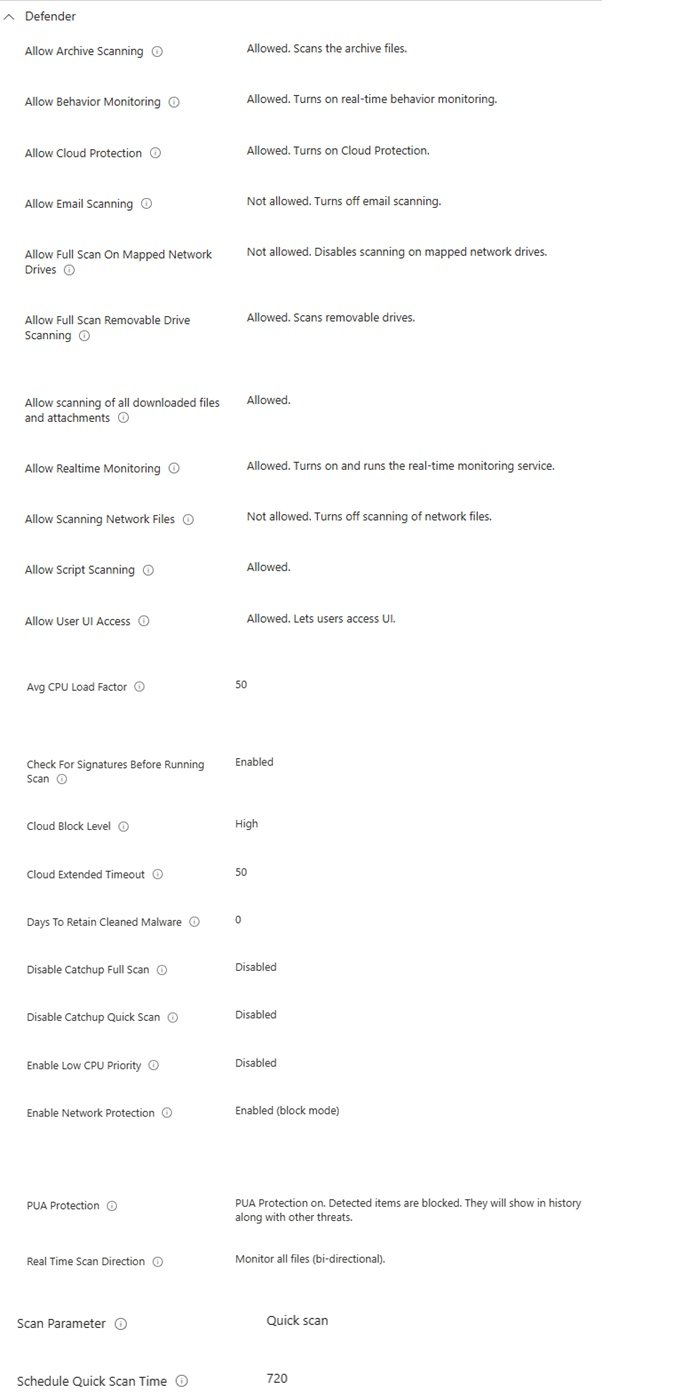
Agents
code
- code
- code
- code
code
- code
- code
- code
code
- code
- code
- code
code
- code
- code
- code
code
- code
- code
- code
code
- code
- code
- code
code
- code
- code
- code
Reports
code
- code
- code
- code
code
- code
- code
- code
code
- code
- code
- code
code
- code
- code
- code
code
- code
- code
- code
code
- code
- code
- code
code
- code
- code
- code
Users
List of users in organization
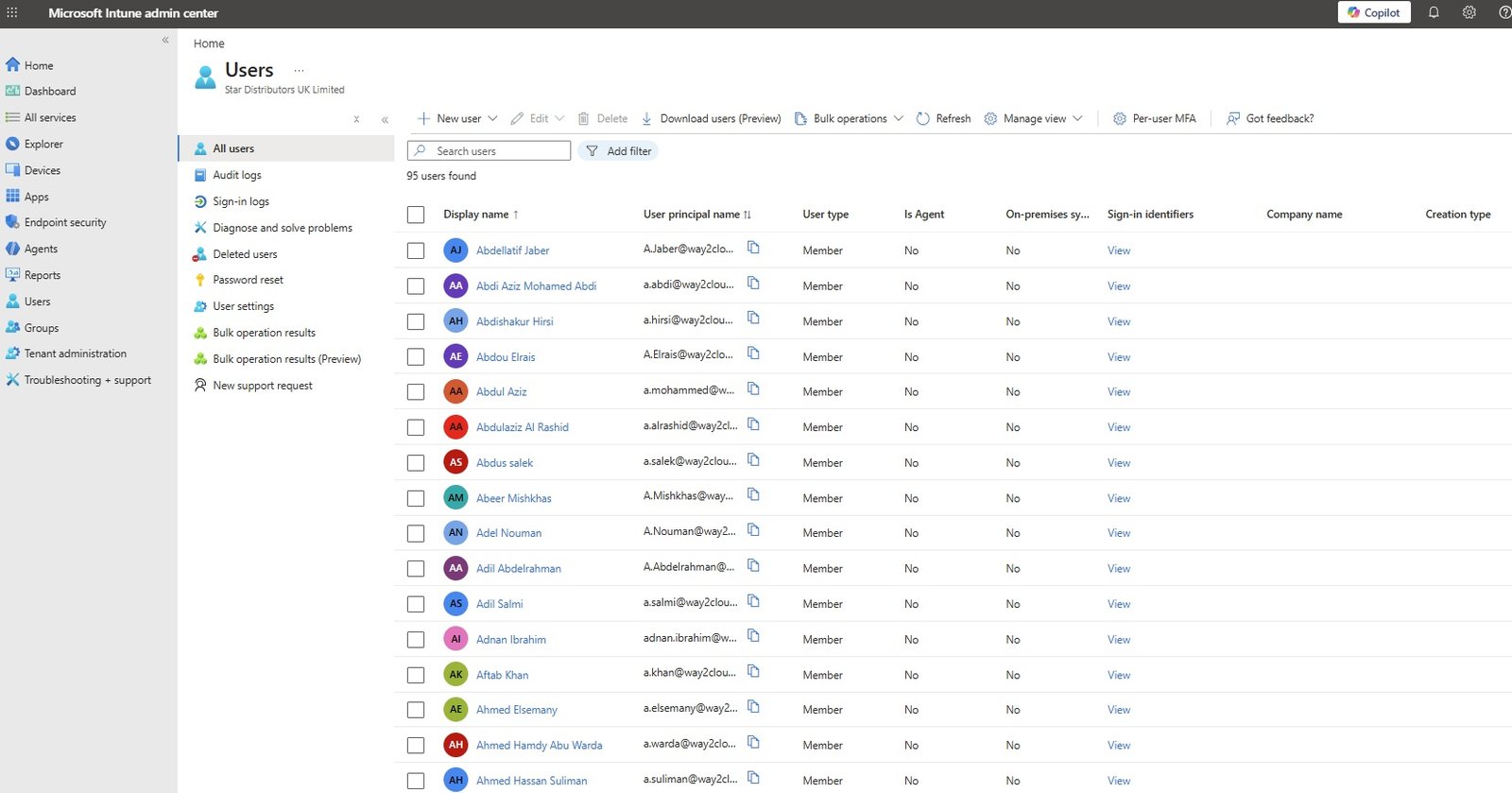
- Click on All users.
- New User: create new user
- Edit existing user details:
- Delete any user:
- Download users
- Bulk operations: These can be done in 365 admin portal. Administrators can reset password in 365 admin portal but in other portals it gives only temp password and user need to change and create a new password.
- Bulk create
- Bulk invite
- Bulk delete
- per-user MFA: Enable to Disable MFA for a user.
Audit Logs
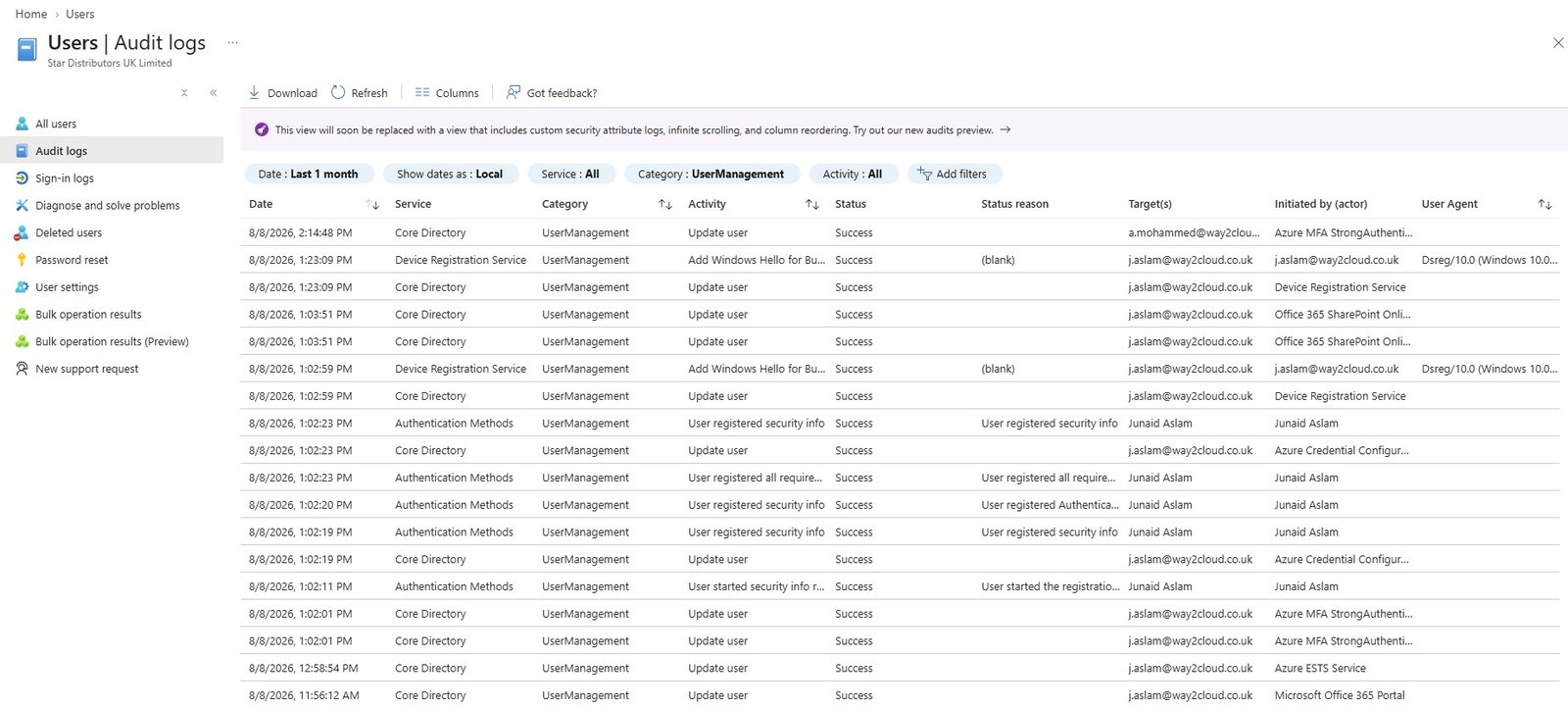
- It shows the user account change history. What changes has been made to user.
- code
- code
Sign-in Logs
- It shows the login history of users.
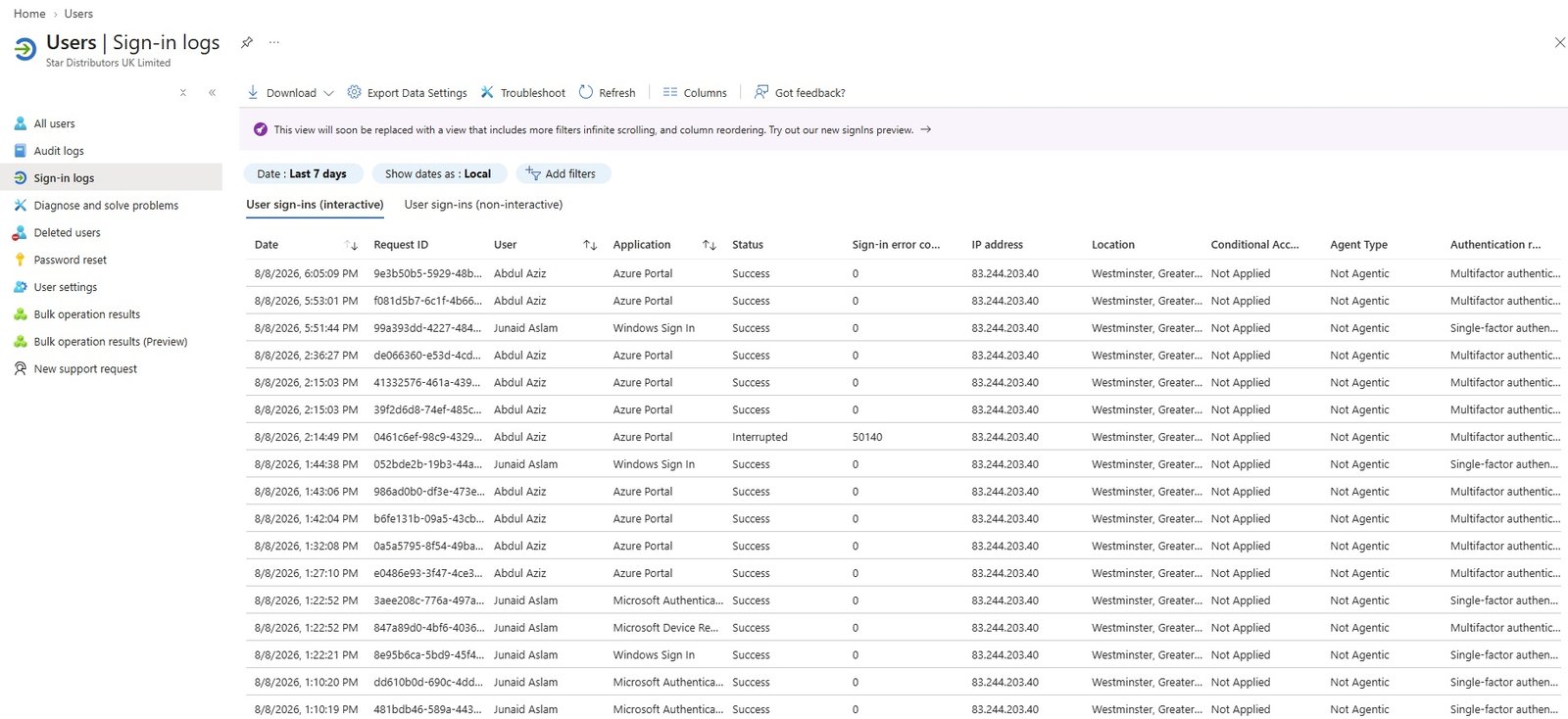
- code
- code
Deleted users
- List of deleted users.
- Deleted users will permanently deleted after 30 days automatically, within 30 days deleted user can be restore.
- Bulk restore.
- code
- code
Password reset: Self service password reset (SSPR)
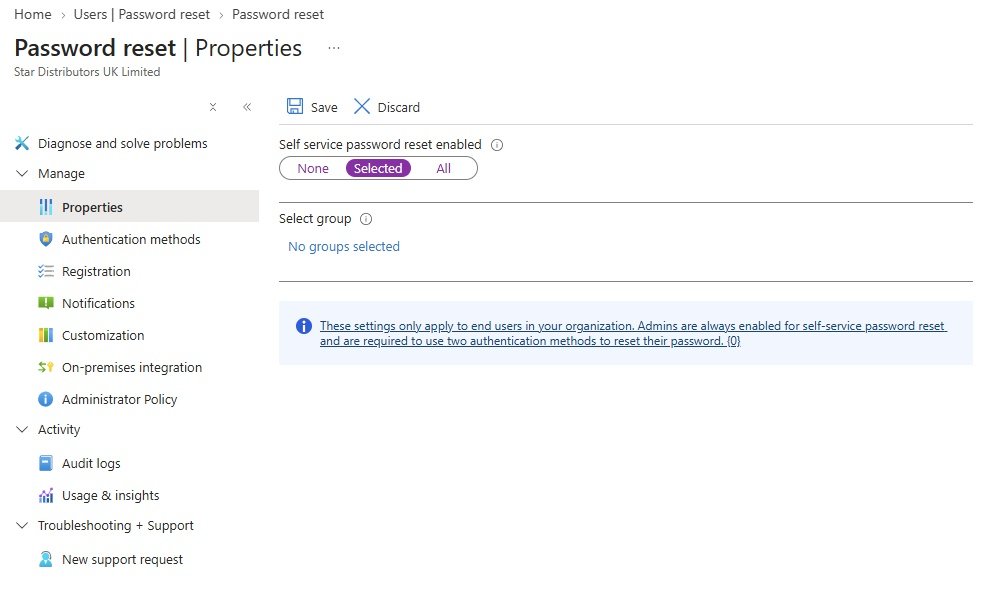
- You can enabled for selected users or all users or None.
- Once it is applied user must provide MFA and user can reset their passowrd by their own.
- For selected user, need to create a group and add users in it.
- These settings only apply to end users in your organization. Admins are always enabled for self-service password reset and are required to use two authentication methods to reset their password. {0}
- Manage
- Properties
- Authentication methods
- Registration
- Notification
- On-premises integration
- Administrator policy
- Activity
- Audit logs
- Usage and insights
- Troughleshooting + Support
- New support request
- code
user settings
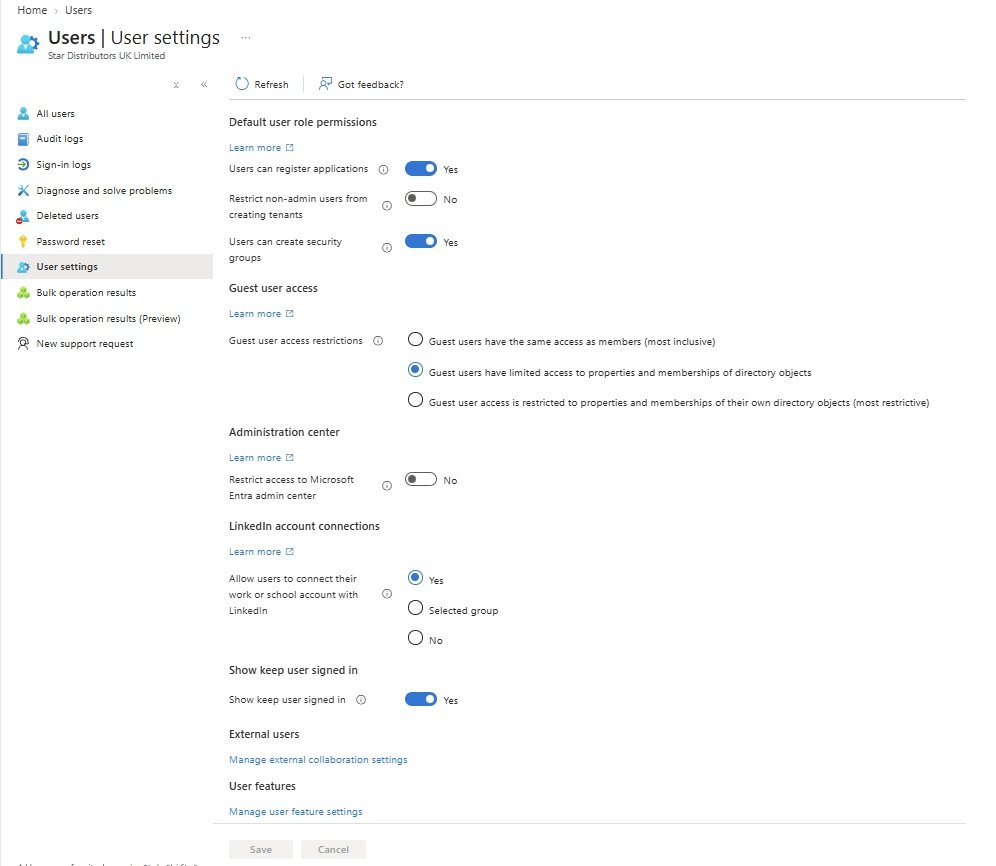
- Default user role permission: Learn more
- Users can register applications: Yes/No
- Restrict non-admin usrs from creating tenants: yes/no
- Users can create security groups: yes/no
- Guest user access: Learn more
- Guest user access restrictions:
- Guest users have the same access as members (most inclusive)
- Guest users have limited access to properties and memberships of directory objects.
- Guest user access is restricted to properties and memberships of their own directory objects (most restrictive).
- Administrator center: Learn more
- Restrict access to Microsoft Entra dmin center: yes/no
- LinkedIn account connections: Learn more
- Allow users to connect their work or school account with LinkedIn : yes, selected group, No
- Show keep user signed in
- show keep user signed in: yes/no
- External users
- Manage external collaboration settings:
- User features
- Manage user feature settings:
- User can use preview features for My Apps: None, Selected, All (This will enable the preview of the new My Apps experience in the Access Panel for the selected users.)
- Administrators can access My Staff: None, Selected, All (This will enable My Staff for the selected administrators)
- code
Bulk operation results
- code
- code
- code
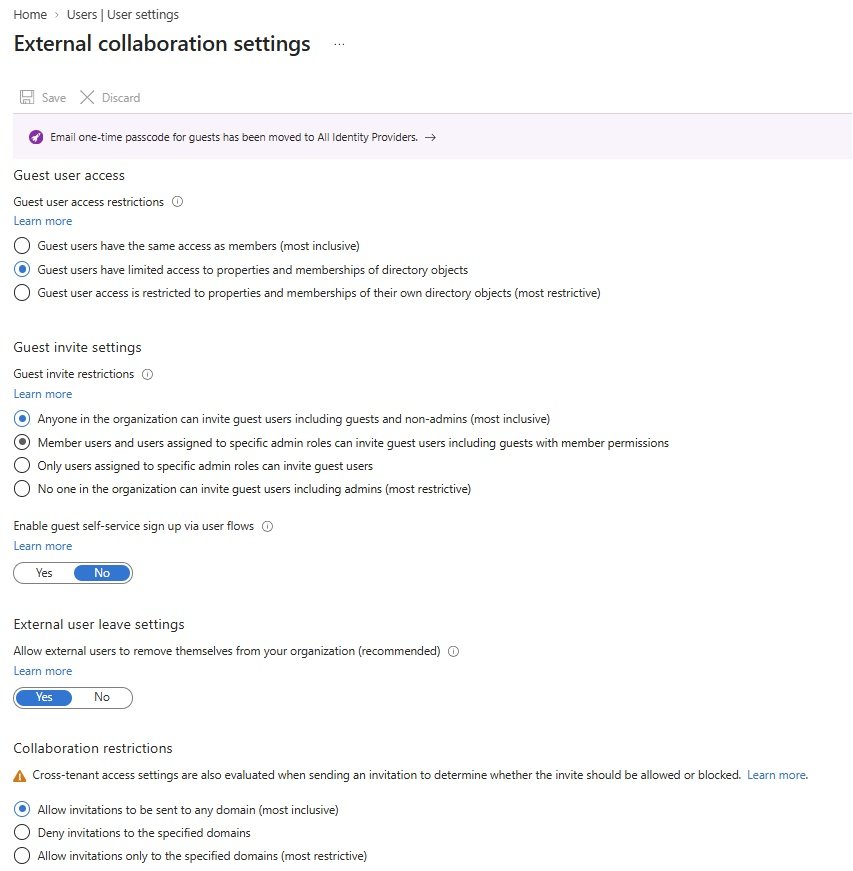
Groups
code
- code
- code
- code
code
- code
- code
- code
code
- code
- code
- code
code
- code
- code
- code
code
- code
- code
- code
code
- code
- code
- code
code
- code
- code
- code
Tenant administration:
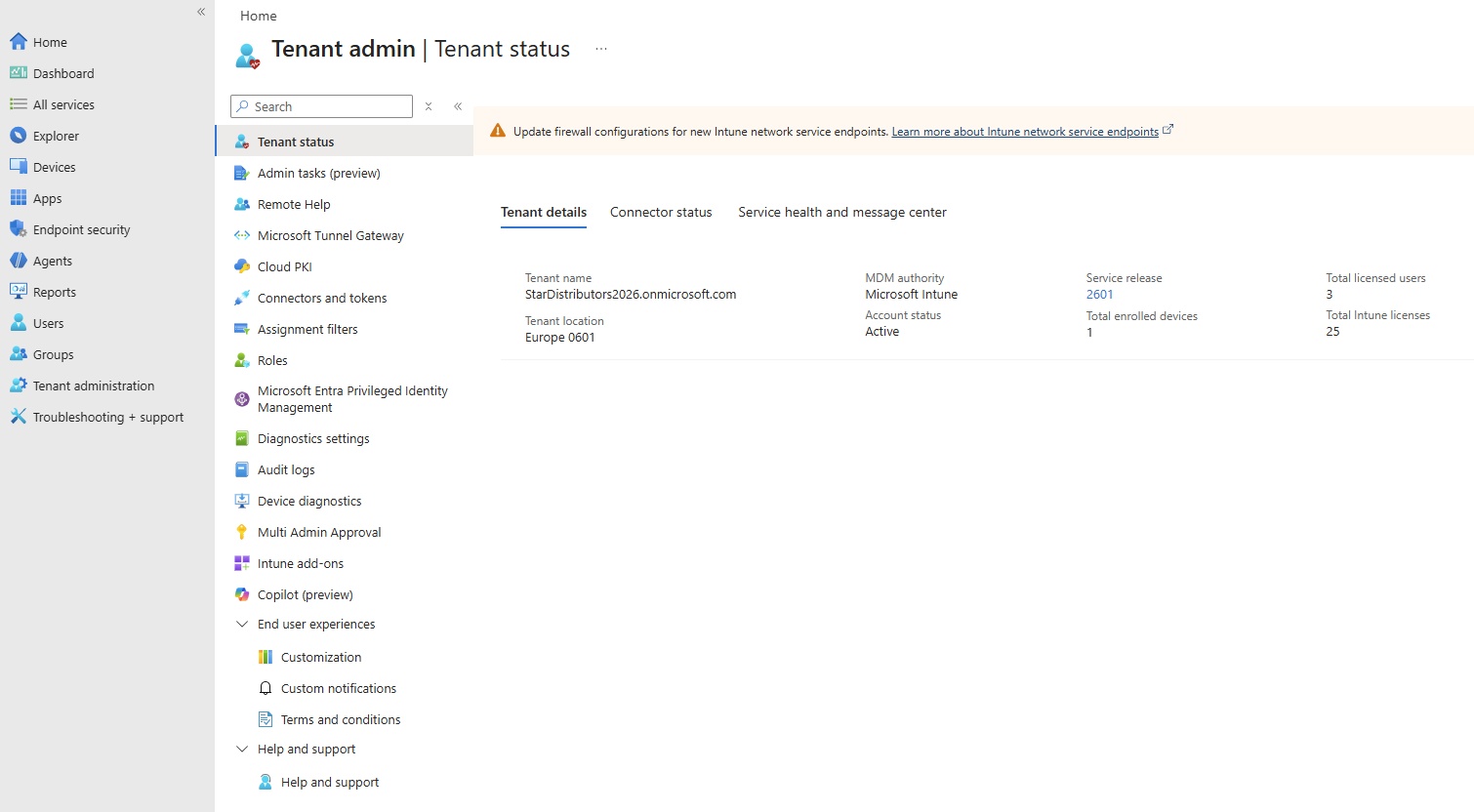
- Tenant status:
- Tenand details:
- Tenant name=StarDistributors2026.onmicrosoft.com
- Tenant location: Europe 0601
- MDM authority Intune Account status = Active
- Service release = 2601
- Total enrolled devices = 1
- Total licenses users = 3
- Total lntune license = 25
- Connector status:Not Enabled
- Service health and message center: check status
- Admin tasks:
- Remote Help;
- Monitor:
- Settings:
- Remote Help sessions:
- Microsoft Tunnel Gateway:
- Cloud PKI:
- Connectors and tokens:
- Assignment filters:
- Roles:
- Microsoft Entra Privileged identity management:
- Diagnostics settings:
- Audit logs: user login details
- Device diagnostics:
- Multi Admin Approval:
- Intune add-ons:
- Copilot:
- End user experience:
- Customization:
- Custom notifications:
- Terms and conditions:
- Help and support
Troubleshooting + support
Device Enrollment Error: Device Already Enrolled
- Solution:
- Go into the Registry and delete all GUIDs under HKEY_LOCAL_MACHINE\SOFTWARE\Microsoft\Enrollments
Make sure Do NOT delete Context, Ownership, Status and ValidNodePaths. - Win + Run
- regedit
- HKEY_LOCAL_MACHINE\SOFTWARE\Microsoft\Enrollments
- Delete all except Context, Ownership, Status and ValidNodePaths
- A couple of the GUIDs would not delete, just skip those.
- Restart computer.
- Now Register with Intune.
- Go into the Registry and delete all GUIDs under HKEY_LOCAL_MACHINE\SOFTWARE\Microsoft\Enrollments
Something went wrong, This feature is not supported.
- This error occur if the device is already joined to domain and trying to register with intune.
- Solution:
- Disjoin from the domain and register with intune.
- Make sure the following settings in Intune.
C Drive Yellow Traingle Warning, bitlocker configuration incomplete.
-
A yellow warning sign with an exclamation mark on your C drive means BitLocker encryption is paused, incomplete, or waiting for activation. This often happens if your PC went to sleep during setup, an update was interrupted, or device encryption needs your Microsoft account sign-in.
- Why it appears:
- Paused Encryption: The computer went to sleep or shut down while setting up security.
- Waiting for Activation: Windows has encryption ready, but it lacks a saved backup recovery key.
- Interrupted Update: A recent system or BIOS update temporarily suspended the lock
- Solution:
- Wait or Finish Encryption: Leave your PC plugged in and awake. It may finish encrypting on its own and clear the icon.
- Sign in to Microsoft: Go to Settings > Privacy & security > Device encryption to see if it asks you to sign in and back up your key.
- Turn Off BitLocker via Command Prompt:
- 1. Click the Start menu, type cmd.
- 2. Right-click Command Prompt and select Run as administrator.
- 3. Type manage-bde C: -off and press Enter.
- 4. Restart your computer once the decryption process finishes
-
- Code
- Code
- Code
- Code
- Code
- Code
- Code
- Code
- Code
- Code
- Code
- Code
- Code
- Code
- Code
- Code